




Current Configuration
(List below serves as quick links to each section)
Server Chassis
Processors
Bezel
Memory
RAID Controllers
Boot Optimized Storage Subsystem (BOSS)
HDD 3.5" Drives
HDD 2.5" Drives
SSD 2.5" Drives
SSD 2.5" NVMe Drives
PCIe Configurations
GPU / FPGA
Network Daughter Card LOM (rNDC)
Internal Dual SD Module (IDSDM)
Optical Drive
Rail Kits
Trusted Platform Module
iDRAC9 Remote Options
Power Supplies
ECS Warranty
The request has been sent.
Thank you.
Price as Configured:
$0
Price as Configured:
$0
2U rack server
Processor | Max: 28 Cores2 x Intel Xeon Scalable
Memory | Max: 3TB, Pmem 6.14TB, 7.68TB Pmem + LRDIMM24 ECC DDR4 RDIMM/LRDIMM 2933Mhz
Up to 12 NVDIMM, 192 GB Max
Up to 12 Intel® Optane™ DC persistent memory PMem
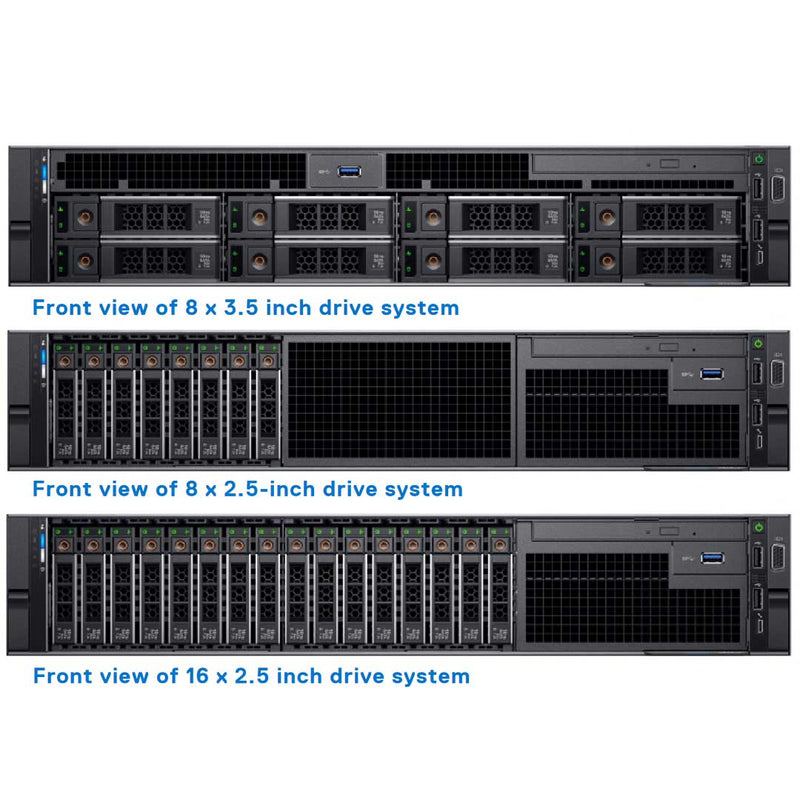
8x LFF SFF SAS/SATA (HDD/SSD)
8x or 16x SFF SAS/SATA (HDD/SSD)
Boot Optimized Server Storage (BOSS-S1)
Internal Dual SD module (IDSDM)
(16/32/64 GB) and vFlash card (16 GB)
S140 (software RAID)
H330, H730P, H740P, HBA330, H840, 12Gbps SAS HBA
4x 1GbE, 2x 10GbE + 2x 1GbE, 4x 10GbE, 2x 25GbE NDC
(Many Options to choose from)
iDRAC9 Express (default) with Lifecycle Controller
PCIe Slots:Up to 8 PCIe Gen 3 slots, maximum of 4 x 16 slots
GPU:- Up to (3) 300W GPUs
- Up to (6) 150W GPUs
- Up to (3) double-width FPGAs
- Up to (4) single-width FPGAs
- Database
- High-Performance Computing (HPC)
- Virtual Desktop Interface (VDI)
| DIMM type | DIMM rank | DIMM capacity | Single processor | Dual processors | ||
|---|---|---|---|---|---|---|
| Min RAM | Max RAM | Min RAM | Max RAM | |||
| lRDIMM | Quad rank | 64 GB | 64 GB | 768 GB | 128 GB | 1536 GB |
| RDIMM | Single rank | 8 GB | 8 GB | 96 GB | 16 GB | 192 GB |
| RDIMM | Dual rank /td> | 16 GB | 16 GB | 192 GB | 32 GB | 384 GB |
| RDIMM | Dual rank | 32 GB | 32 GB | 384 GB | 64 GB | 768 GB |
| NV-DIMM | Single rank | 16GB | Not supported with single processor | Not supported with single processor | RDIMM: 192 GB NVDIMM-N: 16 GB |
RDIMM: 384 GB NVDIMM-N: 192 GB |
NIC support on the Dell PowerEdge R740 comes via the network daughter card (NDC), supporting up to four ports, available in the following configurations:
- Four RJ-45 ports that support 10, 100 and 1000 Mbps
- Four RJ-45 ports that support 100 M, 1 G and 10 Gbps
- Four RJ-45 ports, where two ports support maximum of 10 G and the other two ports maximum of 1 G
- Two RJ-45 ports that support up to 1 Gbps and 2 SFP+ ports that support up to 10 Gbps
- Four SFP+ ports that support up to 10 Gbps
- Two SFP28 ports that support up to 25 Gbps
- NOTE: You can install up to eight PCIe add-on NIC cards.

| Class | PERC |
|---|---|
| Internal | S140 (SW RAID) PERC H330, H730P, H740P, HBA330 |
| External | PERC H840 12Gbps SAS HBA |

- Ensure that both the processors are installed.
- The processor must use a GPU kit low-profile heat sink module
- All GPUs must be of the same type and model.
- You can install up to three double-wide or six single-wide GPUs.
- The filler bracket on the GPU air shroud must be removed before installing the GPU.
- Ensure that high-performance fans, and GPU air shroud are installed.
- When using systems with GPU, ensure that you install PSUs with 1100 W or higher, and set the PSU configuration to non-redundant mode.
- Generally, any GPU that is greater than 75 W requires a power cable. GPUs with 75 W or less does not require a power cable.
- GPU air shroud
- Mylar
- Riser 3A or 3B
- GPU cable for riser 3A or 3B
- GPU cable for riser 2A or 2E
- Riser 2A or 2E
- Riser 1A or 1D
- GPU cable for riser 1A or 1D
- Two 1U processor and heat sink modules and two CPU clips
- Six high performance cooling fans
PCI Expansion Options
| Riser configuration and supported risers | Slot description | PCIe slots on riser 1 (Height and length) | Processor connection | PCIe slots on riser 2 (Height and length) | Processor connection | PCIe slots on riser 3 (Height and length) | Processor connection |
|---|---|---|---|---|---|---|---|
| Riser configuration 0 (No riser) | No PCIe slots (only rear storage) | N/A | N/A | N/A | N/A | N/A | N/A |
| Riser configuration 1 (1B+2 B) | Four x8 slots | Slot 1: x8 full-height, full length | Processor 1 | Slot 4: x8 low profile, half length | Processor 1 | N/A | N/A |
| Slot 2: x8 full-height, full length | Processor 1 | ||||||
| Slot 3: x8 full-height, half length | Processor 1 | ||||||
| Riser configuration 2 (1B+2C) | Three x8 and one x16 slots | Slot 1: x8 full-height, full length | Processor 1 | Slot 4: x16 low profile, half length | Processor 2 | N/A | N/A |
| Slot 2: x8 full-height, full length | Processor 1 | ||||||
| Slot 3: x8 full-height, half length | Processor 1 | ||||||
| Riser configuration 3 (1A+2A) | Two x8 and three x16 slots | Slot 1: x16 full-height, full length | Processor 1 | Slot 4: x16 full-height, full length | Processor 2 | N/A | N/A |
| N/A | N/A | Slot 5: x8 full-height, full length | Processor 2 | ||||
| Slot 3: x16 full-height, half length | Processor 1 | Slot 6: x8 low profile, half length | Processor 1 | ||||
| Riser configuration 4 (1A+2A+3A) | Three x8 and four x16 slots | Slot 1: x16 full-height, full length | Processor 1 | Slot 4: x16 full-height, full length | Processor 2 | Slot 7: x8 full-height, full length | Processor 2 |
| N/A | N/A | Slot 5: x8 full-height, full length | Processor 2 | Slot 8: x16 full-height, full length | Processor 2 | ||
| Slot 3: x16 full-height, half length | Processor 1 | Slot 6: x8 low profile, half length | Processor 1 | ||||
| Riser configuration 15 (1A+2E+3B) | Three x8 and four x16 slots | Slot 1: x16 full-height, full length | Processor 1 | Slot 4: x16 full-height, full length | Processor 2 | Slot 7: x8 full-height, full length | Processor 2 |
| N/A | N/A | Slot 5: x8 full-height, full length | Processor 2 | Slot 8: x16 full-height, full length | Processor 2 | ||
| Slot 3: x16 full-height, half length | Processor 1 | Slot 6: x8 low profile, half length | Processor 1 | ||||
| Riser configuration 5 (1B+2A+3A) | Six x8 and two x16 slots | Slot 1: x8 full-height, full length | Processor 1 | Slot 4: x16 full-height, full length | Processor 2 | Slot 7: x8 full-height, full length | Processor 2 |
| Slot 2: x8 full-height, full length | Processor 1 | Slot 5: x8 full-height, full length | Processor 2 | Slot 8: x16 full-height, full length | Processor 2 | ||
| Slot 3: x8 full-height, half length | Processor 1 | Slot 6: x8 low profile, half length | Processor 1 | ||||
| Riser configuration 6 (1D+2A+3A) | Five x8 and three x16 slots | Slot1: x16 full-height, full length | Processor 1 | Slot 4: x16 full-height, full length | Processor 2 | Slot 7: x8 full-height, full length | Processor 2 |
| Slot 2: x8 full-height, full length | Processor 1 | Slot 5: x8 full-height, full length | Processor 2 | Slot 8: x16 full-height, full length | Processor 2 | ||
| Slot 3: x8 full-height, half length | Processor 1 | Slot 6: x8 low profile, half length | Processor 1 | ||||
| Riser configuration 16 (1D+2E+3B) | Five x8 and three x16 slots | Slot1: x16 full-height, full length | Processor 1 | Slot 4: x16 full-height, full length | Processor 2 | Slot 7: x8 full-height, full length | Processor 2 |
| Slot 2: x8 full-height, full length | Processor 1 | Slot 5: x8 full-height, full length | Processor 2 | Slot 8: x16 full-height, full length | Processor 2 | ||
| Slot 3: x8 full-height, half length | Processor 1 | Slot 6: x8 low profile, half length | Processor 1 |
BOSS is the recommended choice for non-virtualized operating systems, while IDSDM better serves virtualized environments.

A dedicated slot at the rear of the system chassis houses the IDSDM with vFlash module — a Dell EMC-proprietary PCIe x1 slot running over a USB 3.0 interface. On PowerEdge R440 systems, card size shifts from SD to microSD, with IDSDM supporting 16GB, 32GB, or 64GB capacities and vFlash limited to 16GB; a write-protect switch is built directly onto the IDSDM module.

BOSS offers a high-speed alternative for OS installation, keeping the operating system off the main drive-based storage. This simple RAID solution card supports up to two 6Gbps M.2 SATA drives, connecting via an x8 connector over PCIe Gen2 x2 lanes, and comes only in low-profile, half-height form factor.
| PSU | Class | Frequency |
|---|---|---|
| 495 W AC | Platinum | 50/60 Hz |
| 750 W AC | Platinum | 50/60 Hz |
| 750 W AC | Titanium | 50/60 Hz |
| 1100 W AC | Platinum | 50/60 Hz |
| 1100 W DC | N/A | N/A |
| 1600 W AC | Platinum | 50/60 Hz |
| 2000 W AC | Platinum | 50/60 Hz |
| 2400 W AC | Platinum | 50/60 Hz |
- Length: 741.34 mm (29.58")
- Width: 482.0 mm (18.98")
- Height: 86.8 mm (3.42")
- Weight:
- 2.5" | 26.3 kg (57.98 lb)
- 3.5" | 28.6 kg (63.05 lb)
Current Configuration
(List below serves as quick links to each section)
Server Chassis
Processors
Bezel
Memory
RAID Controllers
Boot Optimized Storage Subsystem (BOSS)
HDD 3.5" Drives
HDD 2.5" Drives
SSD 2.5" Drives
SSD 2.5" NVMe Drives
PCIe Configurations
GPU / FPGA
Network Daughter Card LOM (rNDC)
Internal Dual SD Module (IDSDM)
Optical Drive
Rail Kits
Trusted Platform Module
iDRAC9 Remote Options
Power Supplies
ECS Warranty
The request has been sent.
Thank you.
Price as Configured:
$0
Base Standard Capabilities
| Features | Technical specification | |
|---|---|---|
| Processor | Up to two 2nd Generation Intel® Xeon® Scalable processors, up to 28 cores per processor | |
| Memory | 24 DDR4 DIMM slots, Supports RDIMM /LRDIMM, speeds up to 2933MT/s, 3TB max Up to 12 NVDIMM, 192 GB Max Up to 12 Intel® Optane™ DC persistent memory PMem, 6.14TB max (7.68TB max with PMem + LRDIMM) Supports registered ECC DDR4 DIMMs only | |
| Storage controllers | Internal Controllers: PERC H330, H730P, H740P, HBA330 External Controllers: H840, 12 Gbps SAS HBA Software RAID:S140 Boot Optimized Storage Subsystem (BOSS):HWRAID 2 x M.2 SSDs 240GB, 480GB Internal Dual SD Module | |
| Drive bays | Front drive bays: Up to 16 x 2.5” SAS/SATA (HDD/SSD) max 122.88TB or up to 8 x 3.5” SAS/SATA HDD max 128TB Optional DVD-ROM, DVD+RW | |
| Power supplies | Titanium 750W, Platinum 495W, 750W, 750W 240VDC, 1100W, 1100W 380VDC 1600W, 2000W and 2400W, Gold 1100W -48VDC Hot plug power supplies with full redundancy Up to 6 hot plugs fans with full redundancy | |
| Dimensions | Form factor: Rack (2U) Height: 86.8mm (3.4”) Width3: 434.0mm (17.08”) Depth3: 737.5mm (29.03”) Weight: 28.6kg (63lbs.) | |
| Embedded management | iDRAC9 iDRAC Direct iDRAC RESTful API with Redfish Quick Sync 2 wireless module (optional) | |
| Bezel | Optional LCD bezel or security bezel | |
| OpenManage Software | OpenManage Enterprise OpenManage Mobile OpenManage Power Manager | |
| Integrations and connections | Integrations: Microsoft System Center VMware vCenter BMC Software Red Hat Ansible Modules | Connections: IBM Tivoli® Netcool/OMNIbus Micro Focus Operations Manager I Nagios® Core Nagios® XI |
| Security | TPM 1.2/2.0 optional Cryptographically signed firmware Secure Boot Silicon Root of Trust Secure erase System Lockdown (requires iDRAC Enterprise or Datacenter) | |
| I/O & Ports | Network Options:
| Rear Ports:
|
| Accelerator options |
| |
| Supported operating systems | Canonical® Ubuntu® LTS Citrix® XenServer Microsoft Windows Server® LTSC with Hyper-V Oracle® Linux Red Hat® Enterprise Linux SUSE® Linux Enterprise Server VMware® ESXi | |
Spec Sheet 4
| Feature | PowerEdge R740/R740xd | PowerEdge R730/R730xd |
|---|---|---|
| Processor | 2 x 2nd Generation Intel® Xeon® Scalable processor family | Intel® Xeon® processor E5-2600 product family |
| CPU interconnect | Intel Ultra Path Interconnect (UPI) | Intel QuickPath Interconnect (QPI) |
| Memory | ● 24 x DDR4 RDIMM, LRDIMM
● 12 x NVDIMM ● 12 x DCPMM (Intel® Optane™ DC persistent memory) |
24 x DDR4 RDIMM, LRDIMM |
| Disk Drives | ● 3.5 -inch or 2.5 -inch 12Gb/s SAS, 6Gb/s
SATA
● Up to 24 x NVMe |
● 3.5 -inch, 2.5 -inch or 1.8 -inch 12Gb/s SAS, 6Gb/s
SATA
● 4 x PCIe SSD with common slot |
| Storage Controllers | Adapters: HBA330, HBA350i, H330(R740 only), H350(R740 only), H730P, H740P, H840, 12G SAS HBA, HBA355e, H750 Mini Mono: HBA330, H330(R740 only), H730P, H740P, H350 (R740 only), HBA350i (R740xd only) SW RAID: S140 | Adapters: HBA330, H330, H730, H730P, H830 (ext) Mini Mono: HBA330, H330, H730, H730P SW RAID: S130 |
| PCIe Slots | Max 8 x PCIe 3.0 | Max 7 x PCIe 3.0 or 6 x PCIe 3.0 |
| rNDC | 4x 1GbE, 4x 10GbE, 2x 10GbE + 2x 1GbE, or 2x 25GbE | 4x 1GbE, 4x 10GbE, or 2x 10GbE + 2x 1GbE |
| USB Ports | Front:
● 1 x Dedicated iDRAC direct USB ● 2 x USB 2.0 ● 1 x USB 3.0 (optional only for R740) ● 1 x Video Rear: ● 1 x Dedicated iDRAC network port ● 1 x Serial ● 2 x USB 3.0 ● 1 x Video |
Front: two ports (USB 2.0), one managed port Rear: two ports (USB 3.0) Internal: one port (USB 3.0) |
| Rack Height | 2U | 2U |
| Power Supplies | ● AC (Platinum): 495W, 750W, 1100W,
1600W, 2000W, 2400W
● AC (Titanium): 750W, 1600W, 2600W ● DC: 1100W ● DC: 750 W Mixed Mode Platinum (for China only) ● AC: 750 W Mixed Mode Platinum ● Mixed mode/HVDC: 750W, 1100W |
● AC: 495W, 750W, 1100W
● DC: 750W, 1100W |
| System Management | Lifecycle Controller 3.x, OpenManage, QuickSync2.0, OMPC3, Digital License Key, iDRAC Direct(dedicated micro-USB port), Easy Restore, vFlash | Lifecycle Controller 3.x, OpenManage, QuickSync1.0, PM3, Digital License Key, iDRAC8, iDRAC Direct( dedicated micro-USB port), Easy Restore, vFlash |
| Internal GPU | ● *3 x 300W (double-width) or 6 x 150W (single-width) NOTE: *Only supports up to 2 x NVIDIA M10 GPUs. | ● 2 x 300W (double-wide) or 4 x 150W (single-wide)
● Not supported on R730xd ● FPGAs not supported on the R730/xd. |
| Availability | Hot-plug Redundant Cooling
Hot-plug Drives Hot-plug Redundant Power Supplies Boot Optimized Storage Subsystem (BOSS) IDSDM |
Hot-plug Drives Hot-plug Redundant Cooling Hot-plug Redundant Power Supplies IDSDM |