



Current Configuration
(List below serves as quick links to each section)
Server Chassis
Select Processor
Mid Drive Tray
Rear Drive Cage
Bezel
Memory
RAID Controllers
HDD 3.5" Drives
HDD 2.5" Drives
SSD 2.5" Drives
SSD 2.5" U.2 NVMe Gen 4 Drives
PCIe Riser Configurations
Network Daughter Card (rNDC) LOM
Boot Optimized Storage Subsystem (BOSS-S1):
Internal Dual SD Module (IDSDM)
Optical Drive
Rail Kits
Trusted Platform Module (TPM)
iDRAC9 Remote Options
Power Supplies
ECS Warranty
The request has been sent.
Thank you.
Price as Configured:
$0
Price as Configured:
$0
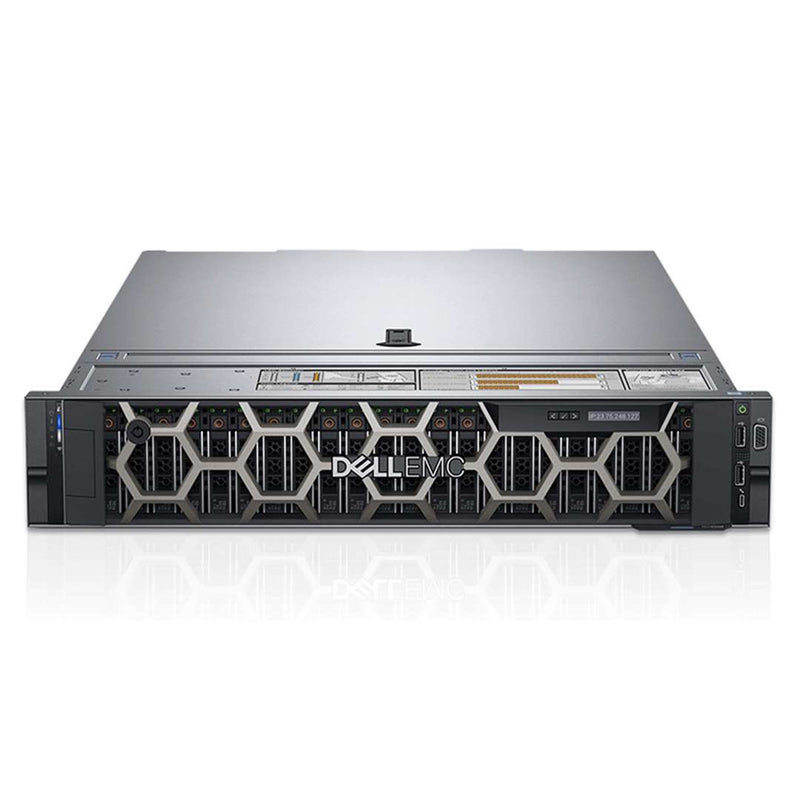
2U rack server
Processor | Max: 32 Cores2x AMD Gen 1 EPYC
Memory | Max: 128GB32 ECC DDR4 RDIMM/LRDIMM 2666Mhz
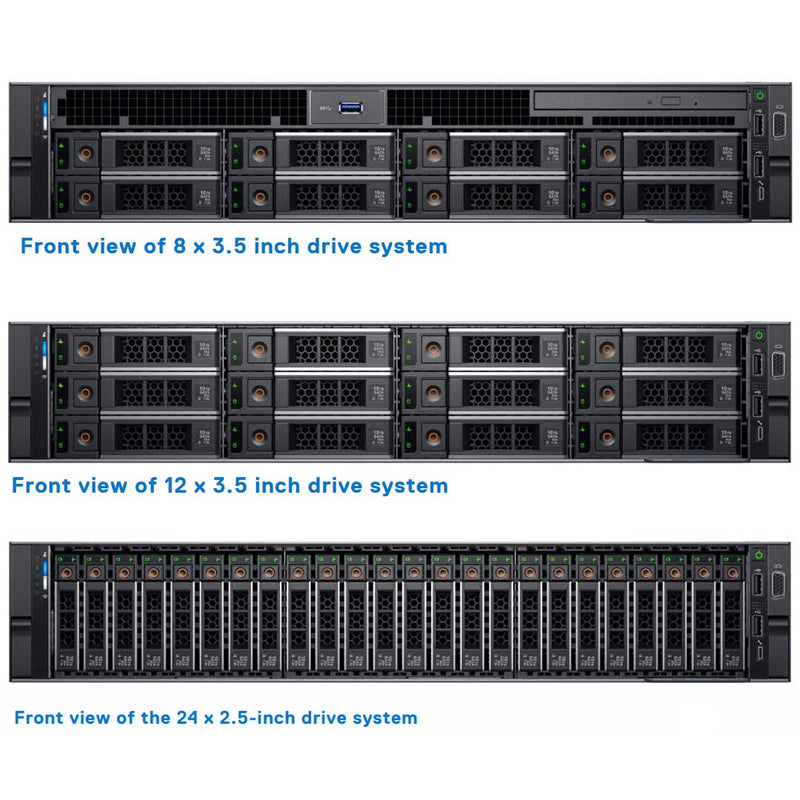
Front bays: 8, 12 LFF or 24 SFF SAS/NL-SAS/SATA (HDD/SSD) NVMe
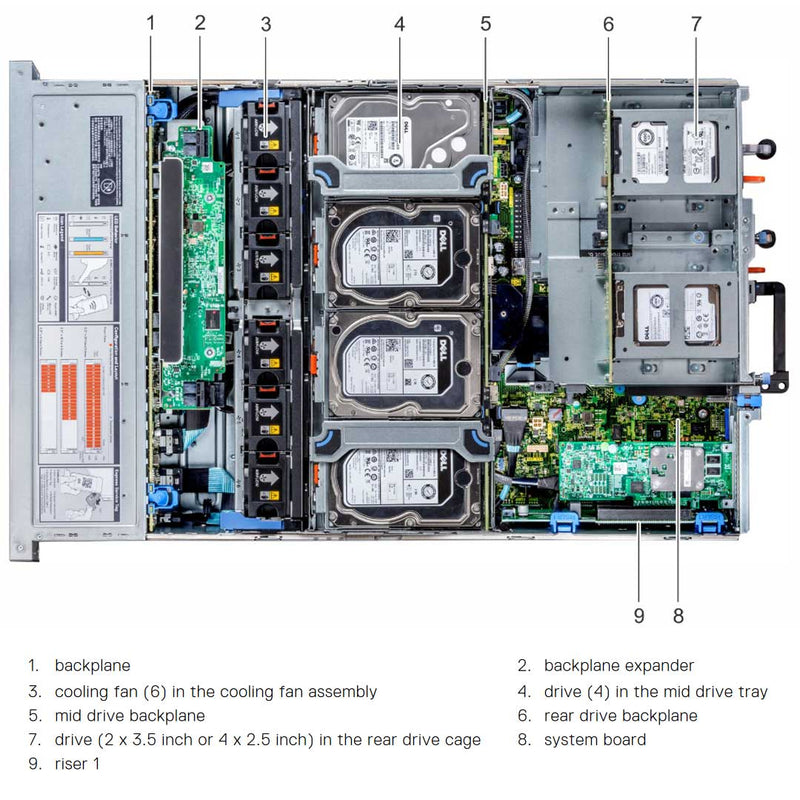
Mid Bay: 4 LFF SAS/SATA (HDD) or 4 SFF SSD NVMe
Rear bay: 2 LFF or 4 SFF SAS/SATA (HDD/SSD)
Boot Optimized Server Storage (BOSS-S1)
Internal Dual SD module (IDSDM)
Internal USB
H330, H730P, H740P, H840, HBA330, 12Gbps SAS HBA
NIC/LOM4 x 1GE or 2 x 10GE + 2 x 1GE or 4 x 10GE or 2 x 25GE
Remote Management:iDRAC9 Express (default) with Lifecycle Controller
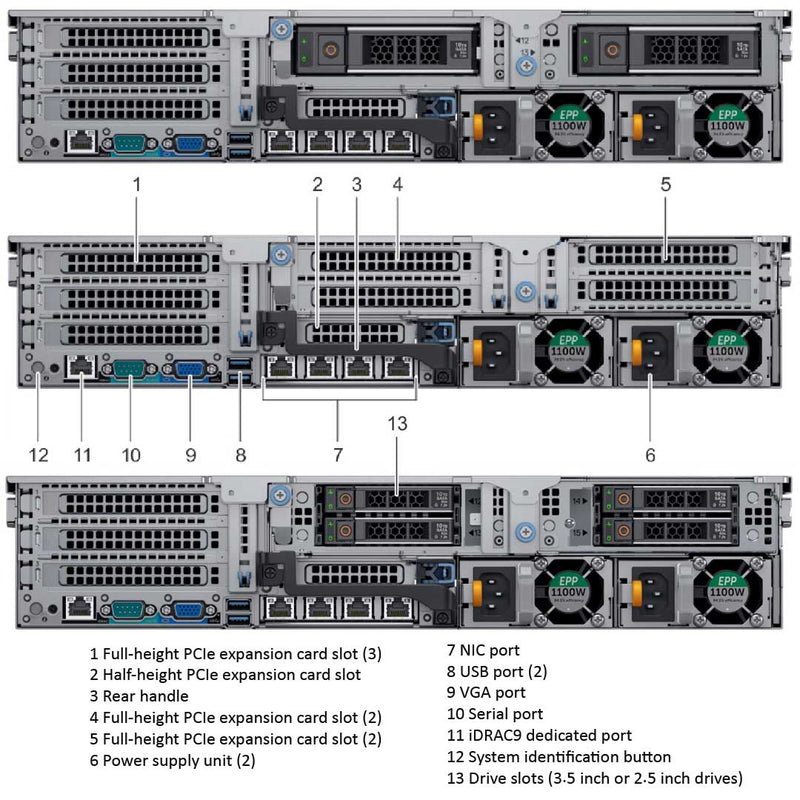
PCIe Slots:Up to 8 PCIe 3.0 slots (6x 16 + 2x 8)
GPU: 3 DW- Dell PowerEdge R710
- Dell PowerEdge R720
- Dell PowerEdge R720XD
- Dell PowerEdge R730
- Dell PowerEdge R730XD
- Dell PowerEdge R740
- Dell PowerEdge R740XD
- Dell PowerEdge R740XD2
- Dell PowerEdge R7415
- Dell PowerEdge R7425
- Dell PowerEdge R750
- Dell PowerEdge R750XA
- Dell PowerEdge R750XS
- Dell PowerEdge R7515
- Dell PowerEdge R7525
- Dell PowerEdge R760
- Dell PowerEdge R760XA
- Dell PowerEdge R760XS
- Dell PowerEdge R760XD2
- Dell PowerEdge R7615
- Dell PowerEdge R7625
(Click to View)
- Big Data Analytics
- Data Analytics
- High-Performance Computing (HPC)
The PowerEdge R7425 platform delivers outstanding TCO for data analytics, hybrid cloud and scale up software-defined deployments. Easily add extreme memory and storage capacity for low latency, data intensive workloads. With up to 64 cores, 128 PCIe lanes, and up to 32 DIMMs, the R7425 provides the balance of compute to I/O that gives you the freedom to take on challenging data intensive projects.
The Dell PowerEdge R7425 enables fast workload performance on more cores for cutting edge application efficiency. With up to 2 enterprise class AMD EPYC processors under the hood, the R7425 offers an adaptable architecture for diverse workloads and environments.
- Maximized memory and IO flexibility with up to 32 DDR4 DIMMs and 128 lanes of PCIe.
- Rich storage performance with up to 24 NVMe drives.
- Up to 4 terabytes memory capacity for data base analytics.
- Increased VDI instances with up to 64 cores.
The Dell EMC OpenManage systems management portfolio delivers peak efficiency for PowerEdge servers through intelligent, automated management of routine tasks. Combined with unique agent-free management capabilities, the R7425 is simply and easily managed, freeing up more time for your high profile projects.
- Automate server life cycle management with scripting via the iDRAC9 Restful API with Redfish conformance.
- Simplify and centralize 1:Many management with the OpenManage Essentials or OpenManage Enterprise console.
- Utilize the OpenManage Mobile app and PowerEdge Quick Sync 2 to easily manage servers using a phone or tablet.
Rely on PowerEdge with built-in security
Every PowerEdge server is designed with a cyber-resilient architecture, integrating security deeply into the complete server life cycle. The R7425 leverages new security features built into every new PowerEdge server strengthening protection so you can reliably and securely deliver accurate data to your customers no matter where they are. By considering each aspect of system security, from design to retirement, Dell EMC ensures trust and delivers a worry-free, secure infrastructure without compromise.
- Operate your workloads on a secure platform anchored by cryptographically trusted booting and silicon root of trust.
- Maintain server firmware safety with digitally signed update packages.
- Prevent unauthorized or malicious changes with System Lockdown.
- Securely and quickly wipe all data from storage media including hard drives,SSDs and system memory with System Erase.
The 1U Heat sink is needed when a CPU with a TDP of 120-170W is installed.
1U High PerformanceWhen the mid-drive tray is installed but you have a CPU with over 180/200W TDP.
2UThe 2U Heat sink is needed when you have a CPU over 180 TDP and only PCIe cards installed.


- 8 LFF or SFF
- 12 LFF
- 18 LFF (12LFF + 4LFF|4SFF + 2LFF)
- 24 SFF
- 24 SFF NVMe
- 32 SFF (24SFF + 4LFF|4SFF + 4SFF)

The mid drive tray is supported only in 32 drives and 18 drives system configurations
It will accept SAS, SATA or Nearline SAS drive in slots 14 to 17.

The rear drive bay supports 2x 3.5" LFF Drives or 4x 2.5" SFF Drives.
4x 2.5" rear drive cage is supported only in 32 drives system configuration, and
2x 3.5" rear drive cage is supported only in 18 drives system configuration.
| Configuration | Description |
|---|---|
| 8 drives system |
|
| 12 drives system |
|
| 18 drives system |
|
| 24 drives system |
|
| 24 drives system |
|
| 24 drives system |
|
| 32 drives system |
|
| NOTE: Universal slots are slots that support SAS, SATA hard drives/SSDs, or NVMe drives in the same slot. | |
| NOTE: Hot swap for the NVMe drives is supported for your system. | |
| DIMM type | DIMM rank | DIMM capacity | Single processor | Dual processors | ||
|---|---|---|---|---|---|---|
| Min RAM | Max RAM | Min RAM | Max RAM | |||
| LRDIMM | Octal rank | 128 GB | 128 GB | 2 TB | 256 GB | 4 TB |
| LRDIMM | Octal rank | 64 GB | 64 GB | 1 TB | 128 GB | 2 TB |
| RDIMM | Dual rank | 32 GB | 32 GB | 512 GB | 64 GB | 1024 GB |
| RDIMM | Dual rank | 16 GB | 16 GB | 256 GB | 32 GB | 512 GB |
| RDIMM | Single rank | 8 GB | 8 GB | 128 GB | 16 GB | 256 GB |

BOSS-S1

IDSDM

Internal USB
The PowerEdge R7425 system supports up to eight PCI Express (PCIe) Generation 3 expansion cards that can be installed on the systemboard using expansion card risers. The following table provides detailed information about the expansion card riser specifications:
Riser Configuration
| Riser configuration and supported risers | Slot description | PCIe slots on riser (Height and length) | Processor connection |
|---|---|---|---|
| Riser configuration 0 (No riser) Without rear storage |
No PCIe slots and rear storage | N/A | N/A |
| Riser configuration 1 (1D) With or without rear storage |
Two x8 and one x16 slots | Slot 1: x16 full-height, full length | Processor 1 |
| Slot 2: x8 full-height, full length | Processor 1 | ||
| Slot 3: x8 full-height, half length | Processor 1 | ||
| Riser configuration 2 (1D+2C) With or without rear storage |
Two x8 and two x16 slots | Slot 1: x16 full-height, full length | Processor 1 |
| Slot 2: x8 full-height, full length | Processor 1 | ||
| Slot 3: x8 full-height, half length | Processor 1 | ||
| Slot 4: x16 low profile, half length | Processor 2 | ||
| Riser configuration 3 (1D+2D) |
Three x8 and three x16 slots | Slot 1: x16 full-height, full length | Processor 1 |
| Slot 2: x8 full-height, full length | Processor 1 | ||
| Slot 3: x8 full-height, half length | Processor 1 | ||
| Slot 4: x16 full-height, full length | Processor 1 | ||
| Slot 5: x16 full-height, full length | Processor 2 | ||
| Slot 6: x8 low profile, half length | Processor 2 | ||
| Riser configuration 4 (1A+2A+3A) |
Two x8 and four x16 slots | Slot 1: x16 full-height, full length | Processor 1 |
| Slot 3: x16 full-height, half length | Processor 1 | ||
| Slot 4: x16 full-height, full length | Processor 2 | ||
| Slot 6: x8 low profile, half length | Processor 2 | ||
| Slot 7: x8 full-height, full length | Processor 2 | ||
| Slot 8: x16 full-height, full length | Processor 2 | ||
| Riser configuration 5 (1D+2A+3A) |
Four x8 and three x16 slots | Slot 1: x16 full-height, full length | Processor 1 |
| Slot 2: x8 full-height, full length | Processor 1 | ||
| Slot 3: x8 full-height, half length | Processor 1 | ||
| Slot 4: x16 full-height, full length | Processor 2 | ||
| Slot 6: x8 low profile, half length | Processor 2 | ||
| Slot 7: x8 full-height, full length | Processor 2 | ||
| Slot 8: x16 full-height, full length | Processor 2 | ||
| Riser configuration 6 (1E+2D+3B) |
One x8 and six x16 slots | Slot1: x16 full-height, full length | Processor 1 |
| Slot 2: x16 full-height, full length | Processor 1 | ||
| Slot 4: x16 full-height, full length | Processor 1 | ||
| Slot 5: x16 full-height, full length | Processor 2 | ||
| Slot 6: x8 low profile, half length | Processor 2 | ||
| Slot 7: x16 full-height, full length | Processor 2 | ||
| Slot 8: x16 full-height, full length | Processor 2 | ||
| Riser configuration 7 (1D+2D+3B) |
Three x8 and five x16 slots | Slot 1: x16 full-height, full length | Processor 1 |
| Slot 2: x8 full-height, full length | Processor 1 | ||
| Slot 3: x8 full-height, half length | Processor 1 | ||
| Slot 4: x16 full-height, full length | Processor 1 | ||
| Slot 5: x16 full-height, full length | Processor 2 | ||
| Slot 6: x8 low profile, half length | Processor 2 | ||
| Slot 7: x16 full-height, full length | Processor 2 | ||
| Slot 8: x16 full-height, full length | Processor 2 | ||
| Riser configuration 8 (1A+2E+3A) |
Two x8 and four x16 slots | Slot 1: x16 full-height, full length | Processor 1 |
| Slot 3: x16 full-height, half length | Processor 1 | ||
| Slot 4: x16 full-height, full length | Processor 2 | ||
| Slot 6: x8 low profile, half length | Processor 2 | ||
| Slot 7: x8 full-height, full length | Processor 2 | ||
| Slot 8: x16 full-height, full length | Processor 2 | ||
| Riser configuration 9 (1D+2E+3A) |
Four x8 and three x16 slots | Slot 1: x16 full-height, full length | Processor 1 |
| Slot 2: x8 full-height, full length | Processor 1 | ||
| Slot 3: x8 full-height, half length | Processor 1 | ||
| Slot 4: x16 full-height, full length | Processor 2 | ||
| Slot 6: x8 low profile, half length | Processor 2 | ||
| Slot 7: x8 full-height, full length | Processor 2 | ||
| Slot 8: x16 full-height, full length | Processor 2 |
The Dell PowerEdge R7424 can hold up to 3 DW GPUs. There are some rules and extra parts you will need if you plan to install any GPUs into the system. The guidelines below will help you understand what is needed to successfully install the GPUs into your Rack Server.
Likewise if you plan to remove any GPUs from the system. Please read the manual to ensure the correct Air Filters and Air Shrouds are installed. By doing this you will maintain the Federal Communications Commission (FCC) certification of the system.

- Ensure that both the processors are installed.
- The processor must use a GPU kit 1U high-performance heat sink module.
- To ensure adequate cooling when one or more GPUs are installed, the ambient inlet temperature is restricted to 30°C for CPU 200 W/180 W, 170 W/150 W, and 120 W. For more information, see the ambient temperature limitations section.
- Ensure that the GPU enablement kit is available.
- All GPUs must be of the same type and model.
- You can install up to three double-wide or six single-wide GPUs.
- The filler bracket on the GPU air shroud must be removed before installing the GPU.
- Ensure that high-performance fans, and GPU air shroud are installed.
- NOTE: When using systems with GPU, ensure that you install PSUs with 1100 W or higher, and set the PSU configuration to nonredundant mode.
- 1. GPU air shroud (1)
- 2. Mylar foam (1)
- 3. Riser 3A for DW GPGPU (1), Riser 3B for SW GPGPU (1)
- 4. GPU external power cable for Riser 3A (DW GPU only) (1)
- 5. GPU external power cable for Riser 2A and Riser 2E (DW GPU only) (1)
- 6. Riser 2A or 2E for DW GPGPU (1), Riser 2D for SW GPGPU (1)
- 7. Riser 1A for DW GPGPU (1), Riser 1E for SW GPGPU (1)
- 8. GPU external power cable for Riser 1A (DW GPU only) (1)
- 9. 1U high-performance heat sink modules (2)
- 10. High-performance cooling fans (6)
- 11. PCIe cable for Riser 3B (SW GPU only) (1)
Current Configuration
(List below serves as quick links to each section)
Server Chassis
Select Processor
Mid Drive Tray
Rear Drive Cage
Bezel
Memory
RAID Controllers
HDD 3.5" Drives
HDD 2.5" Drives
SSD 2.5" Drives
SSD 2.5" U.2 NVMe Gen 4 Drives
PCIe Riser Configurations
Network Daughter Card (rNDC) LOM
Boot Optimized Storage Subsystem (BOSS-S1):
Internal Dual SD Module (IDSDM)
Optical Drive
Rail Kits
Trusted Platform Module (TPM)
iDRAC9 Remote Options
Power Supplies
ECS Warranty
The request has been sent.
Thank you.
Price as Configured:
$0