


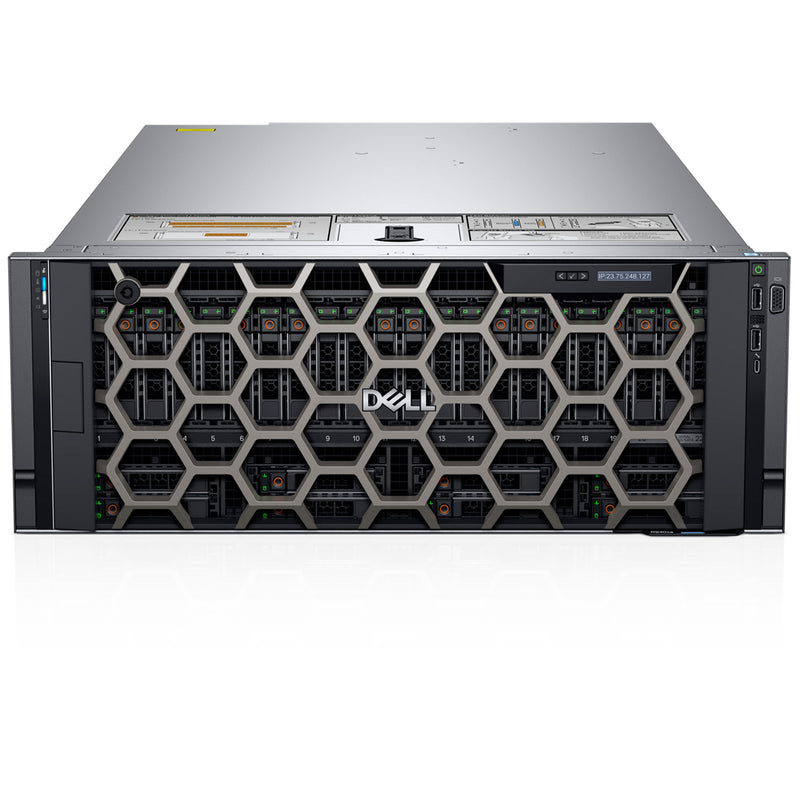


Current Configuration
(List below serves as quick links to each section)
Server Chassis
Processors
Bezel
Memory for 1st Gen Intel
Memory for 2nd Gen Intel
RAID Controllers
HDD (2.5") Drives
SSD (2.5") Drives
SSD U.2 NVMe Drives
PCIe Risers
Accelerator Options
Network Daughter Card
Boot Optimized Storage Subsystem (BOSS-S1):
Internal Dual SD Module (IDSDM)
Optical Drive
Rail Kit
Trusted Platform Module
iDRAC9 Remote Options
Power Supplies
ECS Warranty
The request has been sent.
Thank you.
Price as Configured:
$0
Price as Configured:
$0
4U rack server
Processor | Max: 112 CoresUp to 4x 2nd Gen Intel Xeon Scalable
Memory | Max: 15.36TB48 DDR4 RDIMM, LRDIMM 2933Mhz Max 6TB
Up to 12 NVDIMM, Max 384GB
Up to 24 Intel® Optane™ DC persistent memory PMem, max 12.28TB
(15.36TB max with PMem and LRDIMM)
Supports registered ECC DDR4 DIMMs only
Up to 8x 2.5” SAS SATA (HDD/SSD) max 61.44TB
Up to 24 x 2.5” SAS/SATA (HDD/SSD) max 184.32TB
Up to 32 SAS/SATA (HDD/SSD) with 4 NVME SSD max 245.76TB
None
Boot Options:BOSS
USB
IDSDM (Virtualized Platforms only)
Up to 12 slots, (6x16 slots or 2x16 + 10x8 slots)
Remote management:iDRAC9 with Lifecycle Controller
LOM / rNDC:4 x 1GbE, 4 x 10GbE, 2 x 10GbE+2 x 1GbE, or 2 x 25GbE
RAID controllers:S140 (SW RAID | SATA, NVMe)
PERC H330, H730, H730P, H740P, H750, H840
HBA330, HBA350, HBA355i, HBA355e, 12 Gbps SAS HBA
Up to 4 double-width GPUs or
8 single-width full-height FPGAs
- Dell PowerEdge R920
- Dell PowerEdge R930
- Dell PowerEdge R940
- Dell PowerEdge R940xa
- Dell PowerEdge R960
(Click to View)
- Artificial Intelligence (AI)
- Data Analytics
- Machine Learning (ML)
The Dell PowerEdge R940xa pairs four CPUs with four GPUs in a 1:1 ratio to accelerate database performance and drive real-time decision-making. With up to 6TB of memory and four-socket compute power, it delivers fast, consistent response times — helping businesses scale on-premises capacity to reduce cloud costs and mitigate security risks.
8 Bay Chassis - 8x2.5" SAS/SATA (HDD/SSD)
Supports the Front USB module and the ODD
32 Bay Chassis - 24x2.5" SAS/SATA (HDD/SSD) + 8x2.5" SAS/SATA (HDD/SSD)
32 Bay Chassis - 20x2.5" SAS/SATA (HDD/SSD) + 4x2.5" Universal SAS/SATA/NVMe (HDD/SSD) + 8x2.5" SAS/SATA (HDD/SSD)
This configuration includes the SAS Expander to support the NVMe front drives
The 32-bay configuration uses two separate backplanes — upper and lower. The upper backplane houses 24 slots and supports a SAS Expander accommodating up to 4 SAS/SATA or NVMe drives, while the lower backplane is limited to the 8-bay layout. Note that the 8-bay upper and lower backplanes differ significantly in drive layout.
 8 Bay
8 Bay 32 Bay
 32 Bay w/ Expander for NVMe
The R940xa includes 6 hot-swap fans and offers 4 different air shroud options. If NVDIMMs are installed, the corresponding battery sits on top of the shrouds.
Integrated cooling fans dissipate heat generated during system operation, providing thermal support for processors, expansion cards, and memory modules.
The cooling fan assembly houses the full array of system fans; a failure in this cooling system can lead to server overheating and potential hardware damage.

Each CPU offers 12 memory DIMM slots, totaling 48 DIMMs across the system, organized into six channels with 2 DIMMs per channel. For optimal performance, each CPU's memory channels should be populated evenly — with either 6 or 12 DIMMs per processor.
For complete rules and restrictions on each memory type, refer to the manuals below.

RDIMM/LRDIMM
(Registered DIMM)
(Load Reduced DIMM)
Registered DIMMs offer higher-capacity options and advanced RAS features, making them the most widely used DIMM type — with a strong balance of frequency, capacity, and rank structure choices.
Load-Reduced DIMMs push capacity beyond what RDIMMs offer, though at higher power consumption, using a buffer to reduce memory loading to a single load across all DDR signals for greater density.
RDIMMs and LRDIMMs must not be mixed.
DCPMM
(Intel Optane DC persistent memory)
DCPMM delivers large memory capacity at an affordable price point, working in Memory Mode with any compatible OS, while App Direct Mode unlocks additional performance and persistence for supported applications. It's used alongside RDIMMs or LRDIMMs, with up to 6 DCPMMs supported per CPU, and requires no battery for its persistent memory functionality.
DCPMM comes in 3 different memory sizes, 128 GB, 256 GB, and 512 GB.
PMems' cannot be mixed with other PMems capacities or NVDIMMs
PMems of different capacities are not allowed.
1600W and 2400 W PSU Must be installed
PMem does not support GPU configurations.
NVDIMM-N
(Non-Volatile DIMM)
Non-Volatile DIMMs combine NAND and DRAM to deliver persistent memory that retains data through power loss, system crashes, or normal shutdowns. This solution requires a battery to handle AC loss conditions and can be used alongside RDIMMs.
NVDIMM-Ns or RDIMMs must not be mixed with LRDIMMs.
Maximum of 12 NVDIMM-Ns can be installed in a system.
This system supports up to 12 PCIe slots, with slot width — x8 or x16 — depending on the riser installed. GPU installations require x16 risers, while single-wide FPGA cards can run on the x8 PCIe riser instead.

| Number of processors | NVMe | GPU | Riser size | Slot size | Slot quantity | Available slots | Height | Length |
|---|---|---|---|---|---|---|---|---|
| 4 | NA | GPU Ready/ Double wide accelerators capable | X16 PCIe Riser 1 | x16 | 2 | 2, 4 | FH | FL |
| x8 | 1 | 5 | FH | HL | ||||
| X16 PCIe Riser 2 | x16 | 2 | 9, 11 | FH | FL | |||
| x8 | 1 | 12 | FH | HL | ||||
| NA | Non-GPU/ Single wide FPGA | X8 PCIe Riser 1 | x8 | 5 | 1, 2, 3, 4, 5 | FH | HL | |
| X8 PCIe Riser 2 | x8 | 5 | 8, 9, 10, 11, 12 | FH | HL | |||
| Front NVMe | GPU Ready/ Double wide accelerators capable | X16 PCIe Riser 1 | x16 | 2 | 2, 4 | FH | FL | |
| X16 PCIe Riser 2 | x16 | 2 | 9, 11 | FH | FL | |||
| Front NVMe | Non-GPU/ Single wide FPGA | X8 PCIe Riser 1 | x8 | 4 | 1, 2, 3, 4 | FH | HL | |
| X8 PCIe Riser 2 | x8 | 4 | 8, 9, 10, 11 | FH | HL | |||
| 2 | NA | GPU Ready/ Double wide accelerators capable | X16 PCIe Riser 1 | x16 | 1 | 4 | FH | FL |
| X16 PCIe Riser 2 | x16 | 1 | 11 | FH | FL | |||
| NA | Non-GPU/ Single wide FPGA | X8 PCIe Riser 1 | x8 | 2 | 3, 4 | FH | HL | |
| X8 PCIe Riser 2 | x8 | 2 | 10, 11 | FH | HL |
With only 12 PCIe slots to work with, a dedicated rNDC slot helps preserve capacity while expanding networking options — upgrading from 1GbE to 10GbE, or running both simultaneously with a mixed FlexLOM, is fully supported.
The appropriate riser mounts above the rNDC; if no riser is installed, blanks must be fitted in its place.

The Dell PowerEdge R940xa rack server supports PERC 9, 10, and 11 storage controllers, along with three boot options — BOSS, IDSDM, and an internal USB drive — with the IDSDM typically favored for loading hypervisors in virtualization workloads.
The BOSS adapter houses two M.2 SATA drives to load the OS for the entire system; an internal USB stick offers the same functionality as an alternative.
An optional internal USB memory key can serve as a boot device, security key, or mass storage option — booting from it requires configuring the key with a boot image and specifying it in the boot sequence within System Setup.
The IDSDM holds two microSD cards in RAID 1, paired with a 16GB vFlash drive at the rear of the module. It's not intended for the main OS but works well for loading a hypervisor in virtualization workloads.
| Performance Level | Controller & Description |
|---|---|
| Entry | S140 (SATA, NVMe) SW RAID SATA |
| Value | HBA330 (Internal), 12Gbps SAS HBA (External) Memory: None x8 12 Gb SAS x8 PCIe 3.0, H330, H350, 12Gbps SAS HBA (External), HBA355e (External) Memory: None x8 12 Gb SAS x8 PCIe 3.0, HBA350i |
| Value Performance | H730P Memory: 2GB, NV 72-bit, 866MHz x8 12 Gb SAS x8 PCIe 3.0 , H750 |
| Premium Performance | H740P, 8x8 ROC Memory: 4/8GB, NV 72-bit |
Refer to the PCIe section above for details on the slot availability across each riser configuration.
A number of rules govern GPU and FPGA configurations on this system — refer to the manuals below for the complete list.
- PMem does not support GPU configurations
- 256 GB DIMMS do not support GPU configuration.
- You Must install the GPU air shroud
- The GPU card can be installed only in a X16 PCIe riser configuration.
- The FPGA card is installed in the x8 Riser configuration.

The Dell PowerEdge R940xa supports 4 hot-swap power supply units, configurable in BIOS as either 2+2 for redundancy or 4+0 without redundancy when identical PSUs are installed. In redundant mode with Hot Spare disabled, power draws equally from both PSUs; enabling Hot Spare puts one PSU into sleep mode during low utilization to maximize efficiency.
| AC (Platinum) | AC (Titanium) | DC | Mix Mode/HVDC (China and Japan only) |
|---|---|---|---|
| 1100 W | 1600 W | 2000 W | 2400 W |
| 750 W | 1600 W | 2600 W | |
| 1100 W | Mix Mode: 750 W (for China only) | ||
| 1100 W |
Dimensions
Height: 174.3 mm (6.87”)
Width: 441.16 mm (17.37”)
Depth: 835.9mm (32.9”)
Weight: 56.0kg (123.5lbs.)
*Dimensions do not include bezel
Current Configuration
(List below serves as quick links to each section)
Server Chassis
Processors
Bezel
Memory for 1st Gen Intel
Memory for 2nd Gen Intel
RAID Controllers
HDD (2.5") Drives
SSD (2.5") Drives
SSD U.2 NVMe Drives
PCIe Risers
Accelerator Options
Network Daughter Card
Boot Optimized Storage Subsystem (BOSS-S1):
Internal Dual SD Module (IDSDM)
Optical Drive
Rail Kit
Trusted Platform Module
iDRAC9 Remote Options
Power Supplies
ECS Warranty
The request has been sent.
Thank you.
Price as Configured:
$0
Base Standard Capabilities
| Features | Technical specification | |
|---|---|---|
| Processor | Up to four 2nd Generation Intel® Xeon® Scalable processors, up to 28 cores each | |
| Memory | 48 DDR4 DIMM slots, Supports RDIMM /LRDIMM, up to 2933MT/s, 6TB max Up to 12 NVDIMM, 384GB Max Up to 24 Intel® Optane™ DC persistent memory PMem, max 12.28TB, (15.36TB max with PMem and LRDIMM) Supports registered ECC DDR4 DIMMs only | |
| Storage controllers | Internal Controllers: PERC H330, H730P, H740P, HBA330 External Controllers: H840, 12 Gbps SAS HBA Software RAID:S140 Boot Optimized Storage Subsystem (BOSS):HWRAID 2 x M.2 SSDs 240GB, 480GB Internal Dual SD Module | |
| Drive bays | Front bays:
| |
| Power supplies | Gold:1100W - 48VDC Platinum 1100W, 1600W, 2000W, 2400W Hot plug power supplies with full redundancy option 6 hot plugs fans with N +1 redundancy | |
| Dimensions | Form factor: Rack (4U) Height: 174.3 mm (6.87”) Width: 441.16 mm (17.37”) Depth: 835.9mm (32.9”) Weight: 56.0kg (123.5lbs.) *Dimensions do not include bezel | |
| Embedded management | IPMI 2.0 compliant iDRAC9, iDRAC Direct, Quick Sync 2 BLE/wireless | |
| Bezel | Optional LCD bezel or security bezel | |
| OpenManage Software | OpenManage Enterprise OpenManage Mobile OpenManage Power Center | |
| Integrations and connections | Integrations: Microsoft System Center VMware vCenter BMC Truesight Red Hat Ansible Modules | Connections: IBM Tivoli® Netcool/OMNIbus Micro Focus Operations Manager i (OMi) Nagios® Core Nagios® XI |
| Tools | Dell EMC Repository Manager Dell EMC Update Package Dell EMC System Update Dell EMC Server Update Utility | iDRAC Service Module iDRAC RESTful API with Redfish OpenManage Server Administrator OpenManage Storage Services |
| Security | TPM 1.2/2.0 optional Cryptographically signed firmware Secure Root of Trust Secure Boot Secure Erase System Lockdown (requires iDRAC Enterprise or Datacenter) | |
| I/O & Ports | Network daughter card options:
| Rear Ports:
|
| Accelerator Options | Up to 4 doublewidth GPUs Or up to 4 double-width full-height FPGAs Or 8 single-width full-height FPGAs | |
| Supported operating systems | Canonical® Ubuntu® LTS Citrix® Hypervisor Microsoft Windows Server® LTSC with Hyper-V Oracle® Linux Red Hat® Enterprise Linux SUSE® Linux Enterprise Server VMware® ESXi | |
Spec Sheet 4
| Feature | PowerEdge R940xa | PowerEdge R930 |
|---|---|---|
| Processor | 4x 2nd Generation Intel Xeon Processor Scalable Family (Gold and Platinum) | 4x Intel Xeon E5-5600 v3 |
| CPU interconnect | Intel Ultra Path Interconnect (UPI) | Intel QuickPath Interconnect (QPI) |
| Memory | ● 48x DDR4 RDIMM, LRDIMM, 12x NVDIMM
● Up to 6 TB with 48x 128 GB LRDIMM ● DCPMM 12.28 TB (15.36 TB with LRDIMM) |
● 96 x DDR4 RDIMM, LRDIMM
● Up to 3 TB with 96x 32 GB LRDIMM |
| Disk Drives | 2.5 inches - 12 Gb SAS, 6 Gb SATA | 2.5 inches - 12 Gb SAS, 6 Gb SATA |
| Storage Controllers | Adapters: HBA330, H330, H350, H730P, H740P,
H750, 12G SAS HBA, H840, HBA350i and
HBA355e
SW RAID: S140 |
12 Gbps PERC-9 series |
| PCIe SSD | Up to 4x PCIe SSD | 8x PCIe SSD with dedicated slots using two extender cards. |
| PCIe Slots | Max 12 PCIe 3.0 | Max 10 PCIe 3.0 |
| rNDC | 4x 1 GB, 4x 10 GB, 2x 10 GB+2x 1 GB, or 2x 25 GB | 4x 1 Gb, 4x 10 Gb, or 2x 10 Gb+2x 1 Gb |
| Accelerators | Up to 4 double-width GPUs or up to 4 doublewidth or up to 8 single-width FPGAs. | Not Available |
| USB Ports | Front: 2 ports (USB 2.0), 1 managed (micro-usb) Rear: 2 ports (USB 3.0) Internal: 1 port (USB 3.0) Optional: 1 Front port (USB 3.0) - only offered on 8-drive configuration | Front: 2 ports (USB 2.0) Rear: 2 ports (USB 2.0) Internal: 1 port (USB 2.0) |
| Rack Height | 4U | 4U |
| Power Supplies | ● AC (Platinum): 750 W, 1100 W, 1600 W, 2000
W, 2400 W
● Mix Mode: 750 W PSU (DC input for China only) ● AC (Titanium): 750 W, 1600 W, 2600 W ● DC: 1100 W ● Mix Mode/HVDC: 750 W (for China only), 1100 W |
● AC: 750 W, 1100 W
● DC: 1100 W ● Mix Mode/HVDC: 750 W |
| System Management | Lifecycle Controller 3.x, OpenManage, QuickSync2.0, OMPC3, Digital License Key, iDRAC Direct (dedicated micro-USB port), Easy Restore, vFlash | Lifecycle Controller 2.x, OpenManage, Digital License Key, iDRAC QuickSync, iDRAC Direct, Easy Restore |
| Availability | ● Hot-plug Drives
● Hot-plug Redundant Cooling ● Hot-plug Redundant Power Supplies ● IDSDM |
● Hot-plug Drives
● Hot-plug Redundant Cooling ● Hot-plug Redundant Power Supplies ● IDSDM |