





Current Configuration
(List below serves as quick links to each section)
Server Chassis
HPE Processors
Heat Sinks
HPE Memory v3
HPE Memory v4
HPE FlexibleLOM Adapter
HPE Network Mezzanine Adapters
HPE Fibre Channel Mezzanine Adapter
HPE InfiniBand Mezzanine Adapter
SFF Drives SAS (2.5\")
SFF Drives SATA (2.5\")
NVMe Drives
Storage Battery
Storage controller / NVMe pass-through board
HPE M.2 enablement kit
Flash media kits for USB drives
GPUS
HPE Integrated Lights-Out (iLO) for Server Management
Trusted Platform Module (TPM)
ESC Warranty
The request has been sent.
Thank you.
Price as Configured:
$0
Price as Configured:
$0
- New Graphics options, including the NVIDIA Tesla M60 and Quadro M3000SE
- NVMe SFF Solid State Disk (SSD) support.
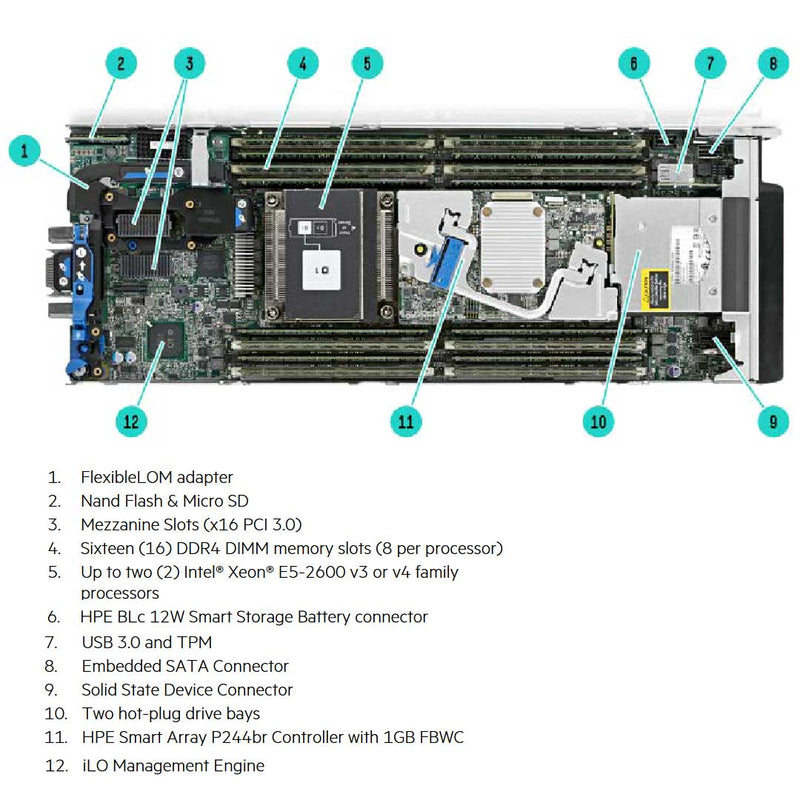
- 16 (8 per processor) 2400 MT/s DDR4 memory.
- 2 Socket System with support for the Intel E5-2600 v3 or v4 product family.
- 2 I/O expansion slots
- 1 FlexLOM
- TPM Security
- iLO Standard
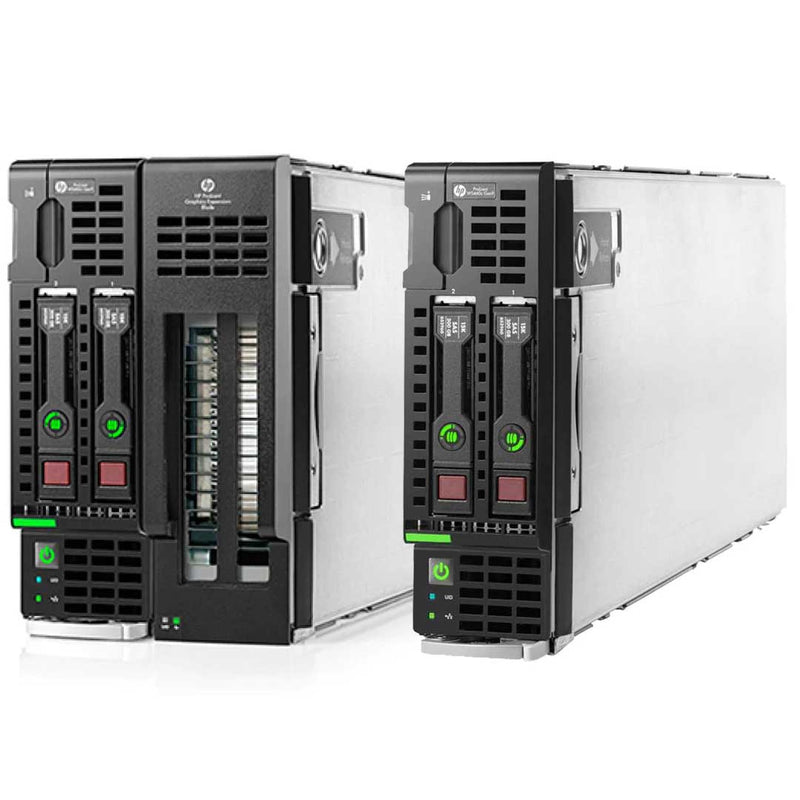
The HPE ProLiant WS460c Gen9 Graphics Server Blade now delivers even more performance with new Intel Xeon Processor E5-2600 v3 processors and 2,133 MHz DDR4 memory. It is the industry’s first bladed technology to support up to six MXM form factor GPUs per blade, lowering the cost per user while enabling remote users to easily complete large model visualizations.
SAS/SATA Drives
Please make sure you select the correct chassis that has the SAS/SATA backplane installed. For SAS drives you'll need to install a SAS controller and Cables. For the SATA drives you'll need just the SATA cables. The System board comes with The HPE Smart Array B140 i Controller (chipset SATA). If RAID is required when using the B140 i, please choose ‘HPE FIO B140 i RAID Enable Kit - BIOS Setting’ (784308-B21).
NVME Drives
For NVMe Drives to work you'll also need to install the Storage Controller HPE NVMe BL460c Gen9 Pass-Through DC (744408-001) as well as install the HPE BL460c G9 Broadwell NVMe FIO Setting (825555-B21).
The HPE Gen9 Broadwell NVMe FIO Setting (825555-B21) is required to support SFF NVMe SSDs within the system. This option is not compatible with the HPE Smart Array P244br, HPE Smart Array P246br, or HPE Smart HBA H244br. HPE recommends the use of a dual M.2 solid state drive kit for boot when using this option.
How does the HPE Expansion Blade Connect to the HPE ws460c?
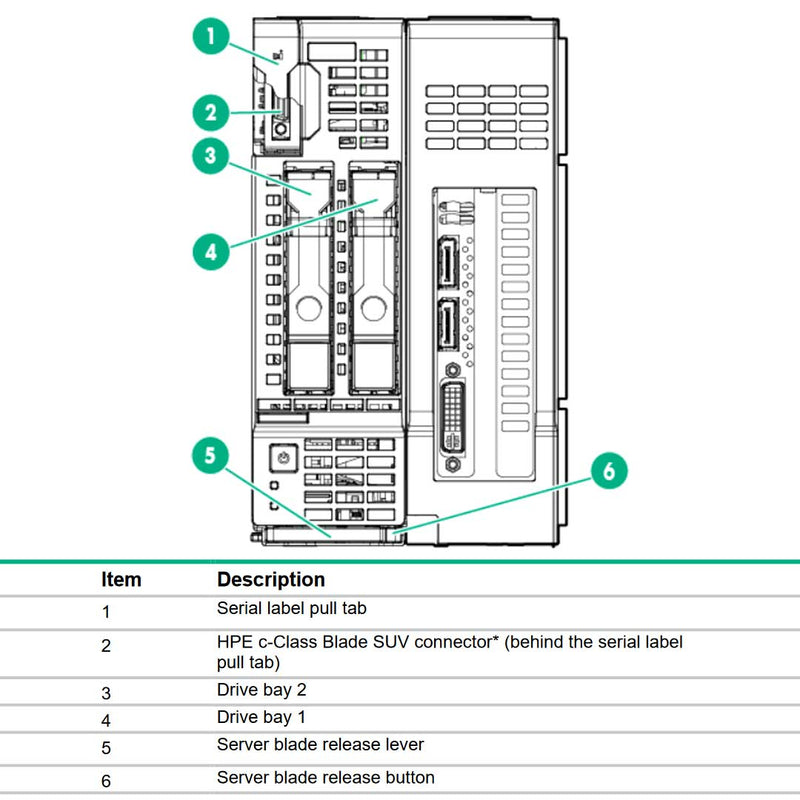
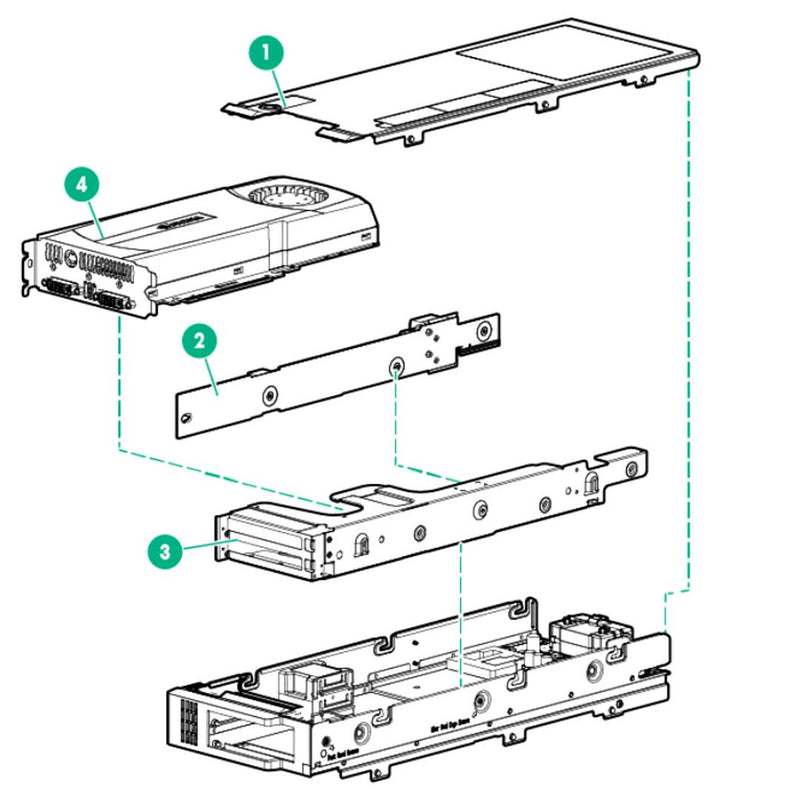
With the following components. 1 or 2 Mezzanine Pass-through card (792948-001) installed in either Expansion slot 1 or 2 on the host ws460c server. If you only have one installed for pass through use the clear bracket (801520-001). If you have dual mezzanine pass-throughs then use the black bracket (801810-001). Now you'll need the Controller cables to link the pass-throughs to the Riser board. There is 1 Graphic Expansion cable to choose with 2 different length. When installing 2 Mezzanines you'll need both lengths. HPE recommends on a 1 mezzanine installation to use Mezz slot 1 with the long expansion cable (715290-001). When installing from Mezz slot 2. You first need the expansion Blade Slot2 FIO enablement kit (775168-B21) then you'll want to use the smaller expansion cable (715289-001). Both of these cables get plugged into the Expansion Riser Board (792949-001).
Pass-through GPU
The HP ProLiant WS460c Gen9 Graphics Server Blade delivers the industry’s first support for MXM form-factor graphics with up to six GPUs per blade with PCI Express (PCIe) Gen3 x 16 GPU support—all on the proven HP ProLiant Gen9 architecture.
This solution enables a lower cost per seat through multi-tenancy in a virtualized environment while keeping a dedicated GPU per user for performance, and taking full advantage of NVIDIA drivers. This is beneficial to users who utilize high performance graphics applications in multiple industries.
What GPU's can go into the Expansion blade of the HPE ws460c Blade Server?
The double-wide HPE ws460c with the Expansion Blade installed can use either MXM or Single and Double Width Full Length GPU's. The HPE ws460c without the Expansion Blade can handle a MXM gpu installed.
MXM Type-A Mezzanine Adapter:
- 792946-001 is for Type-A Mezzanine Cards
MXM Type-B Mezzanine Adapters: When AMD FirePro S7100X , NVIDIA Quadro K3100M, or Tesla M6 card is installed in Mezz slot 2, no other card may be installed in Mezz slot 1.
- 847623 - 001 is for the M6 and S7100x
- 792947-001 is ONLY for the K3100M
NOTE: When using the NVIDIA Quadro M3000SE GPU, the HPE Storage Controllers are
installable in mezzanine slot 2. This is not the case for all other GPU options.
Single Width GPUs for ws460c:
- AMD FirePro S4000X Mezzanine Type-A Graphics Kit (785918-B21)
- AMD FirePro S7100X Mezzanine Type-B Graphics Kit (845803-B21)
- NVIDIA Quadro 1000M MXM Type-B Graphics Card (652673-001)
- NVIDIA Quadro K3100M Mezzanine Type-B Graphics Kit (753269-001)
- NVIDIA Quadro M3000SE Mezzanine Type-B Graphics Kit (867583-B21)
- NNVIDIA Tesla M6 Mezzanine Type-B Graphics Card (805132-B21)
Double Width GPUs for ws460c:
- NVIDIA Tesla M60 GPU adapter (872629-B21 - 813433-001)
- NVIDIA Quadro K4000 Graphics card (736757-001)
- NVIDIA Quadro K5000 Graphics card (736758-001)
- NVIDIA Quadro K6000 Graphics card (730874-B21 - 736859-001)
- NVIDIA Quadro M5000 Graphics Accelerator (M9R60A - 826220-001)
- NVIDIA Quadro M6000 Graphics Accelerator (J0G92A - 813432-001)
- NVIDIA Quadro P6000 Graphics Accelerator (Q0V76A)
- NVIDIA GRID K1 PCIe GPU (736759-001 - 730876-B21)
- NVIDIA GRID K2 PCIe GPU (732635-001)
- MultiGPU with 2 AMD S7100X FIO Graphics kit (845804-B21)
- MultiGPU with 2 NVIDIA Tesla M6 GPU FIO Adapter (805133-B21)
- MultiGPU with 4 NVIDIA Quadro 1000M MXM (652673-001)
- MultiGPU with 3 NVIDIA Quadro M3000SE FIO Graphics kit (867584-B21)
- MultiGPU with 3 NV K3100M (810907-B21 - 753112-001)
Additional GPU requirement to know:
Expansion Blade Gen9 Slot2 Enablement FIO Kit (PN 775168-B21) is required when supporting two HPE MultiGPU Carrier cards. All of the MultiGPU cards are installed on the MultiGPU carrier (811100-001).
HP has expanded its comprehensive set of graphics offerings with NVIDIA GRID solutions that, for the first time, support hardware GPU virtualization and multiple GPUs on a single adapter card, providing an excellent end-user experience.NVIDIA GRID GPU adaptors have an optimized multi-GPU design that helps to maximize user density.
GRID K1 boards, which include four Kepler based GPUs and 16 GB of memory, are designed to host the maximum number of concurrent users. GRID K2 boards, which include two higher-end Kepler GPUs and 8 GB of memory, deliver maximum density for users of workstation-class graphics applications.
With GRID, users benefit from the best of both software virtualized and pass through GPU technologies, because the virtual machine (VM) shares the resource of a GPU, but has direct access to the dedicated resources of the GPU.
True Virtual GPU
Also known as “NVIDIA GRID vGPU” is the NVIDIA/Citrix/VMware implementation of the
technology, True Virtual GPU offers the benefit of GPU scaling like the software virtualized GPU (application programming interface [API] intercept) and provides the performance of a native NVIDIA graphics driver like the pass through models.
This technology is currently implemented by the NVIDIA GRID K1 and K2 products. The GRID GPU is shared between multiple VMs similar to API intercept. However, in this model each VM has direct access to the GPU via dedicated channels managed by the NVIDIA GRID vGPU Manager. Unlike the software virtualized GPU (API intercept) model, the NVIDIA vGPU Manager within the host hypervisor manages the VM to GPU channels, guaranteeing that each VM has a dedicated amount of Video RAM per user and direct access to the GPU. Administrators will have the ability to assign one to eight users per physical GPU depending on their workload needs.
Multi-GPU configurations
The HP ProLiant WS460c Gen9 Graphics Server Blade has two options for the base blade configuration. The single width base blade or double width blade with graphics Expansion. The base blade supports up to two MXM style graphics cards installed on the blade mezzanine slots, while the expansion blade allows installation of full size high-end graphics cards.
The HP WS460c Gen9 HP Multi-GPU Carrier card allows for up to (6) GPUs (MXM style) to be installed in the blade, creating three times more GPU density in the same 10U enclosure than similar performance-class graphics in single-width blades.
Current Configuration
(List below serves as quick links to each section)
Server Chassis
HPE Processors
Heat Sinks
HPE Memory v3
HPE Memory v4
HPE FlexibleLOM Adapter
HPE Network Mezzanine Adapters
HPE Fibre Channel Mezzanine Adapter
HPE InfiniBand Mezzanine Adapter
SFF Drives SAS (2.5\")
SFF Drives SATA (2.5\")
NVMe Drives
Storage Battery
Storage controller / NVMe pass-through board
HPE M.2 enablement kit
Flash media kits for USB drives
GPUS
HPE Integrated Lights-Out (iLO) for Server Management
Trusted Platform Module (TPM)
ESC Warranty
The request has been sent.
Thank you.
Price as Configured:
$0