




Current Configuration
(List below serves as quick links to each section)
Server Chassis
Fabric A
Fabric B
Fabric C
Power Cable
MX7000 Options
ECS Warranty
The request has been sent.
Thank you.
Price as Configured:
$0
Price as Configured:
$0
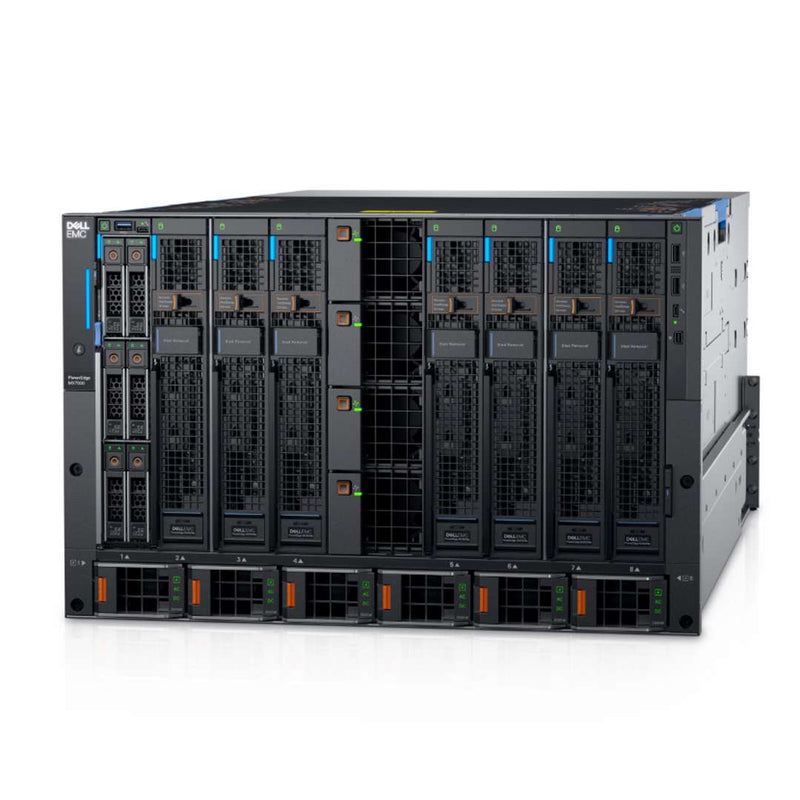
7U Modular Rack server
Power:Up to 6 front-loading power supply units
Fans:4 x 60 mm front hot-swap fans modules and 5 x 80 mm rear fan modules
Expandability:Multi-chassis networking up to 10 chassis via the 1GbE Ports on the MX9002m.
Fabrics A,B:Up to 2 pairs of redundant general-purpose switch or pass-through modular bays.
Fabrics C:Up to 2 redundant pair of storage-specific switch bays
(The MX5016s connects to the servers via the MX5000s SAS switch.)
8 single-width or 4 double-width sleds
If you need help with the configuration, don't hesitate to get in touch with our IT Support today.
- Dell PowerEdge MX7000 Modular CTO Enclosure Chassis
-
Dell PowerEdge MX740c CTO Compute Sled Up to 8
- Dell PowerEdge MX750c CTO Compute Sled Up to 8
- Dell PowerEdge MX760c CTO Compute Sled Up to 8
- Dell PowerEdge MX840c CTO Compute Sled Up to 4
- Dell PowerEdge MX5016s CTO Storage Sled Up to 7 Requires a minimum of 1 compute node in a chassis with storage sleds

Each Node is a separate CTO you must configure.
The PowerEdge MX7000 chassis supports two PowerEdge MX9002m management modules for redundancy. The Dell EMC PowerEdge MX9002m management module controls the overall chassis power, and cooling and hosts the OpenManage Enterprise-Modular (OME-M) console. Two external 1G-BaseT Ethernet ports are provided to enable management connectivity and to connect more PowerEdge MX7000 chassis into a single logical chassis.
Dynamically scale and respond to changing needs
PowerEdge MX7000 hosts elastic compute and storage resources connected by a smart I/O fabric. Featuring an innovative design to accommodate the streamlined transition to emerging technologies, the chassis delivers extensibility for evolving application requirements.
- Flexible 7U modular enclosure, with eight front-accessible slots, holds 2-socket single-width or 4-socket double-width compute sled and 12Gbps single-width storage sled combinations
- Low latency, cost-efficient 25Gb Ethernet, 12Gb SAS and 32Gb Fibre Channel I/O options
- Three I/O networking fabrics, two general purpose and one storage specific, each with redundant modules
- Scalable Fabric Architecture for multi-chassis networking up to 10 chassis
- Assured support for multiple future generations of server processor microarchitectures
PowerEdge MX7000 includes comprehensive embedded systems management, Dell EMC OpenManage Enterprise – Modular Edition, which delivers key functions of OpenManage Enterprise management within the chassis for the entire environment – a single management point for compute, storage and networking. Deploy and monitor multiple chassis at once, roll-out changes and templates faster and integrate with third-party tools.
- Operational template methodology and comprehensive OpenManage RESTful API based on Redfish
- Flexible at-the-box Touchscreen LCD, wireless and traditional crash cart management options
- Remote server access with OpenManage Mobile application and the new Quick Sync 2 feature
- As with every PowerEdge server, embedded agent-free Integrated Dell Remote Access Controller (iDRAC)9 with Lifecycle Controller (LC)
PowerEdge MX infrastructure embeds hardware and system-level security features to protect with a deep layer of defense and quick detection in order to recover, if breached. A Cyber Resilient Architecture extends across every aspect, including embedded firmware, data stored, the operating system, peripheral devices and management operations within.
- Security Development Lifecycle (SDL) model where security is an integral part of overall infrastructure design process and encompasses needs through the entire lifecycle
- Robust iDRAC APIs, such as WS-Man or RESTful API (compliant with Redfish standards) for automated deployment of hardware security features
- Aligns with key industry standards for cryptography and security such as NIST SP800-147B and UEFI Secure Boot
The PowerEdge MX740c and MX750c compute sled is a unique design for the PowerEdge MX7000 chassis and is not compatible with other PowerEdge modular chassis.
If you're trying to use the MX5016s Sled then you need to choose the MX5000s Management Module, NOT the MXG610s. This module along with HBA330 mini-mezz or the PERC H745P MX allows the compute sled(s) to utilize all the drives in the MX5016s Storage Sled. Please read the MX5016s Spec Manual for more detailed information.
Current Configuration
(List below serves as quick links to each section)
Server Chassis
Fabric A
Fabric B
Fabric C
Power Cable
MX7000 Options
ECS Warranty
The request has been sent.
Thank you.
Price as Configured:
$0
Base Standard Capabilities
| Feature | Technical Specification | ||
|---|---|---|---|
| Processor | Up to 6 3000W; PSU and grid redundancy support | ||
| Fans | 5 rear- and 4 front-accessible hot-swap fans | ||
| Dimensions (LxWxD) | 816.8mm (32.16 inches) x 482mm (18.98 inches) x 307.4mm (12.10 inches) | ||
| Rack Units | 7U | ||
| Embedded mgmt | MX7000 chassis: OpenManage Enterprise Modular Edition (OME-Modular); running on up to 2 redundant MX9002m management modules Unified control: single management point for server, storage and networking Intelligent automation: Operational template methodology and comprehensive RESTful API Quick Sync 2 Bluetooth Low Energy (BLE)/wireless module option On compute sled: As every other PowerEdge server, the integrated Dell Remote Access Controller (iDRAC)9 with Lifecycle Controller (LC) | ||
| Bezel | |||
| OpenManage™ SW | OpenManage Enterprise OpenManage Essentials OpenManage Mobile (OMM) OpenManage Power Center (OMPC) | ||
| Integrations & Connections |
| ||
| Security |
| ||
| Embedded NIC | |||
| Networking Options (NDC) | Fabric options: Up to 2 pairs of redundant general-purpose switch or pass-through modular bays (Fabrics A and B); redundant pair of storage specific switch bays (Fabric C) Up to 25GbE, 32Gbps Fibre Channel, 12Gbps SAS | ||
| GPU Options | |||
| Front Ports |
|