



Current Configuration
(List below serves as quick links to each section)
Server Chassiss
HPE Processors
Tower To Rack
HPE Memory v4
HPE Memory v3
Drive Options
HPE LFF SAS Drives (3.5in)
HPE LFF SATA Drives (3.5in)
HPE SFF SAS Drives (2.5in)
HPE SFF SATA Drives (2.5in)
HPE SFF NVMe Drives (2.5in)
M.2 Drives
Networking Adapters
Storage Controller
GPU
Cable Kits
Optical Drives
USBs
Intergrated Lights-Out Server Management
Trust Platform Module (TPM)
Cooling Fans
Power Supply Unit (PSU)
ECS Warranty
The request has been sent.
Thank you.
Price as Configured:
$0
Price as Configured:
$0
- Processor: Gen9 supports Intel Xeon E5-2600 v3/v4 with up to 22 cores, compared to E5-2600 v2 with a maximum of 12 cores in Gen8.
- Memory: Gen9 supports DDR4 memory (up to 768GB, expandable to 3TB) with 24 DIMM slots, whereas Gen8 supports DDR3 (up to 384GB) with fewer DIMM slots.
- Storage: Gen9 adds support for NVMe drives and increased capacity with up to 48 SFF or 24 LFF drives, surpassing Gen8’s more limited storage options.
- Power Efficiency: Gen9 introduces Flex Slot Power Supplies, offering higher efficiency and a smaller footprint compared to Gen8.
- Management: Gen9 uses iLO 4 for enhanced remote management, security, and diagnostics, compared to iLO 3 on Gen8.
- Expansion: Gen9 provides up to 9 PCIe 3.0 slots, supporting better scalability and network options compared to Gen8's PCIe 2.0 slots.
- Cloud Servers
- Corporate IT
- Database
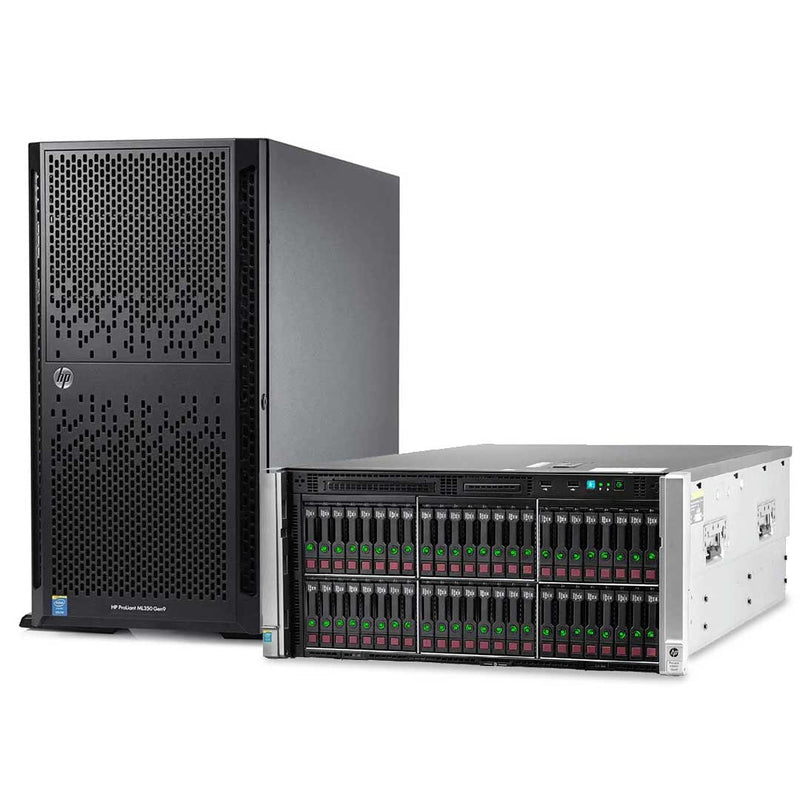
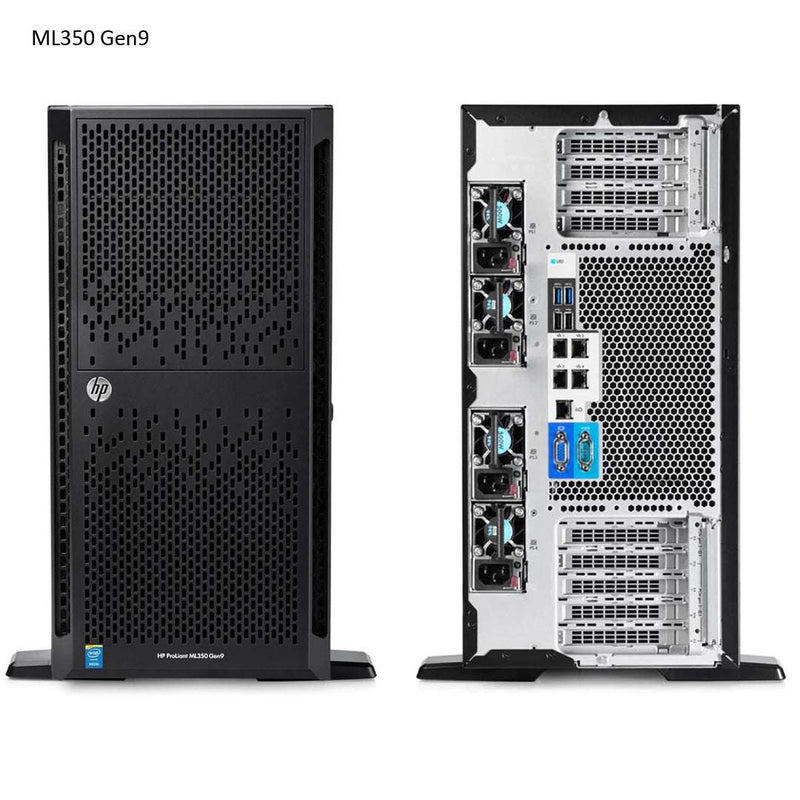
The ML350 Gen9 is the 2P premium server which delivers a class-leading combination of performance, availability, expandability, manageability, reliability and serviceability making it the choice for remote offices, growing businesses and data centers.
| CTO Server [Chassis] | HPE ProLiant ML350 Gen9 Hot Plug 8SFF Configure-to-order Rack Server |
HPE ProLiant ML350 Gen9 Hot Plug 8SFF Configure-to-order Tower Server |
HPE ProLiant ML350 Gen9 Hot Plug 8LFF Configure-to-order Tower Server |
|---|---|---|---|
| SKU Number | 754534-B21 | 754536-B21 | 754537-B21 |
| Processor | 2 (optional) x HPE Smart Socket Guide | ||
| DIMM Slots | 24 DIMM slots for RDIMM, LRDIMM DDR4 Memory | ||
| Storage Controller | HPE Dynamic Smart Array B140i | ||
| PCIe | 9 Standard (8 FH/FL, 1 FH/HL) | ||
| Drive Cage - included | 8SFF Hot Plug | 8LFF Hot Plug | |
| Network Controller | HPE Embedded 1Gb Ethernet 4-port 331i Adapter | ||
| Fans | 3 hot swap fans, non-redundant | ||
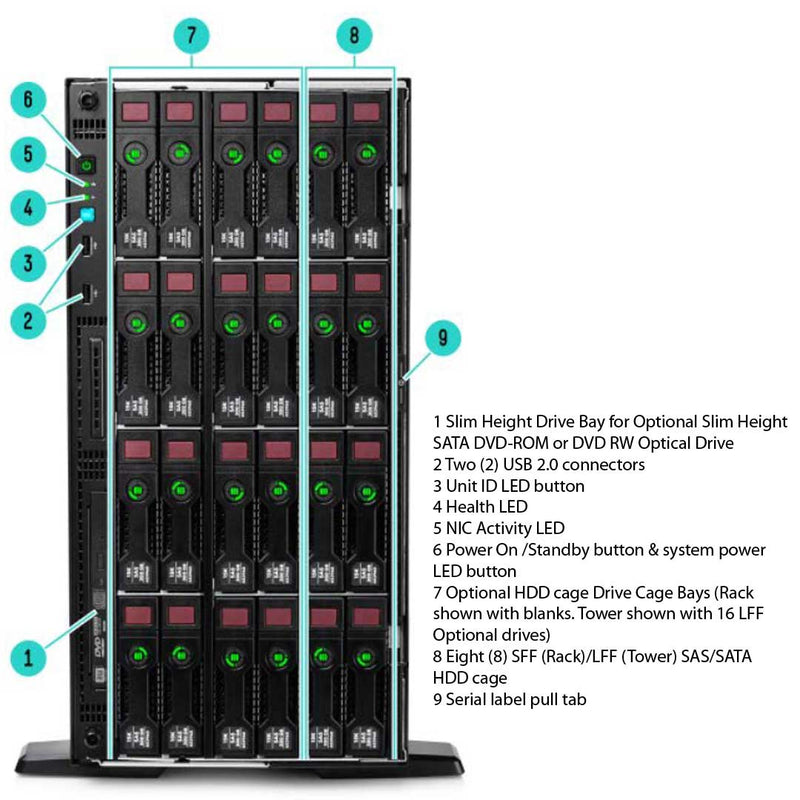
| USB | 2 front, 2 internal, 4 rear | ||
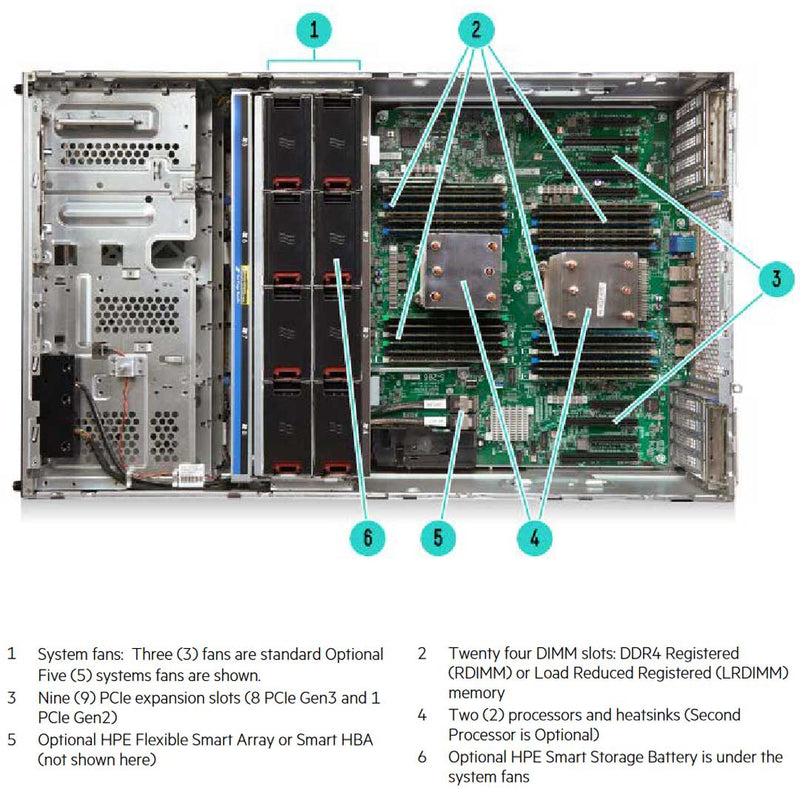
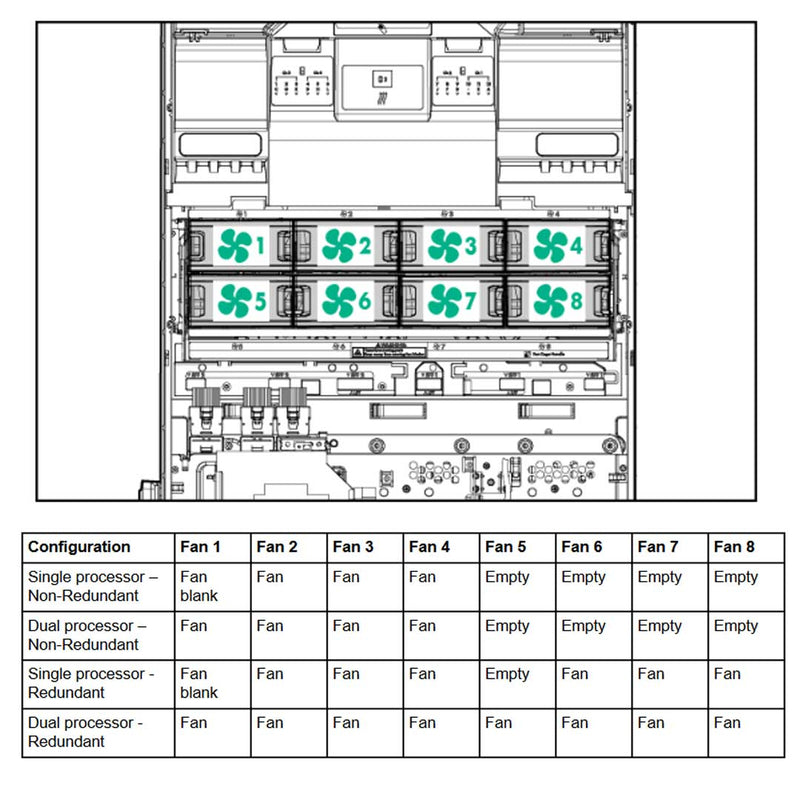
The big difference between a 1-socket and 2-socket configuration is cooling. In a 1 Socket configuration, there are 3 fans and 1 blank in the Fan cage. This system allows redundant fan configuration for better airflow. The Fan cage can hold 8 fans for a redundant 2-socket configuration. To install the redundant fans you’ll need the HP ML350 Gen9 Redundant Fan Kit (725878-B21). This kit consists of four system fans and two PCIe air baffles. View the images above for fan numbering and placement.

| Configuration | Fan 1 | Fan 2 | Fan 3 | Fan 4 | Fan 5 | Fan 6 | Fan 7 | Fan 8 |
|---|---|---|---|---|---|---|---|---|
| Single processor – Non-Redundant | Fan blank | Fan | Fan | Fan | Empty | Empty | Empty | Empty |
| Dual processor – Non-Redundant | Fan | Fan | Fan | Fan | Empty | Empty | Empty | Empty |
| Single processor – Redundant | Fan blank | Fan | Fan | Fan | Empty | Fan | Fan | Fan |
| Dual processor – Redundant | Fan | Fan | Fan | Fan | Fan | Fan | Fan | Fan |
- DIMM Slots Available 24
- Maximum Capacity (LRDIMM) 1.5TB (24 x 64GB LRDIMM)
- Maximum Capacity (RDIMM) 768GB (24 x 32GB RDIMM)
- Mixing of 2133 and 2400MHz memory is not supported.
- DIMM Slots Available 24
- Maximum Capacity (LRDIMM) 3TB (24 x 128GB LRDIMM)
- Maximum Capacity (RDIMM) 768GB (24 x 32GB RDIMM)
- Mixing of 2133 and 2400MHz memory is not supported.
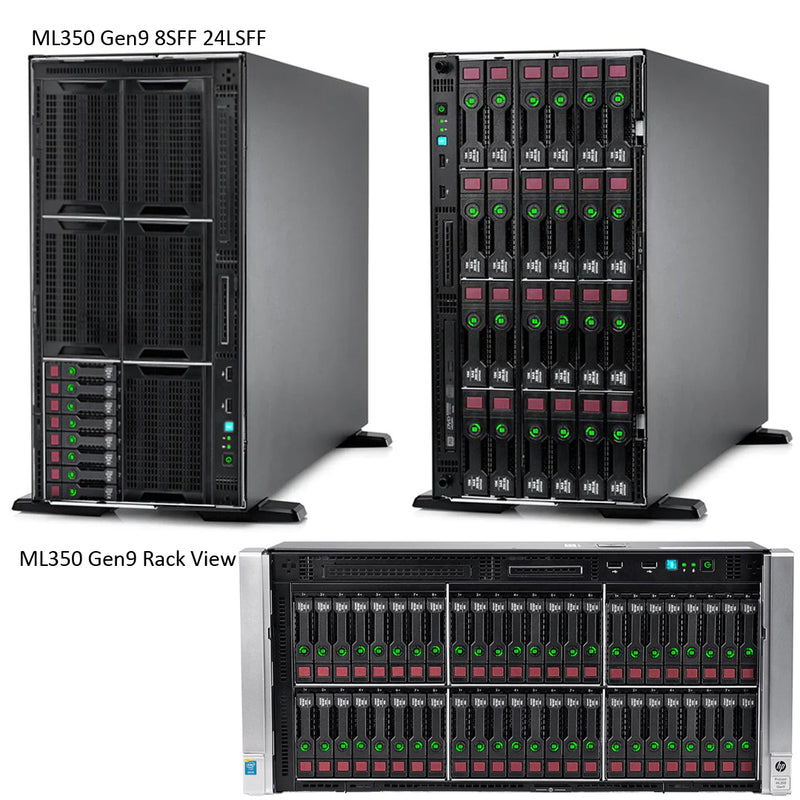
Converting the Tower to a Rack server is somewhat straightforward for detailed information please read the Tech Manual below. Below is a list of parts that are needed for the rack conversion to go over well.
- HP Security Bezel Kit - 660584-B21
- HP ML350 Gen9 Tower to Rack Conversion Kit - 726567-B21
- 5U rail kit,
- Cable management arm (CMA)
- Rack enablement kit (rack ear, rack handle, SID blank etc)
- Hot Plug LFF SAS 288TB 24 x 12TB
- Hot Plug LFF SATA 288TB 24 x 12TB
- Hot Plug LFF SAS SSD 38.4TB 24 x 1.6TB
- Hot Plug LFF SATA SSD 92.16TB 24 x 3.84TB
- Hot Plug SFF SAS 96TB 48 x 2TB
- Hot Plug SFF SATA 96TB 48 x 2TB
- Hot Plug SFF SAS SSD 184.32TB 48 x 3.84TB
- Hot Plug SFF SATA SSD 184.32TB 48 x 3.84TB
- Hot Plug SFF NVMe PCIe SSD 7.2TB 6 x 1.2TB

 Drive Support (NVMe)
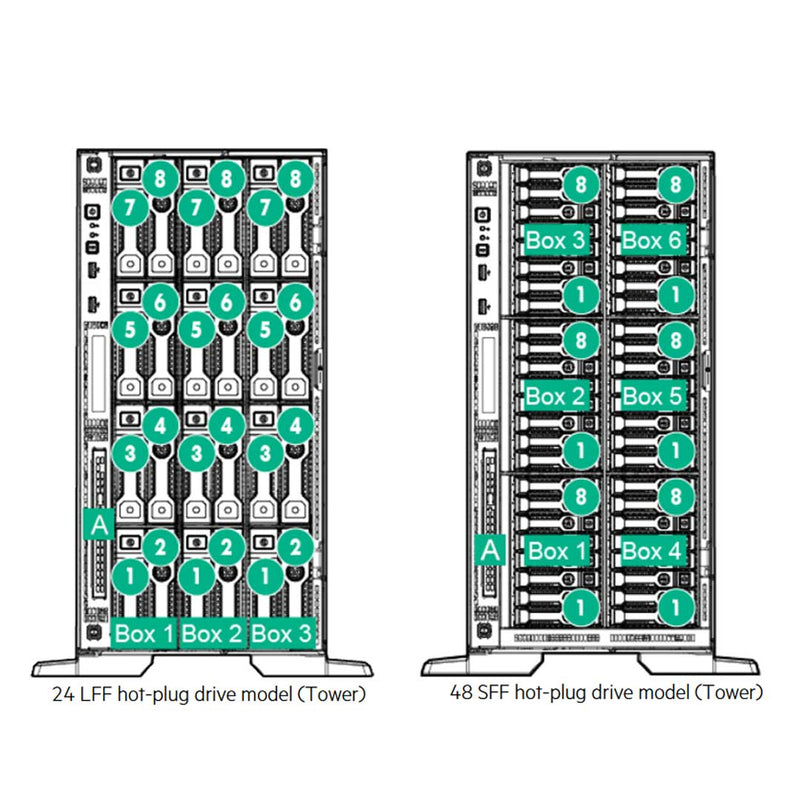
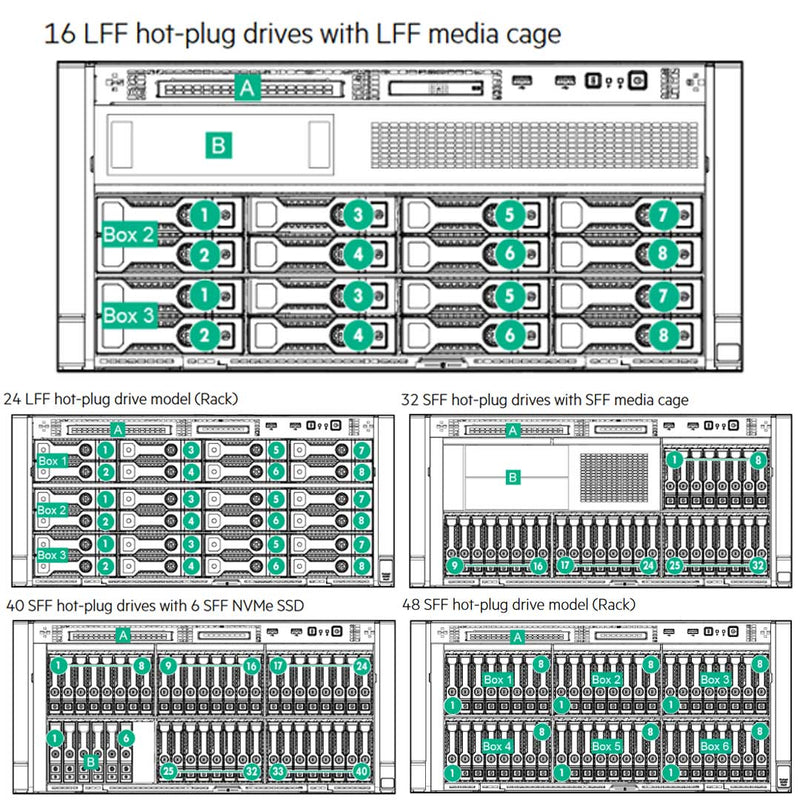
This ML350 Tower Server can handle either LFF or SFF, SAS, or SATA Drives. You can’t mix LFF and SFF but you can mix SAS and SATA. If RAID is installed the SAS drives will be the only drives in the RAID. This System can also hold up to 6 NVMe SSD drives only on the SFF Chassis. You will need to install the HP ML350 Gen9 NVMe 6 Solid State Drive Express Bay Enablement Kit (726551-B21). Which comes with the Drive Cage and Express Bay Bridge card.
 Drive Upgrade Options
Each chassis comes with 1 Drive cage installed, for extra drive cages you will need to install the following. If you have the LFF Chassis, you’ll need the HP ML350 Gen9 8LFF Hot Plug Drive Cage Kit (726547-B21 ). If you have the SFF Chassis, you’ll need the HP ML350 Gen9 8SFF Hard Drive Cage Kit (778157-B21). If you do not fill the entire drive cage, you’ll need Blanks to keep the airflow correct. Here we have the HPE Large Form Factor Hard Drive Blank Kit (666986-B21 ) and the HPE Small Form Factor Hard Drive Blank Kit (666987-B21 ).
 M.2 Boot Option
Inside the ML350 Tower Server, you have the option to place the HPE Universal SATA HHHL M.2 Kit (878783-B21) in PCI-e Slot 1. The M.2 SSD ML-DL Enablement Kit can be used to build RAID 0, 1 by using the B140i controller. Unless you have the P440ar or H240ar installed then the enablement kit cannot support RAID nor can the B140i controller be used.
There are a few ways to add SAS drives to the system. It depends on the amount of SAS drives you need.
 8 SAS Drives
I recommend the Flexible Smart Array Controller (AROC) cards. The HPE Flexible Smart Array P440ar/2GB FBWC (726736-B21) and the HPE H240ar Smart Host Bus Adapter (726757-B21) are both installed directly on the system board, saving PCIe slots. Alternatively, you can use the HPE Smart Array P440/4GB FBWC (726821-B21), but it will occupy one PCIe slot.
 24 SAS Drives
I recommend the HPE 12Gb SAS Expander Card (769635-B21). This card must be paired with an HPE Smart Array P440 or P840 Controller or an H240 Host Bus Adapter. It is not compatible with H240ar or P440ar Flexible Smart Array Controller (AROC) cards. The kit includes two cables: one for connecting the Smart Array controller or HBA to the SAS Expander and another for connecting the Expander to the HDD backplane.
 48 SAS Drives
I recommend the HPE ML350 Gen9 2nd SAS Expander Card (811216-B21), which works alongside the ML350 Gen9 SAS Expander Kit (769635-B21). This configuration also requires 2 CPUs, a redundant PSU kit (802988-B21), and the HPE Smart Array P840/4GB FBWC 12Gb 2-ports Internal SAS Controller (761874-B21) for optimal performance.
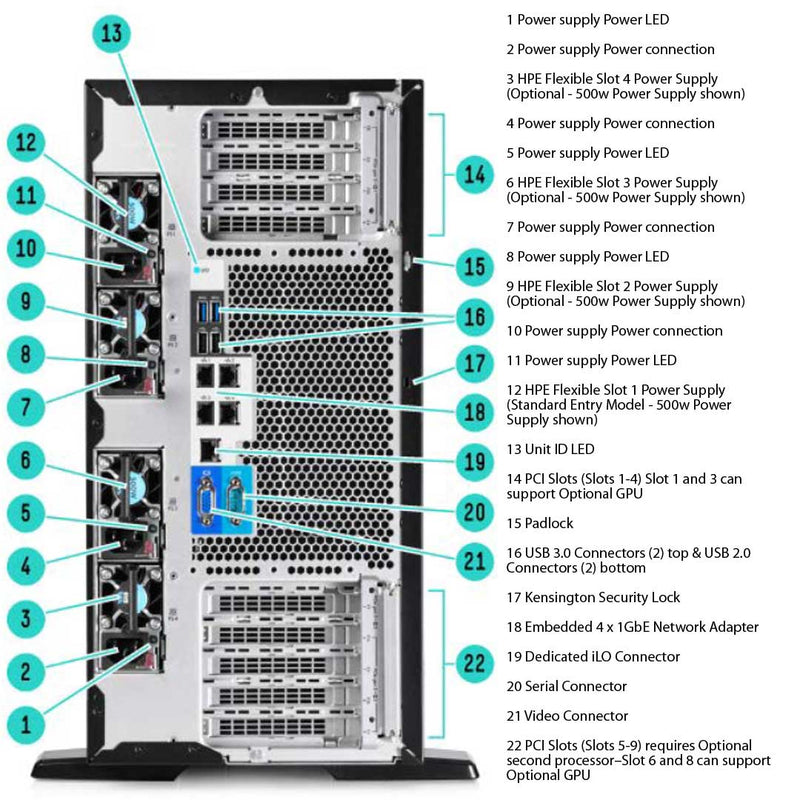
Nine total expansion slots.
Three PCIe 3.0 x16 (x16 speed); One PCIe 3.0 x16 (x8 speed); Four PCIe 3.0 x8 (x4 speed); One PCIe 2.0 x8 (x4 speed).
For all 9 PCIe slots to work you'll need to install a second processor. Keep in mind you'll need the redundant fan kit. Please read the manual when installing a GPU or any Smart Array. The manual has many rules, requirements, and limitations.
| Expansion Slots # | Technology | Bus Width | Connector Width | Bus Number | Form Factor | Notes |
|---|---|---|---|---|---|---|
| 9 | PCIe 3.0 | x4 | x8 | - | Full-height, full-length slot | For processor 2 |
| 8 | PCIe 3.0 | x16 | x16 | - | Full-height, full-length slot | For processor 2 |
| 7 | PCIe 3.0 | x4 | x8 | - | Full-height, full-length slot | For processor 2 |
| 6 | PCIe 3.0 | x16 | x16 | - | Full-height, full-length slot | For processor 2 |
| 5 | PCIe 2.0 | x4 | x8 | 0 | Full-height, half-length slot | For processor 2 |
| 4 | PCIe 3.0 | x4 | x8 | 0 | Full-height, full-length slot | For processor 1 |
| 3 | PCIe 3.0 | x16 | x16 | 0 | Full-height, full-length slot | For processor 1 |
| 2 | PCIe 3.0 | x4 | x8 | 0 | Full-height, full-length slot | For processor 1 |
| 1 | PCIe 3.0 | x8 | x16 | 0 | Full-height, full-length slot | For processor 1 |
One Graphic Card Support Kit - (726565-B21) is required for each computation or graphics accelerator except for K2200 or M2000. Below is the list of GPU’s, you can have up to 4.
- HP AMD FirePro W7100 Accelerator Kit (J0H10A)
- NVIDIA Tesla K40C 12GB Computational Accelerator (753960-B21). If this is selected you will need the redundant PSU kit ( 725870 -B21 ) with at least 3 800W PSU’s.
The following are only allowed on the E5-2600v4 Processors.
- HPE NVIDIA Quadro M4000 Graphics Accelerator (M9X58A)
- HP NVIDIA Quadro M5000 Graphics Accelerator (M9R60A)
- HPE NVIDIA Quadro M2000 Graphics Accelerator (P8Y48A)
- HPE NVIDIA Quadro P2000 Graphics Accelerator (Q0V77A)
- HPE NVIDIA Quadro P4000 Graphics Accelerator (Q0V78A)
NOTE:
If more than two Double Wide Graphics options are selected, then HPE ML350 Gen9 X4 RPS Enablement Kit must be selected in order to get the third and fourth supporting power connectors to supply power to the GPU cards.
By deafult the hpe ml350 gen 9 is setup to support 2 psu. When you install certain itmes the Power will need to be upgraded. When upgrading the Power Supply Units, please look at the rules below or in the manual.
4 PSUs KitHP ML350 Gen9 X4 Redundant Power Supply Enablement (RPS) FIO Kit (725870 -B21).
- This kit does not support the 500W Power Supply.
- Required with Two Double Wide Graphics
- Required with NVIDIA Tesla K40C 12GB Card (753960-B21)
- Required with HP ML350 Gen9 2nd Expander Card (811216-B21)
Current Configuration
(List below serves as quick links to each section)
Server Chassiss
HPE Processors
Tower To Rack
HPE Memory v4
HPE Memory v3
Drive Options
HPE LFF SAS Drives (3.5in)
HPE LFF SATA Drives (3.5in)
HPE SFF SAS Drives (2.5in)
HPE SFF SATA Drives (2.5in)
HPE SFF NVMe Drives (2.5in)
M.2 Drives
Networking Adapters
Storage Controller
GPU
Cable Kits
Optical Drives
USBs
Intergrated Lights-Out Server Management
Trust Platform Module (TPM)
Cooling Fans
Power Supply Unit (PSU)
ECS Warranty
The request has been sent.
Thank you.
Price as Configured:
$0
Base Standard Capabilities
Product features
Feature | Description | |||||||||||||||||||||||||||||||||||||||||||||||||||||||||||||||||||||||||||||||||||||||||||||||||||||||||||||||||||||||||||||||||||||||||||||||||||||||||||||||||||||||||||||||||||||||||||||||||||||||||||||||||||||||||||||||||||||||||||||||||||||||||||||||||||||||||||||||||||||||||||||||
|---|---|---|---|---|---|---|---|---|---|---|---|---|---|---|---|---|---|---|---|---|---|---|---|---|---|---|---|---|---|---|---|---|---|---|---|---|---|---|---|---|---|---|---|---|---|---|---|---|---|---|---|---|---|---|---|---|---|---|---|---|---|---|---|---|---|---|---|---|---|---|---|---|---|---|---|---|---|---|---|---|---|---|---|---|---|---|---|---|---|---|---|---|---|---|---|---|---|---|---|---|---|---|---|---|---|---|---|---|---|---|---|---|---|---|---|---|---|---|---|---|---|---|---|---|---|---|---|---|---|---|---|---|---|---|---|---|---|---|---|---|---|---|---|---|---|---|---|---|---|---|---|---|---|---|---|---|---|---|---|---|---|---|---|---|---|---|---|---|---|---|---|---|---|---|---|---|---|---|---|---|---|---|---|---|---|---|---|---|---|---|---|---|---|---|---|---|---|---|---|---|---|---|---|---|---|---|---|---|---|---|---|---|---|---|---|---|---|---|---|---|---|---|---|---|---|---|---|---|---|---|---|---|---|---|---|---|---|---|---|---|---|---|---|---|---|---|---|---|---|---|---|---|---|---|---|---|---|---|---|---|---|---|---|---|---|---|---|---|---|---|---|---|---|---|---|---|---|---|---|---|---|---|---|---|---|---|---|---|
Processor | (One of the following depending on model)
| |||||||||||||||||||||||||||||||||||||||||||||||||||||||||||||||||||||||||||||||||||||||||||||||||||||||||||||||||||||||||||||||||||||||||||||||||||||||||||||||||||||||||||||||||||||||||||||||||||||||||||||||||||||||||||||||||||||||||||||||||||||||||||||||||||||||||||||||||||||||||||||||
Chipset |
| |||||||||||||||||||||||||||||||||||||||||||||||||||||||||||||||||||||||||||||||||||||||||||||||||||||||||||||||||||||||||||||||||||||||||||||||||||||||||||||||||||||||||||||||||||||||||||||||||||||||||||||||||||||||||||||||||||||||||||||||||||||||||||||||||||||||||||||||||||||||||||||||
On system management chipset 1 | HPE iLO (Firmware HPE iLO4 2.0 or later)) 4GB NAND1 | |||||||||||||||||||||||||||||||||||||||||||||||||||||||||||||||||||||||||||||||||||||||||||||||||||||||||||||||||||||||||||||||||||||||||||||||||||||||||||||||||||||||||||||||||||||||||||||||||||||||||||||||||||||||||||||||||||||||||||||||||||||||||||||||||||||||||||||||||||||||||||||||
Memory 2 | (One of the following depending on model) Type: HPE SmartMemory DDR4 Registered (RDIMM) or Load Reduced (LRDIMM)
| |||||||||||||||||||||||||||||||||||||||||||||||||||||||||||||||||||||||||||||||||||||||||||||||||||||||||||||||||||||||||||||||||||||||||||||||||||||||||||||||||||||||||||||||||||||||||||||||||||||||||||||||||||||||||||||||||||||||||||||||||||||||||||||||||||||||||||||||||||||||||||||||
Memory protection |
| |||||||||||||||||||||||||||||||||||||||||||||||||||||||||||||||||||||||||||||||||||||||||||||||||||||||||||||||||||||||||||||||||||||||||||||||||||||||||||||||||||||||||||||||||||||||||||||||||||||||||||||||||||||||||||||||||||||||||||||||||||||||||||||||||||||||||||||||||||||||||||||||
Network controller | HPE 1 GbE 4-port 331i Adapter |
Specs 1
Expansion slots 3 |
| ||||||||||||||||||||||||||||||||||||||||||||||||||||||||||||||||||||||
Storage controller | (One of the following depending on model)
| ||||||||||||||||||||||||||||||||||||||||||||||||||||||||||||||||||||||
Internal storage devices | (One of the following depending on model)
| ||||||||||||||||||||||||||||||||||||||||||||||||||||||||||||||||||||||
Maximum internal storage | (One of the following depending on model)
| ||||||||||||||||||||||||||||||||||||||||||||||||||||||||||||||||||||||
Power supply | (One of the following depending on model)
| ||||||||||||||||||||||||||||||||||||||||||||||||||||||||||||||||||||||
System fans | (One of the following depending on model)
| ||||||||||||||||||||||||||||||||||||||||||||||||||||||||||||||||||||||
Interfaces |
| ||||||||||||||||||||||||||||||||||||||||||||||||||||||||||||||||||||||
Upgradeability |
| ||||||||||||||||||||||||||||||||||||||||||||||||||||||||||||||||||||||
Industry standard compliance |
| ||||||||||||||||||||||||||||||||||||||||||||||||||||||||||||||||||||||
Graphics |
| ||||||||||||||||||||||||||||||||||||||||||||||||||||||||||||||||||||||
Form factor | Tower or rack (5U) | ||||||||||||||||||||||||||||||||||||||||||||||||||||||||||||||||||||||
HPE ServerUEFI/Legacy ROM | UEFI enables numerous new capabilities specific to HPE ProLiant servers such as:
| ||||||||||||||||||||||||||||||||||||||||||||||||||||||||||||||||||||||
Embedded management |
| ||||||||||||||||||||||||||||||||||||||||||||||||||||||||||||||||||||||
Server utilities |
| ||||||||||||||||||||||||||||||||||||||||||||||||||||||||||||||||||||||
Security |
| ||||||||||||||||||||||||||||||||||||||||||||||||||||||||||||||||||||||
NOTE:
| |||||||||||||||||||||||||||||||||||||||||||||||||||||||||||||||||||||||
Specs 2
Software overview
Feature | Description |
|---|---|
OS and virtualization software support for ProLiant servers |
|
NOTE:
| |
Physical specifications
Specification | Description |
|---|---|
Tower dimensions | 46.4 x 21.9 x 76.9 cm (18.27 x 8.62 x 30.28 in) |
Rack dimensions | 21.8 x 44.5 x 74.6 cm (8.58 x 17.51 x 29.37 in) |
Tower weight | Minimum: 30 kg (66.14 lb) Maximum: 55 kg (121.30 lb) |
Rack weight | Minimum: 26 kg (57.3 lb) Maximum: 51 kg (112.4 lb) |
Electrical specifications
Specification | Description |
|---|---|
Range line voltage |
|
Maximum BTU rating |
|
Rated Steady- State power |
|
Maximum peak power |
|
Environmental specifications
Specification | Description |
|---|---|
Operating temperature | 10° to 35°C (50° to 95°F) |
Non-operating temperature | -30° to 60°C (-22° to 140°F) |
Operating relative humidity | 8% to 90% |
Non-operating relative humidity | 5% to 95%, non-condensing |
Operating altitude | 3050 m (10,000 ft) |
Non-operating altitude | 9144 m (30,000 ft) |
Safety certifications
Specification | Description |
|---|---|
FCC Rating | Class A |
Normative standards | CISPR 22; EN55022; EN55024; FCC CFR 47, Pt 15; ICES- 003; CNS13438; GB9254; K22;K24; EN 61000-3-2; EN 61000- 3-3; EN 60950-1; IEC 60950-1 |