


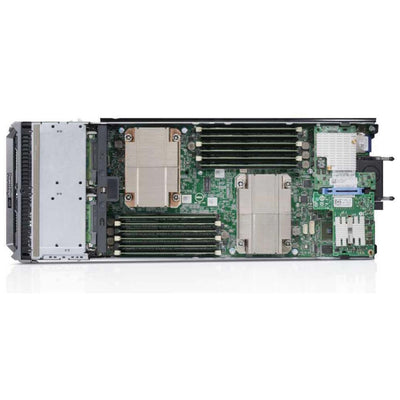
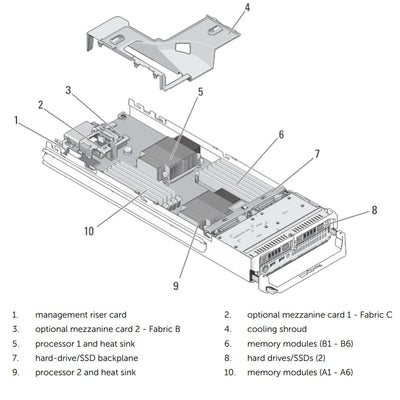


Half Height Blade Server
Processor | Max: 8 Cores2 x Intel Xeon E5-2400
Memory | Max: 384GB12 DDR3 RDIMM 1600Mhz
Boot Option:IDSDM
USB
vFlash
2 SFF SAS/SATA (HDD/SSD)
Storage Controllers:PERC S110 (SW RAID)
H310, H710, H710p
iDRAC7 with Lifecycle Controller
PCIe Slots | 2.0:1 LOM and 2 Mezzanine Slots
GPU:None
- Database
- Virtualization
This is one of the supported Blade servers, each Modular Enclosure is a separate CTO you must configure.
When installed into the Modular Enclosure. The M520 has a few different supported items. When you configure the M520 for the VRTX, the Blade Server will not support SATA drives and has only 1 Mezzanine Ethernet Pass-through option.
- Dell PowerEdge M1000e CTO Blade Enclosure
- Dell PowerEdge M420 CTO Blade Server
- Dell PowerEdge M520 CTO Blade Server
- Dell PowerEdge M620 CTO Blade Server
- Dell PowerEdge M630 CTO Blade Server
- Dell PowerEdge M640 CTO Blade Server
- Dell PowerEdge M710 CTO Blade Server
- Dell PowerEdge M710HD CTO Blade Server
- Dell PowerEdge M820 CTO Blade Server
- Dell PowerEdge M830 CTO Blade Server
Achieve business continuity
Ensure maximum uptime with the fully redundant M-series power, cooling, and networking infrastructure, designed to provide the stability and resiliency our customers demand for Enterprise-class deployments. The M520’s design matches Dell’s commitment to reliability, with features such as multiple hardware RAID choices and our unique failsafe virtualization technology, which utilizes redundant SD media to provide failover capabilities for embedded hypervisors.
Improve operational efficiency
Help manage your servers using the Dell OpenManage portfolio, including Dell’s exclusive integrated Dell Remote Access Controller (iDRAC) with Lifecycle Controller. iDRAC, an embedded systems management feature, allows you to manage Dell servers in physical, virtual, local and remote environments, either in-band or out-ofband, with or without a systems management software agent. OpenManage also integrates and connects to leading third-party systems management solutions you may already use, allowing you to maintain a single point of control and capitalize on your existing investment. OpenManage simplifies the lifecycle of deploying, updating, monitoring, and maintaining your Dell PowerEdge servers.
PowerEdge M-series blade server line
Implement the right combination of features and performance scalability with the PowerEdge M-series blade servers, which can handle tough workloads in any size data centers. In addition to the world-class management features provided in all PowerEdge servers, the M520 also takes advantage of the capabilities of the M1000e Chassis Management Controller (CMC). The CMC allows M-series blades to be managed individually or as groups, in single or multiple chassis, and within a data center or in multiple geographically dispersed locations around the globe without requiring a single agent or additional hardware. PowerEdge M-series blade servers use the redundant power, cooling, and networking infrastructure provided by the Dell M1000e blade enclosure, which is exceptionally easy to deploy and manage, and maximizes power and cooling efficiency.
Configure your M1000E — drives, RAID, rails, and warranty.
Talk to a sales expert today.
Build Your Refurbished M1000E →