




Current Configuration
(List below serves as quick links to each section)
Server Chassis
Processors
Bezel
Memory
Add Ons
RAID Controllers
Boot Optimized Storage Subsystem (BOSS)
HDD (3.5") Drives
HDD (2.5") Drives
SSD (2.5") Drives
NVMe (2.5") Drives
Riser Configurations
Network Daughter Card (rNDC | LOM)
GPU
Internal Dual SD Module (IDSDM)
Optical Drive
Rail Kits
Trusted Platform Module
iDRAC9 Remote Options
Power Supply Units (PSU)
ECS Warranty
The request has been sent.
Thank you.
Price as Configured:
$0
Price as Configured:
$0
1U rack server
Processor | Max: 28 Cores2 x 2nd Gen Intel Xeon Scalable
Memory | Max: 3TB24x ECC DDR4 RDIMM/LRDIMM 2933Mhz
NV Memory | Max: 192GBSupports up to 12 NVDIMM
Pmem Memory | Max: 6.14TBSupports up to 12 Intel Optane
NIC/LOM:4 x 1GbE
2 x 10GbE + 2 x 1GbE
4 x 10GbE
2 x 25GbE
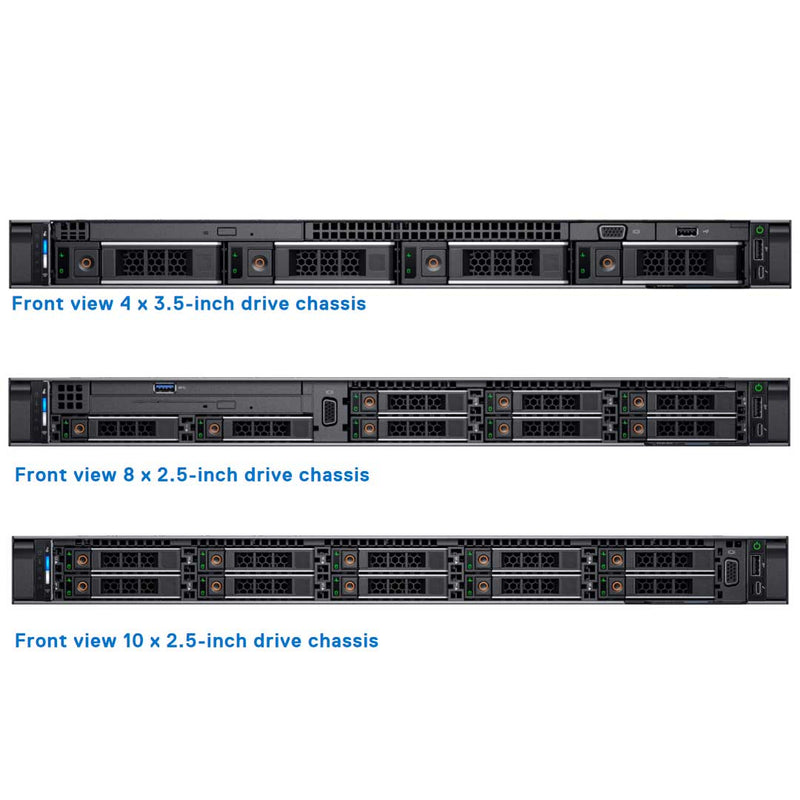
4x 3.5" SAS/NL-SAS/SATA (HDD/SSD)
8x 2.5" SAS/NL-SAS/SATA (HDD/SSD)
10x 2.5" SAS/NL-SAS/SATA (HDD/SSD) NVMe + (Optional Rear Drives)
2x 2.5" SAS/SATA (HDD/SSD) NVMe
RAID Controller:S140-SATA, NVMe (SW RAID) SATA, NVMe
H330, HBA330, HBA350i, H730P, H740P, H750
H840, HBA355e, 12 Gbps SAS HBA
3x PCIe 3.0 plus a dedicated PERC and rNDC slot
GPU:Up to 3 single-width GPU (NVIDIA T4) or up to 1 FPGA
Boot Options:BOSS-S1
IDSDM w/ vFlash
iDRAC9 with Lifecycle Controller
- Cloud Servers
- High-Performance Computing (HPC)
- Virtualization
The Dell PowerEdge R640 supports up to 24 DIMMs, with memory speeds reaching up to 2933 MT/s at 1 DIMM per channel or 2666 MT/s at 2 DIMMs per channel, depending on the 2nd Generation Intel® Xeon Scalable processor installed. Flexible configurations range from 8GB minimum up to 7.68TB maximum capacity.
With 12 memory DIMM slots per CPU spread across 6 channels at 2 DIMMs per channel, best performance comes from evenly populating each CPU's channels — either 6 or 12 DIMMs total.
There are 4 different types of DIMMs:
Registered DIMMs (RDIMMs) stand out as the most commonly used DIMM type, offering higher-capacity options, advanced RAS features, and a solid mix of frequency, capacity, and rank structure choices.
LRDIMMs push memory capacity beyond RDIMM limits at the cost of higher power draw, using a buffer to reduce loading to a single load across all DDR signals for greater density.
DCPMM — also known as Intel Optane DC persistent memory — delivers large memory capacity at an affordable price point, used alongside RDIMMs or LRDIMMs with up to 6 modules supported per CPU, and requiring no battery for its persistent memory function.
NVDIMMs combine NAND and DRAM to offer a persistent memory solution that survives power loss, system crashes, or normal shutdowns, relying on a battery for AC loss conditions, and can be paired with RDIMMs.
I/O on the Dell PowerEdge R640 stays balanced and scalable through integrated PCIe 3.0 expansion slots, while Dell EMC Network Daughter Cards let businesses select the right network fabric — speed, technology, vendor, and features like switch-independent partitioning for shared bandwidth management on 10GbE connections — without sacrificing a PCIe slot.
Supported Options- 4 x 1GbE
- 2 x 10GbE + 2 x 1GbE
- 4 x 10GbE
- 2 x 25GbE

The PowerEdge R640 system board reserves one x8 PCIe Gen3 slot for the storage controller card and another x8 PCIe Gen3 slot dedicated to the NDC, alongside its full riser lineup.

Riser 1A
Butterfly Riser

Riser 1B
Right Riser Low-Profile

Riser 2A
Left Riser Low-Profile

Riser 2B
Left Riser Full Height
| Expansion card riser | PCIe slots on the riser | Height | Length | Link |
|---|---|---|---|---|
| Riser 1A (Butterfly Riser) |
Slot 2 | Low Profile | Half Length | x16 |
| Slot 1 | Low Profile | Half Length | x16 | |
| Riser 1B Right Riser LP |
Slot 1 | Low Profile | Half Length | x16 |
| Riser 2A Left Riser LP |
Slot 3 | Low Profile | Half Length | x16 |
| Riser 2B Left Riser FH |
Slot 2 | Low Profile | Half Length | x16 |
A dedicated Mini-PERC slot sits on the Dell PowerEdge R640's system board, with additional PERC adapter card support available through any riser option — or the default system ports running SW RAID S140 can be used instead.

| Performance level | Controller and description |
|---|---|
| Entry | ● S140-SATA, NVMe ● (SW RAID) SATA, NVMe |
| Value | ● HBA330i Internal ● H330e External, 12 Gbps SAS HBA-External |
| Value Performance | H730P |
| Premium Performance | H740P, H840P |
Non-virtualized OS deployments call for BOSS, while virtualized environments are better served by the IDSDM.

IDSDM or vFlash card
This system's IDSDM with vFlash module occupies a dedicated slot at the rear of the chassis, using a Dell EMC-proprietary PCIe x1 slot over USB 3.0. On the PowerEdge R640, card format shifts from SD to microSD — IDSDM supports 16GB, 32GB, or 64GB, vFlash is fixed at 16GB, and a write-protect switch is built directly onto the module.

Boot Optimized Storage Subsystem (BOSS)
Providing a fast, dedicated location for OS installation, BOSS keeps drive-based storage free for data rather than the operating system. This RAID solution card supports up to two 6Gbps M.2 SATA drives via an x8 connector over PCIe Gen2 x2 lanes, offered exclusively in low-profile, half-height form factor.
| PSU | 495 W AC | 750 W AC | 750 W AC | 750 W Mixed Mode AC | 1100 W AC | 1600 W AC |
|---|---|---|---|---|---|---|
| Class | Platinum | Platinum | Titanium | Titanium | Platinum | Platinum |
| Heat dissipation —maximum | 1908 BTU/hr | 2891 BTU/hr | 2843 BTU/hr | 2902 BTU/hr | 4100 BTU/hr | 6000 BTU/hr |
| Frequency | 50/60 Hz | |||||
| Voltage | 100–240 V AC, autoranging | 100–240 V AC, autoranging | 200–240 V AC, autoranging | 100–240 V AC, autoranging | 100–240 V AC, autoranging | 100–240 V AC, autoranging |
| Current | 6.5 A – 3 A | 10 A – 5 A | 5 A | 10 A – 5 A | 12 A – 6.5 A | 10 A |
Current Configuration
(List below serves as quick links to each section)
Server Chassis
Processors
Bezel
Memory
Add Ons
RAID Controllers
Boot Optimized Storage Subsystem (BOSS)
HDD (3.5") Drives
HDD (2.5") Drives
SSD (2.5") Drives
NVMe (2.5") Drives
Riser Configurations
Network Daughter Card (rNDC | LOM)
GPU
Internal Dual SD Module (IDSDM)
Optical Drive
Rail Kits
Trusted Platform Module
iDRAC9 Remote Options
Power Supply Units (PSU)
ECS Warranty
The request has been sent.
Thank you.
Price as Configured:
$0
Base Standard Capabilities
| Features | Technical specification | |
|---|---|---|
| Processor | Up to two 2nd Generation Intel® Xeon® Scalable processors, up to 28 cores per processor | |
| Memory | 24 DDR4 DIMM slots, Supports RDIMM /LRDIMM, speeds up to 2933 MT/s, 3TB max Up to 12 NVDIMM, 192 GB Max Up to 12 Intel® Optane™ persistent memory PMem, 6.14TB max, (7.68TB max with PMem + LRDIMM) Supports registered ECC DDR4 DIMMs only | |
| Storage controllers | Internal Controllers: PERC H330, HBA330, HBA350i (adapter only), H730P, H740P, H750 (adapter only) External Controllers: H840, 12 Gbps SAS HBA, HBA355e (adapter only, non-RAID) Software RAID: S140 Boot Optimized Storage Subsystem (BOSS): HWRAID 2 x M.2 SSDs 240 GB, 480 GB Internal Dual SD Module | |
| Drive bays | Front drive bays: Up to 10 x 2.5” SAS/SATA (HDD/SSD) with up to 8 NVMe SSD max 76.8TB or up to 10 NVMe drives max 64TB, or up to 4 x 3.5” SAS/SATA HDD max 64TB Rear drive bays: Up to 2 x 2.5” SAS/SATA (HDD/SSD), NVMe SSD max 15.36TB Optional DVD-ROM, DVD+RW | |
| Power supplies | 495W Platinum 750W Platinum 1100W 48VDC 1100W Platinum 1600W Platinum 750W Titanium Hot plug power supplies with full redundancy option Up to 8 hot plugs fans with full redundancy | |
| Dimensions | Form factor: Rack (1U) Height: 42.8mm (1.69”) Width*: 482.0mm (18.98”) Depth*: 808.5mm (31.8”) Weight: 21.9kg (48.3 lbs.) *Dimensions include bezel. | |
| Embedded management | iDRAC9 iDRAC Direct iDRAC RESTful API with Redfish Quick Sync 2 wireless module (optional) | |
| Bezel | Optional LCD bezel or security bezel | |
| OpenManage Software | OpenManage Enterprise OpenManage Mobile OpenManage Power Center | |
| Integrations and connections | Integrations: Microsoft System Center VMware vCenter BMC Software Red Hat Ansible Modules | Connections: IBM Tivoli® Netcool/OMNIbus IBM Tivoli® Network Manager IP Edition Micro Focus® Operations Manager I Nagios® Core Nagios® XI |
| Security | TPM 1.2/2.0 optional Cryptographically signed firmware Secure Boot Silicon Root of Trust Secure erase System Lockdown (requires iDRAC Enterprise or Datacenter) | |
| I/O & Ports | Network Options:
| Rear Ports:
|
| Accelerator options | Up to 3 single-width GPU (NVIDIA T4) or up to 1 FPGA | |
| Supported operating systems | Canonical® Ubuntu® LTS Citrix® XenServer Microsoft Windows Server® LTSC with Hyper-V Red Hat® Enterprise Linux SUSE® Linux Enterprise Server VMware® ESXi | |
Spec Sheet 4
| Feature | PowerEdge R640 | PowerEdge R630 |
|---|---|---|
| Processor | 2nd Generation Intel® Xeon® Scalable Processor Family | Intel® Xeon® processor E5-2600 v3 or E5- 2600 v4 |
| Chipset | Intel® C620 | Intel® C610 |
| Memory | ● 24x DDR4 RDIMM/LR-DIMM 12x NVDIMM
+ 12 x RDIMM
● 12 x DCPMM + 12 x RDIMM or 12 x LRDIMM |
24x DDR4 RDIMM/LR-DIMM |
| Chassis | Storage design modularity
● 4 Hard Drive Chassis ● 8 Hard Drive Chassis ● 10 Hard Drive Chassis ● 10 NVMe Drive Chassis |
Three individual chassis for three SKU
● 8 Hard Drive Chassis ● 1 Hard Drive Chassis ● 24 Hard Drive Chassis |
| Disk Drives | Front drive bays:
● Up to 10 x 2.5 -inch with up to 8 NVMe, SAS/SATA/SSD/NVMe, max 76.8TB , or up to 10 NVMe drives max 64TB. Or up to 4 x 3.5” SAS/SATA, max 64TB Rear drive bays: ● Up to 2 x 2.5 -inch SAS/SATA/SSD/ NVMe, max 15.36TB |
● 8 x 2.5 -inch SAS/SATA or SATA only
● 10 x2. 5 -inch SAS/SATA or SAS/SATA/NVMe (NVMe up to 4) ● 24 x 1.8 inch SATA (single PERC or dual PERCs) |
| PCIe SSD | Up to 10 CPU Direct Attach PCIe SSD | Up to 4x PCIe SSD from PCIe bridge card |
| RAID Controller | S140, HBA330, H330, H730, H730P, H740P, H840P, 12Gbps SAS HBA(External) | S130, H330, H730, H730P, H830 (External) Support for 2 internal RAID controllers for x24 SSD configuration only |
| LCD Module | LCD module option in bezel | LCD by default in base x8 chassis, not available on x10 and x24 chassis. |
| Backplane | ● 10 x 2.5 inch SATA/SAS/NVMe (up to 8
NVMes)
● 10 x 2.5 inch NVMe ● 8 x 2.5 inch SATA/SAS/NVMe ● 4 x 3.5 inch SATA/SAS |
● 8 x 2. 5 inch SAS/SATA
● 10 x 2. 5 inch SAS/SATA ● 10 x 2. 5 inch SAS/SATA/PCIeSSD ● 24 x 1.8 inch SATA |
| Riser | Up to 2 riser connectors (left/right) | Up to 3 riser connectors (left/center/right) |
| PCIe Slots | Up to 3x PCIe Gen3 (x16/x16/x16) | Up to 3x PCIe Gen3 (x16/x8/x16) |
| Embedded NIC | ● 4 x 1GbE
● 2 x 10GbE + 2 x 1GbE ● 4 x 10GbE ● 2 x 25GbE |
● Broadcom 5730 Base-T
● Intel 1350 Base-T ● Broadcom 57800 SFP+ ● Broadcom 57800 Base-T ● Intel X540 Base-T |
| Power supplies | ● 495W Platinum
● 750W Platinum ● 750 W Mixed Mode AC Platinum ● 750 W Mixed Mode DC Platinum (for China only) ● 750W 240HVDC Platinum* (China only) ● 1100W - 48VDC ● 1100W Platinum ● 1100W 380HVDC Platinum* (Available in China and Japan only) ● 1600W Platinum ● 750W Titanium |
● 495 W AC
● 750 W AC ● 1100 W AC ● 1100 W DC |
| Remote Management | iDRAC9 | iDRAC8 |
| TPM | TPM China, TPM1.2, TPM2.0 | TPM China, TPM1.2, TPM2.0 |
| USB 3.0 Hub board | Extra USB3.0 connector to front plane | None |
| iDRAC Direct front port | Micro USB | USB type A |
| Fan | Up to eight FAN support. (1X6 type) | Up to seven FAN support (2X3 type) |
| IDSDM Module | Internal Dual SD Module (IDSDM) and vFlash | Internal Dual SD Module (IDSDM) |
| BOSS Module | M.2 SATA interface | None |
| PERC | Mini-PERC 10 | Mini-PERC 9 |
| NVDIMM Battery | External 12 V power bank for NVDIMM used | None |
| ODD/TBU | ODD via NPIO | TBU and ODD via 7-pin connectors |
| On board PCH SATA Connectors | 4x NPIOs | 2x Mini SAS_HDs |