






Current Configuration
(List below serves as quick links to each section)
Select Chassis
Select Processor
Select Security Bezel
Select Riser Card 1
Select Riser Card 2
Select Memory
Select Memory Mode
Select RAID Controller
Select HDD(s)
Select SSD(s)
Select Boot Drives
Select NVMe Drive
Select Interposer Board & Cable Kit
Select PCIe Option Card
Select Network Card Accessories
Select GPU & GPU Power Cables
Select Power Supplies
Select Power Cables
Select Rail Kit
Select Cable Management Arm (CMA)
Select NIC Mode
Select Trusted Platform Module
Select SD Card Module
Select USB 3.0 Drive
Select a Warranty
The request has been sent.
Thank you.
Price as Configured:
$0
Price as Configured:
$0
- (2) Intel Xeon E5-2600 v3 or v4 Processors
- (24) 2400MT/s DDR4 DIMMs
- (8-24) SFF SATA/SAS Drives
- (6) PCIe 3.0 Slots
- (1-4) GPU Support
- Dedicated mLOM Slot
- Dedicated Cisco 12G SAS Modular RAID controller Slot
- Embedded 2 x 1 GbE LAN-on-motherboard (LOM)
- (6) Hot Swap Fans
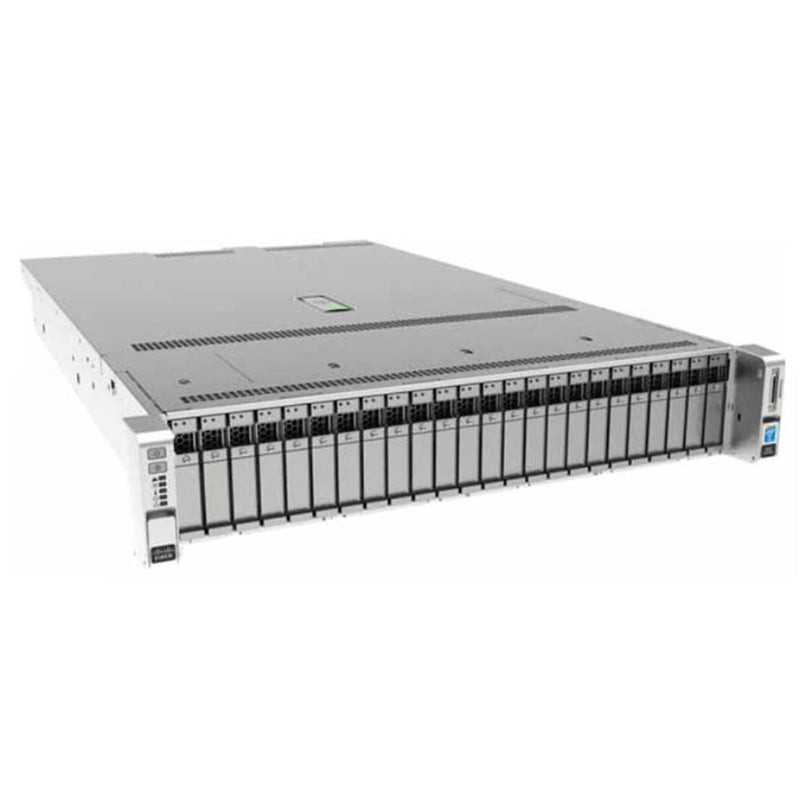
The UCS C240 M4 Large form factor (LFF) server is a 2U rack server from Cisco, designed for both performance and expandability over a wide range of storage-intensive infrastructure workloads from big data to collaboration.
The enterprise-class UCS C240 M4 LFF server extends the capabilities of Cisco’s Unified Computing System portfolio in a 2U form factor with the addition of the Intel® Xeon E5-2600 v3 and v4 series processor family that delivers the best combination of performance, flexibility, and efficiency gains. In addition, the UCS C240 M4 LFF server provides 24 DIMM slots, up to 6 PCI Express (PCIe) 3.0 slots, up to 12 front-loading drives plus two (optional) internal SATA boot drives for a total of 14 internal drives.
- Cisco C220 M4 | M5 | M6 | M7
- Cisco C240 M4 | M5 | M6
- Artificial Intelligence (AI)
- Big Data Analytics
- Cloud Servers
- Corporate IT
- Data Analytics
- Database
- Deep Learning (DL)
- Edge Servers
- High-Performance Computing (HPC)
- Machine Learning (ML)
- Retail Servers
- Video Analytics
- Virtualization
- Virtual Machines (VM)
- Web Tech
- Anything as a service (Xaas)
Need help with the configuration? Contact us today!
 C240 M4 8x2.5"
 UCSC-C240-M4S
- (8) SFF Drives
- Supports two Embedded Controllers
- Primary Controller (SATA) 1-4
- Secondary Controller (sSATA) 5-9
- (1) GPU Supported
 Cisco C-Series C240 M4 16x2.5
 UCSC-C240-M4S2
- (16) SFF Drives
- SAS expander technology
- Embedded software RAID not supported
- Supports HW RAID and HBA
- (2) GPU Supported
 Cisco C-Series C240 M4 24x2.5
 UCSC-C240-M4SX
- (24) SFF Drives
- SAS expander technology
- Embedded software RAID not supported
- Supports HW RAID and HBA
- (4) GPU Supported
The C240 M4 server includes a modular LAN on motherboard (mLOM) slot for installation of a Cisco Virtual Interface Card (VIC) or third-party network interface card (NIC) without consuming a PCI slot in addition to 2 x 1 GbE embedded (on the motherboard) LOM ports. These features combine to provide outstanding levels of internal memory and storage expandability along with exceptional performance.
The Cisco UCS C240 M4 server can be used standalone, or as part of the Cisco Unified Computing System, which unifies computing, networking, management, virtualization, and storage access into a single integrated architecture enabling end-to-end server visibility, management, and control in both bare metal and virtualized environments.
 Riser Card 1 option A
UCSC-PCI-1A-240M4
Slot 1 FH-3/4 x8 NCSI-Yes
Slot 2 FH-FL x16 NCSI-Yes
Slot 3 No slot available
GPU capable slot 2
NCSI supported in only one slot at a time (default slot 2). If a GPU card is present in slot 2, NCSI support automatically moves to slot 1
 Riser Card 1 option B
UCSC-PCI-1B-240M4
Slot 1 FH-3/4 x8 NCSI-No
Slot 2 FH-FL x16 NCSI-Yes
Slot 3 FH-FL x8 NCSI-No
No GPUs are supported on this riser. There is no GPU power connector in this version. Use riser version 1A for GPU cards
 Riser Card 1 option C
UCSC-PCI-1C-240M4
Slot 1 FH3/4 x8 NCSI-Yes
Slot 2 FHFL x16 NCSI-Yes
Slot 3 2xSATA Boot Drives
There is no PCIe connector in slot 3; instead, there are two connectors available for connecting SATA boot drives.
 Riser Card 2
UCSC-PCI-2-C240M4
Slot 1 FH3/4 x8 NCSI-Yes
Slot 2 FHFL x16 NCSI-Yes
Slot 3 No slot available
GPU capable slot 5
NCSI supported in only one slot at a time (default slot 5). If a GPU card is present in slot 5, NCSI support automatically moves to slot 4.

All GPU cards require two CPUs and a minimum of two power supplies in the server.
If you order one or two boot drives, you can order a maximum of one GPU and it must be installed in Riser 2 slot 5.
(UCSC-PCI-2-C240M4)
NVIDIA GRID K1 and K2 GPUs can be mixed.
No other GPU mixing is allowed.
K1/K2/K40 Power Cable UCSC-GPUCBL-240M4
K80 or M60 GPU must select Power Cable UCS-300WKIT-240M4
K80 or M60 GPU must select two 1400 W power supplies
Slot 5 on riser card 2 is the required slot for the first GPU
Slot 2 on riser card 1 is the secondary slot for a second GPU.
Do not install more than fourteen 64-GB DIMMs when using an NVIDIA GPU card in this server.
| Parameter | Value |
|---|---|
| Height | 3.43 in. (8.70 cm) |
| Width (including slam latches) | 17.65 in. (44.8 cm) Including handles: 18.96 in. (48.2 cm) |
| Depth | 29.0 in. (73.8 cm) Including handles: 30.18 in. (76.6 cm) |
| Front Clearance | 3 in. (76 mm) |
| Side Clearance | 1 in. (25 mm) |
| Rear Clearance | 6 in. (152 mm) |
| Weight1 | Maximum (12 HDDs, 2 CPUs, 24 DIMMs, 2 power supplies): 67.5 lbs (30.6 kg) Minimum (1 HDD, 1 CPU, 1 DIMM, 1 power supply): 39.2 lbs (17.8 kg) Bare (0 HDD, 0 CPU, 0 DIMM, 1 power supply): 35.9 lbs (16.3 kg) |
Current Configuration
(List below serves as quick links to each section)
Select Chassis
Select Processor
Select Security Bezel
Select Riser Card 1
Select Riser Card 2
Select Memory
Select Memory Mode
Select RAID Controller
Select HDD(s)
Select SSD(s)
Select Boot Drives
Select NVMe Drive
Select Interposer Board & Cable Kit
Select PCIe Option Card
Select Network Card Accessories
Select GPU & GPU Power Cables
Select Power Supplies
Select Power Cables
Select Rail Kit
Select Cable Management Arm (CMA)
Select NIC Mode
Select Trusted Platform Module
Select SD Card Module
Select USB 3.0 Drive
Select a Warranty
The request has been sent.
Thank you.
Price as Configured:
$0
Base Standard Capabilities
| Capability / Feature | Description | |||||||||||||||||||||
|---|---|---|---|---|---|---|---|---|---|---|---|---|---|---|---|---|---|---|---|---|---|---|
| Chassis | Two rack unit (2RU) chassis | |||||||||||||||||||||
| CPU | One or two Intel Xeon E5-2600 v3 or v4 series processor family CPUs | |||||||||||||||||||||
| Chipset | Intel® C610 series chipset | |||||||||||||||||||||
| Memory | 24 slots for registered ECC DIMMs (RDIMMs) or load-reduced DIMMs (LRDIMMs) | |||||||||||||||||||||
| Multi-bit Error Protection | This server supports multi-bit error protection. | |||||||||||||||||||||
| Expansion slots | Up to six PCIe slots (on two riser cards)
| |||||||||||||||||||||
| PCIe Interposer Board | An optional interposer board inside the chassis containing two mini-SAS HD connectors allows two front-mount NVMe SFF 2.5” drives to mount in drive bays 1 and 2 (only) and connect to the PCIe bus of CPU2. | |||||||||||||||||||||
| Video | The Cisco Integrated Management Controller (CIMC) provides video using the Matrox G200e video/graphics controller:
| |||||||||||||||||||||
| Internal storage devices | Drives are installed into front-panel drive bays that provide hot-pluggable access.
| |||||||||||||||||||||
| Cisco Flexible Flash drives | The server supports up to two internal 32 GB or two internal 64 GB Cisco Flexible Flash drives (SD cards). The second SD card is blank and can be used to mirror the first SD card. It can be used to protect the Hypervisor Partition with RAID1. | |||||||||||||||||||||
| Interfaces |
| |||||||||||||||||||||
| Power subsystem | Up to two of the following hot-swappable power supplies:
| |||||||||||||||||||||
| Storage controller | Embedded Software RAID (6 Gbps)
Cisco 12G SAS Modular RAID controller card with internal SAS connectivity.
Can be purchased alone, or along with an onboard Flash-Backed Write Cache (FBWC) upgrade option, as shown in the table below
All versions of the UCSC-MRAID12G RAID controller support up to 24 internal SAS drives on the 24-drive backplane version of the server, up to 16 drives on the 16-drive backplane version, or up to 8 drives on the 8-drive backplane version. | |||||||||||||||||||||
| WoL | The 1-Gb Base-T Ethernet LAN ports support the wake-on-LAN (WoL) standard. | |||||||||||||||||||||
| Front Panel | A front panel controller provides status indications and control buttons | |||||||||||||||||||||
| ACPI | This server supports the advanced configuration and power interface (ACPI) 4.0 standard. | |||||||||||||||||||||
| Fans | Chassis: Six hot-swappable fans for front-to-rear cooling | |||||||||||||||||||||
| Boot drives | Up to two optional SATA drives can be installed internal to the chassis on riser 1. The two SATA boot drives are supported only on the 24-drive backplane chassis version and are managed in AHCI mode, using OS-based software RAID. | |||||||||||||||||||||
| Storage controller | Cisco 12 Gbps Modular SAS HBA with internal SAS connectivity
Cisco 9300-8E 12G SAS HBA with external SAS connectivity
| |||||||||||||||||||||
| Embedded NIC | Two embedded (on the motherboard) Intel i350 GbE ports, supporting the following:
| |||||||||||||||||||||
| Modular LAN on Motherboard (mLOM) slot | The mLOM slot can flexibly accommodate the following cards:
| |||||||||||||||||||||
| Integrated management processor | Baseboard Management Controller (BMC) running Cisco Integrated Management Controller (CIMC) firmware. Depending on your CIMC settings, the CIMC can be accessed through the 1-GbE dedicated management port, the 1-GbE LOM ports, or a Cisco virtual interface card (VIC). | |||||||||||||||||||||
| Footer | ||||||||||||||||||||||
| The four Intel i350 ports are provided on an optional card that plugs into the mLOM slot, and are separate from the two embedded (on the motherboard) LAN ports | ||||||||||||||||||||||
| NCSI = Network Communications Services Interface protocol. An NCSI slot is powered even when the server is in standby power mode. | ||||||||||||||||||||||
| The drives are available as both self-encrypted drives (SED) and non self-encrypted drives. | ||||||||||||||||||||||
Available Chassis
| Product ID (PID) | PID Description | |||||||||
|---|---|---|---|---|---|---|---|---|---|---|
| UCSC-C240-M4SX | UCS C240 M4 SFF, no CPU, memory, HDD, SSD, PCIe cards, tool-less rail kit, or
power supply, with 24-drive backplane with SAS expander | |||||||||
| UCSC-C240-M4S2 | UCS C240 M4 SFF, no CPU, memory, HDD, SSD, PCIe cards, tool-less rail kit, or power supply, with 16-drive backplane with SAS expander | |||||||||
| UCSC-C240-M4S | UCS C240 M4 SFF, no CPU, memory, HDD, SSD, PCIe cards, tool-less rail kit, or power supply, with 8-drive backplane with no SAS expander | |||||||||
| Footnote: | ||||||||||
| [1] | Embedded Software RAID can only be used with the 8-drive backplane version of the server. | |||||||||
| [2] | The Cisco 12G SAS Modular RAID controller and Cisco 12 Gbps Modular SAS HBA can be used with any backplane version. | |||||||||
| [3] | Does not include power supply, CPU, memory, hard disk drives (HDDs), solid-state drives (SSDs), boot drives, SD cards, riser 1, riser 2, tool-less rail kit, or PCIe cards. | |||||||||
Available Riser Cards
| Product ID (PID) | PID Description | |||||||||
|---|---|---|---|---|---|---|---|---|---|---|
| Riser 1 Options | ||||||||||
| UCSC-PCI-1A-240M4 | C240 M4 PCIe Riser 1 Assy (option A) (2 PCIe slots: 1x8 and 1x16 GPU capable) | |||||||||
| UCSC-PCI-1B-240M4 | C240 M4 PCIe Riser 1 Assy (option B) (3 PCIe slots: 3x8) | |||||||||
| UCSC-PCI-1C-240M4 | C240 M4 PCIe Riser 1 Assy (option C) (2 PCIe slots: 1x8 and 1x16 plus connectors for 2 SATA boot drives) | |||||||||
| Riser 2 Options | ||||||||||
| UCSC-PCI-2-C240M4 | PCIe Riser Board (Riser 2) for C240 M4 (3 slots: 2x8 and 1x16) | |||||||||
| Footnote: | ||||||||||
| [1] | Riser card 1 is the one on the left when viewed from the back of the server and riser card 2 is on the right. | |||||||||
| [2] | The selection of riser card 1 determines the number and type of PCIe cards and SATA boot drives supported in the riser. | |||||||||
| [3] | If no riser is selected, a riser blanking panel will be installed. You will not be able to install any PCIe cards without a riser selected | |||||||||
Available CPU's
| Product ID (PID) | Intel Number | Clock Freq (GHz) | Power (W) | Cache Size (MB) | Cores | QPI | Highest DDR4 DIMM Clock Support (MHz) [1] | |||
|---|---|---|---|---|---|---|---|---|---|---|
| UCS-CPU-E52699AE | E5-2699A v4 | 2.4 | 145 | 55 | 22 | 9.6 GT/s | 2400 | |||
| UCS-CPU-E52699E | E5-2699 v4 | 2.2 | 145 | 55 | 22 | 9.6 GT/s | 2400 | |||
| UCS-CPU-E52698E | E5-2698 v4 | 2.2 | 135 | 50 | 20 | 9.6 GT/s | 2400 | |||
| UCS-CPU-E52697AE | E5-2697A v4 | 2.6 | 145 | 40 | 16 | 9.6 GT/s | 2400 | |||
| UCS-CPU-E52697E | E5-2697 v4 | 2.3 | 145 | 45 | 18 | 9.6 GT/s | 2400 | |||
| UCS-CPU-E52695E | E5-2695 v4 | 2.1 | 120 | 45 | 18 | 9.6 GT/s | 2400 | |||
| UCS-CPU-E52690E | E5-2690 v4 | 2.6 | 135 | 35 | 14 | 9.6 GT/s | 2400 | |||
| UCS-CPU-E52683E | E5-2683 v4 | 2.1 | 120 | 40 | 16 | 9.6 GT/s | 2400 | |||
| UCS-CPU-E52680E | E5-2680 v4 | 2.4 | 120 | 35 | 14 | 9.6 GT/s | 2400 | |||
| UCS-CPU-E52667E | E5-2667 v4 | 3.2 | 135 | 25 | 8 | 9.6 GT/s | 2400 | |||
| UCS-CPU-E52660E | E5-2660 v4 | 2 | 105 | 35 | 14 | 9.6 GT/s | 2400 | |||
| UCS-CPU-E52650E | E5-2650 v4 | 2.2 | 105 | 30 | 12 | 9.6 GT/s | 2400 | |||
| UCS-CPU-E52650LE | E5-2650L v4 | 1.7 | 65 | 35 | 14 | 9.6 GT/s | 2400 | |||
| UCS-CPU-E52643E | E5-2643 v4 | 3.4 | 135 | 20 | 6 | 9.6 GT/s | 2400 | |||
| UCS-CPU-E52640E | E5-2640 v4 | 2.4 | 90 | 25 | 10 | 8.0 GT/s | 2133 | |||
| UCS-CPU-E52637E | E5-2637 v4 | 3.5 | 135 | 15 | 4 | 9.6 GT/s | 2400 | |||
| UCS-CPU-E52630E | E5-2630 v4 | 2.2 | 85 | 25 | 10 | 8.0 GT/s | 2133 | |||
| UCS-CPU-E52630LE | E5-2630L v4 | 1.8 | 55 | 25 | 10 | 8.0 GT/s | 2133 | |||
| UCS-CPU-E52623E | E5-2623 v4 | 2.6 | 85 | 10 | 4 | 8.0 GT/s | 2133 | |||
| UCS-CPU-E52620E | E5-2620 v4 | 2.1 | 85 | 20 | 8 | 8.0 GT/s | 2133 | |||
| UCS-CPU-E52609E | E5-2609 v4 | 1.7 | 85 | 20 | 8 | 6.4 GT/s | 1866 | |||
| UCS-CPU-E52658E | E5-2658 v4 | 2.3 | 105 | 35 | 14 | 9.6 GT/s | 2400 | |||
| UCS-CPU-E52680D | E5-2680 v3 | 2.5 | 120 | 30 | 12 | 8.0 GT/s | 2133 | |||
| UCS-CPU-E52640D | E5-2640 v3 | 2.6 | 90 | 20 | 8 | 6.4 GT/s | 1866 | |||
| UCS-CPU-E52620D | E5-2620 v3 | 2.4 | 85 | 15 | 6 | 6.4 GT/s | 1866 | |||
| UCS-CPU-E52609D | E5-2609 v3 | 1.9 | 85 | 15 | 6 | - | 1600 | |||
| UCS-CPU-E52658D | E5-2658 v3 | 2.2 | 105 | 30 | 12 | 8.0 GT/s | 2133 | |||
| Footnote: | ||||||||||
| [1] | If higher or lower speed DIMMs are selected than what is shown in the table for a given CPU, the DIMMs will be clocked at the lowest common denominator of CPU clock and DIMM clock | |||||||||
| [1] | You can select either one processor or two identical processors. | |||||||||
| [2] | For optimal performance, select DIMMs with the highest clock speed for a given processor | |||||||||
Available DIMMs and Memory Mirroring
| Product ID (PID) | PID Description | Voltage | Ranks /DIMM | |||||||
|---|---|---|---|---|---|---|---|---|---|---|
| 2400-MHz DIMM Options | ||||||||||
| UCS-ML-1X644RV-A | 64GB DDR4-2400-MHz LRDIMM/PC4-19200/quad rank/x4 | 1.2 V | 4 | |||||||
| UCS-MR-1X322RV-A | 32GB DDR4-2400-MHz RDIMM/PC4-19200/dual rank/x4 | 1.2 V | 2 | |||||||
| UCS-MR-1X161RV-A | 16GB DDR4-2400-MHz RDIMM/PC4-19200/single rank/x4 | 1.2 V | 1 | |||||||
| UCS-MR-1X081RV-A | 8 GB DDR4-2400-MHz RDIMM/PC4-19200/single rank/x4 | 1.2 V | 1 | |||||||
| UCS-ML-1X324RV-A | 32GB DDR4-2400-MHz LRDIMM/PC4-19200/quad rank/x4 | 1.2 V | 4 | |||||||
| UCS-MR-1X162RV-A | 16GB DDR4-2400-MHz RDIMM/PC4-19200/dual rank/x4 | 1.2 V | 2 | |||||||
| Memory Mirroring Option | ||||||||||
| N01-MMIRROR | Memory mirroring option | - | - | |||||||
| Footnote: | ||||||||||
| [1-CPU] | Without memory mirroring: Select from 1 to 12 DIMMs. | |||||||||
| [2-CPU] | Without memory mirroring: Select from 1 to 12 DIMMs. | |||||||||
| [1] | System performance is optimized when the DIMM type and quantity are equal for both CPUs, and when all channels are filled equally across the CPUs in the server. | |||||||||
| [2] | System speed is dependent on how many DIMMs are populated per channel and the CPU DIMM speed support. | |||||||||
| [3] | When you mix 2400 MHz RDIMMs of different sizes (for example, 4x32GB + 4x16GB), the memory speed clocks one step down to 2133 MHz. | |||||||||
| [4] | Do not mix RDIMMs with LRDIMMs | |||||||||
| [5] | Do not mix 64GB DDR4-2133-MHz TSV-RDIMMs with any other DIMMs | |||||||||
| [6] | Single-rank DIMMs can be mixed with dual-rank DIMMs in the same channel | |||||||||
| [7] | Do not mix quad-rank DIMMs with single- or dual-rank DIMMs in the same channel | |||||||||
| [8] | DIMMs for CPU 1 and CPU 2 (when populated) must always be configured identically. | |||||||||
| [9] | When using mirroring, DIMMs must be installed in identical pairs across paired DDR4 buses. That is, mirrored pairs in channels A and B must be identical and pairs in channels C and D must be identical. However, the DIMMs used in channels A and B can be different from those in channels C and D. | |||||||||
| [10] | Memory mirroring reduces the amount of available memory by 50% (quantity of DIMMs must be even for mirroring). | |||||||||
| [11] | Non-ECC DIMMs are not supported. | |||||||||
| [12] | Cisco memory from previous generation servers (DDR3) is not compatible with this server | |||||||||
Available RAID Controllers
| Product ID (PID) | PID Description | |||||||||
|---|---|---|---|---|---|---|---|---|---|---|
| Embedded Software RAID 5 Key Upgrade | ||||||||||
| UCSC-SWRAID5 | Embedded Software RAID 5 key upgrade, consisting of a storage controller unit
(SCU) module that plugs into a 2-pin header on the motherboard, supporting
up to eight internal SATA only HDDs. See Embedded SATA RAID: Two SATA
Controllers, page 95. This module upgrades the embedded software RAID
controller option to add RAID 5. This option supports RAID 0, 1, 10, 5 and
operates at 6 Gbps. Operating systems supported are Windows and Linux only
(no VMware support). On M4 platforms, SWRAID is not supported for RHEL 7.3
and above. VMware ESX/ESXi or any other virtualized environments (such as Hyper-V, Xen, or KVM) are not supported for use with the embedded software RAID controller. | |||||||||
| Controllers for Internal Drives | ||||||||||
| - | Note that if the following Cisco 12G SAS Modular RAID controller or Cisco 12Gbps Modular SAS HBA controller is selected, it is factory-installed in the dedicated internal slot. | |||||||||
| UCSC-MRAID12G | Cisco 12G SAS Modular RAID Controller
| |||||||||
| UCSC-SAS12GHBA | Cisco 12 Gbps Modular SAS HBA
| |||||||||
| UCSC-PSAS12GHBA [1] | Same functionality as UCSC-SAS12GHBA, but vendor is Microsemi | |||||||||
| Flash-Backed Write Cache (FBWC) Upgrade Options for Cisco 12G SAS Modular RAID controller | ||||||||||
| UCSC-MRAID12G-1GB | 1 GB FBWC, which includes a 1 GB MB memory plus a SuperCap for write cache backup. Supports JBOD, RAID 0, 1, 10, 5, 6, 50, and 60. | |||||||||
| UCSC-MRAID12G-2GB | 2 GB FBWC, which includes a 2 GB MB memory plus a SuperCap for write cache backup. Supports JBOD, RAID 0, 1, 10, 5, 6, 50, and 60. | |||||||||
| UCSC-MRAID12G-4GB | 4 GB FBWC, which includes a 4 GB MB memory plus a SuperCap for write cache backup. Supports JBOD, RAID 0, 1, 10, 5, 6, 50, and 60. | |||||||||
| SAS HBA for External JBOD Attach Two SFF8644 mini-SAS HD connectors on this card are accessible at the rear of the chassis. | ||||||||||
| UCSC-SAS9300-8E | Cisco 9300-8e 12G SAS HBA for external JBOD attach Supports external JBOD using X8 wide SAS ports. | |||||||||
| RAID Configuration Options (not available for Cisco 12 Gbps Modular SAS HBA or embedded software RAID) | ||||||||||
| R2XX-SRAID0 | Enable Single Disk Raid 0 Setting | |||||||||
| R2XX-RAID0 | Factory preconfigured RAID striping option Enable RAID 0 Setting. Requires a minimum of one hard drive. | |||||||||
| R2XX-RAID1 | Factory preconfigured RAID mirroring option Enable RAID 1 Setting. Requires exactly two drives with the same size, speed, capacity. | |||||||||
| R2XX-RAID5 | Factory preconfigured RAID option Enable RAID 5 Setting. Requires a minimum of three drives of the same size, speed, capacity. | |||||||||
| R2XX-RAID6 | Factory preconfigured RAID option Enable RAID 6 Setting. Requires a minimum of four drives of the same size, speed, capacity. | |||||||||
| Footnote: | ||||||||||
| [1] | You can choose either the default embedded software RAID or the embedded software RAID 5 key upgrade. The default RAID configuration is embedded software RAID, which supports SATA HDDs (RAID 0, 1, 10). The embedded software RAID 5 key upgrade supports RAID 0, 1, 5, 10. NotesThe embedded software RAID in the Intel chipset hub is split into two, SATA and sSATA (secondary SATA). They are seen as separate software RAID controllers and are configurable separately. | |||||||||
| [2] | If you want to boot from a device other than the Cisco 12G SAS Modular RAID controller or Cisco 12 Gbps Modular SAS HBA, you can leave the card installed. Just disable the OPROM for its slot, and the system will boot even with the card installed. | |||||||||
| [3] | External drive PCIe controller card is the Cisco 12G 9300-8e 12G SAS HBA and can be installed simultaneously with the Cisco 12G SAS Modular RAID controller card or Cisco 12 Gbps Modular SAS HBA. | |||||||||
| [Caveats] | - | |||||||||
| [1] | A maximum of two Cisco 9300-8e 12G SAS HBAs can be installed in any slot (depending on the number of CPUs installed). The system can also support combinations of one Cisco 9300-8e 12G SAS HBA and a Storage Accelerator card along with either a Cisco 12G SAS Modular RAID Controller, or a Cisco 12 Gbps Modular SAS HBA. | |||||||||
| [2] | For the Cisco 12G SAS Modular RAID controller you can choose an optional RAID configuration (up to RAID 0, 1, 10, 5, 6, 50, 60 if optional FBWC option is chosen), which is preconfigured at the factory. The RAID level you choose must be an available RAID choice for the controller selected. RAID levels 50 and 60 are supported, although they are not available as configuration options. It can also be combined with AHCI support for internal SSDs (SATA Boot Drives) in 24-drive systems (only) and cannot be mixed with Embedded RAID. | |||||||||
| [3] | A system supports up to 8 SATA-only drives through the embedded software RAID controller if no Cisco 12G SAS Modular RAID controller is chosen. | |||||||||
| [Approved Configurations] | - | |||||||||
| [-] | The C240 M4 SFF server can be ordered as a UCSC-C240-M4SX (24-drive backplane with SAS expander), a UCSC-C240-M4S2 (16-drive backplane with SAS expander), or UCSC-C240-M4S (8-drive backplane with no SAS expander). | |||||||||
| [1] | The embedded software RAID (default) supports up to 8 internal SATA HDDs with RAID 0, 1, 10 support. | |||||||||
| [2] | The embedded software RAID 5 upgrade key option supports up to 8 internal SATA HDDs with RAID 0, 1, 10, 5 support. | |||||||||
| [3] | The Cisco 12G SAS Modular RAID controller upgrade option supports up to 24 internal drives with up to RAID 0, 1, 10, 5, 6, 50, 60 support (with FBWC option chosen). | |||||||||
| [4] | The Cisco 12 Gbps Modular SAS HBA supports up to 24 internal drives with JBOD support. | |||||||||
| [5] | The Cisco 9300-8e 12G SAS HBA supports up to 8 external SAS ports with JBOD support. | |||||||||
| [Cisco 12G SAS Modular RAID Controller] | - | |||||||||
| [1] | You can choose the Cisco 12G SAS RAID controller, which plugs into a dedicated RAID controller card slot.
This RAID controller supports RAID 0, 1, 10 (without the FBWC option) and supports RAID 0, 1, 10, 5, 6, 50,
60 (with the FBWC option) The number of RAID groups (virtual drives) supported per RAID controller is as follows:
| |||||||||
| [2] | This controller can be ordered with several modular flash-backed write cache (FBWC) options: 1 GB, 2 GB, or 4 GB. If the controller has a FBWC and you are using a RAID configuration that uses striping (RAID 0, 10, 50, or 60), then the full list of stripe sizes is available (8, 16, 32, 64, 128, 256, 512, or 1024 KB). If the controller does not have a FBWC, then the only stripe size available is 64 KB. | |||||||||
| [SAS HBA (internal HDD/SSD/JBOD support)] | - | |||||||||
| [1] | Instead of a RAID controller, you can choose a SAS HBA for internal JBOD drive connectivity
(non-RAID):
| |||||||||
| [1] | In addition to a RAID controller or JBOD controller for internal drives, you can choose the
following SAS HBA for external JBOD drive connectivity (non-RAID): Cisco 9300-8e 12G SAS HBA (provides 8 SAS ports for external JBOD connectivity). | |||||||||
| [Select Controller Options] | - | |||||||||
| [1] | Select as follows (these choices are dependent on the backplane used (24-drive, 16-drive, or 8-drive backplane)): | |||||||||
| [2] | For a 24-drive backplane system, select one of the following:
| |||||||||
| [3] | For a 16-drive backplane system, select one of the following:
| |||||||||
| [4] | For an 8-drive backplane system, select one of the following:
| |||||||||
Available 2.5" SFF Hot-pluggable Drives
| Product ID (PID) | PID Description | Drive Type | Capacity | |||||||
|---|---|---|---|---|---|---|---|---|---|---|
| HDDs (15K RPM) | ||||||||||
| UCS-HD900G15K12G | 900 GB 12G SAS 15K RPM SFF HDD | SAS | 900 GB | |||||||
| UCS-HD600G15K12G | 600 GB 12G SAS 15K RPM SFF HDD | SAS | 600 GB | |||||||
| UCS-HD450G15K12G | 450 GB 12G SAS 15K RPM SFF HDD | SAS | 450 GB | |||||||
| UCS-HD300G15K12G | 300 GB 12G SAS 15K RPM SFF HDD | SAS | 300 GB | |||||||
| HDDs (10K RPM) | ||||||||||
| UCS-HD18TB10KS4K1 | 1.8 TB 12 Gbps SAS 10K RPM SFF HDD (4K Sector Format) | SAS | 1.8 TB | |||||||
| UCS-HD12TB10K12G | 1.2 TB 12G SAS 10K RPM SFF HDD | SAS | 1.2 TB | |||||||
| UCS-HD900G10K12G | 900 GB 12G SAS 10K RPM SFF HDD | SAS | 900 GB | |||||||
| UCS-HD600G10K12G | 600 GB 12G SAS 10K RPM SFF HDD | SAS | 600 GB | |||||||
| UCS-HD300G10K12G | 300 GB 12G SAS 10K RPM SFF HDD | SAS | 300 GB | |||||||
| HDDs (7.2K RPM) | ||||||||||
| UCS-HD2T7K12G | 2 TB 12G SAS 7.2K RPM SFF HDD | SAS | 2 TB | |||||||
| UCS-HD1T7K12G | 1 TB 12G SAS 7.2K RPM SFF HDD | SAS | 1 TB | |||||||
| UCS-HD1T7K6GA | 1 TB 6G SATA 7.2K RPM SFF HDD | SATA | 1 TB | |||||||
| SSDs | ||||||||||
| Enterprise Performance SSDs (High endurance, supports up to 10X or 3X DWPD (drive writes per day)) [2] | ||||||||||
| UCS-SD16TB12S4-EP | 1.6 TB 2.5 inch Enterprise Performance 12G SAS SSD (10X DWPD) (Sandisk Lightning Ascend) | SAS | 1.6 TB | |||||||
| UCS-SD400G12S4-EP | 400 GB 2.5 inch Enterprise Performance 12G SAS SSD (10X DWPD) (Sandisk Lightning Ascend) | SAS | 400 GB | |||||||
| UCS-SD800G12S4-EP | 800 GB 2.5 inch Enterprise Performance 12G SAS SSD (10X DWPD) (Samsung 1635)) | SAS | 800 GB | |||||||
| UCS-SD16TSASS3-EP | 1.6TB 2.5 inch Enterprise performance 12G SAS SSD(3X DWPD) | SAS | 1.6 TB | |||||||
| UCS-SD800GSAS3-EP | 800GB 2.5 inch Enterprise performance 12G SAS SSD(3X DWPD | SAS | 800 GB | |||||||
| UCS-SD32TSASS3-EP | 3.2TB 2.5 inch Enterprise performance 12G SAS SSD(3X DWPD) | SAS | 3.2 TB | |||||||
| UCS-SD400GSAS3-EP | 400GB 2.5 inch Enterprise performance 12G SAS SSD(3X DWPD) | SAS | 400 GB | |||||||
| UCS-SD480GIS3-EP | 480GB 2.5in Enterprise performance 6G SATA SSD(3X endurance) | SATA | 400 GB | |||||||
| UCS-SD960GIS3-EP | 960GB 2.5in Enterprise performance 6G SATA SSD(3X endurance) | SATA | 960 GB | |||||||
| UCS-SD19TIS3-EP | 1.9TB 2.5in Enterprise performance 6G SATA SSD(3X endurance) | SATA | 1.9 TB | |||||||
| Enterprise Value SSDs (Low endurance, supports up to 1X DWPD (drive writes per day)) [3] | ||||||||||
| UCS-SD38TBKS4-EV | 3.8 TB 2.5 inch Enterprise Value 6G SATA SSD (Samsung PM863) | SATA | 3.8 TB | |||||||
| UCS-SD19TBKSS-EV | 1.9 TB 2.5 inch Enterprise Value 6G SATA SSD (Samsung PM863) | SATA | 1.9 TB | |||||||
| UCS-SD16TBKS4-EV | 1.6 TB 2.5 inch Enterprise Value 6G SATA SSD (Intel 3510) | SATA | 1.6 TB | |||||||
| UCS-SD960GIKS4-EV | 960GB 2.5 inch Enterprise Value 6G SATA SSD | SATA | 900 GB | |||||||
| UCS-SD480GBKSS-EV | 480 GB 2.5 in Enterprise Value 6G SATA SSD (Samsung PM863) | SATA | 480 GB | |||||||
| UCS-SD480GBKS4-EV | 480 GB 2.5 inch Enterprise Value 6G SATA SSD (Intel 3510) | SATA | 480 GB | |||||||
| UCS-SD120GBKS4-EV | 120 GB 2.5 inch Enterprise Value 6G SATA SSD (Intel 3510) | SATA | 120 GB | |||||||
| UCS-SD960GBKS4-EV | 960 GB 2.5 inch Enterprise Value 6G SATA SSD (Samsung PM863) | SATA | 960 GB | |||||||
| UCS-SD240GBKS4-EV | 240 GB 2.5 inch Enterprise Value 6G SATA SSD (Samsung PM863) | SATA | 240 GB | |||||||
| UCS-SD120GBMS4-EV | 120 GB 2.5 inch Enterprise Value 6G SATA SSD (Micron 5100 MAX) | SATA | 120 GB | |||||||
| UCS-SD240GBMS4-EV | 240 GB 2.5 inch Enterprise Value 6G SATA SSD (Micron 5100 PRO) | SATA | 240 GB | |||||||
| UCS-SD480GBMS4-EV | 480 GB 2.5 inch Enterprise Value 6G SATA SSD (Micron 5100 PRO) | SATA | 480 GB | |||||||
| UCS-SD960GBMS4-EV | 960 GB 2.5 inch Enterprise Value 6G SATA SSD (Micron 5100 PRO) | SATA | 960 GB | |||||||
| UCS-SD16TBMS4-EV | 1.6 TB 2.5 inch Enterprise Value 6G SATA SSD (Micron 5100 MAX) | SATA | 1.6 TB | |||||||
| UCS-SD19TBMS4-EV | 1.9 TB 2.5 inch Enterprise Value 6G SATA SSD Micron 5100 ECO) | SATA | 1.9 TB | |||||||
| UCS-SD38TBMS4-EV | 3.8 TB 2.5 inch Enterprise Value 6G SATA SSD (Micron 5100 ECO) | SATA | 3.8 TB | |||||||
| UCS-SD76TBMS4-EV | 7.6 TB 2.5 inch Enterprise Value 6G SATA SSD (Micron 5100 ECO) | SATA | 7.6 TB | |||||||
| UCS-SD480GSAS-EV | 480 GB 2.5 inch Enterprise Value 12G SAS SSD (Toshiba PX05) | SAS | 480 GB | |||||||
| UCS-SD480GBIS6-EV | 480GB 2.5 inch Enterprise Value 6G SATA SSD | SATA | 480 GB | |||||||
| UCS-SD960GBIS6-EV | 960GB 2.5 inch Enterprise Value 6G SATA SSD | SATA | 960 GB | |||||||
| UCS-SD38TBIS6-EV | 3.8TB 2.5 inch Enterprise Value 6G SATA SSD | SATA | 3.8 TB | |||||||
| UCS-SD38TSAS-EV | 3.8TB 2.5 inch Enterprise Value 12G SAS SSD | SAS | 3.8 TB | |||||||
| UCS-SD19TSAS-EV | 1.9TB 2.5 inch Enterprise Value 12G SAS SSD | SAS | 1.9 TB | |||||||
| UCS-SD960GSAS-EV | 960GB 2.5 inch Enterprise Value 12G SAS SSD | SAS | 960 GB | |||||||
| Boot Drives | ||||||||||
| UCS-SD16TBKS4-EB | 1.6 TB 2.5 inch Enterprise Value 6G SATA SSD (boot) | SATA | 1.6 TB | |||||||
| UCS-SD480GBKS4-EB | 480 GB 2.5 inch Enterprise Value 6G SATA SSD (boot) | SATA | 480 GB | |||||||
| UCS-SD240GBKS4-EB | 240 GB 2.5 inch Enterprise Value 6G SATA SSD (boot) | SATA | 240 GB | |||||||
| UCS-SD120GBKS4-EB | 120 GB 2.5 inch Enterprise Value 6G SATA SSD (boot) | SATA | 120 GB | |||||||
| The available plug-in PCIe SSD drives and kits below | ||||||||||
| NVMe SFF 2.5” drives | ||||||||||
| UCSC-NVMEM4-H800 | Cisco 2.5in U.2 800GB HGST SN200 NVMe. High Endurance SSD | NVMe SSD | 800 GB | |||||||
| UCSC-NVMEM4-H1600 | Cisco 2.5in U.2 1.6TB HGST SN200 NVMe. High Endurance SSD | NVMe SSD | 1.6 TB | |||||||
| PCIE SSD Interposer board + cable kit | ||||||||||
| UCSC-IPSSD-240M4B | C240 M4 PCIE SSD Interposer board + cable kit (24 drive configuration)2 | - | - | |||||||
| UCSC-IP-SSD-240M4 | C240 M4 PCIE SSD Interposer board + cable kit (8 or 16 drive configurations)2 | - | - | |||||||
| Footnote: | ||||||||||
| [Notes] | - | |||||||||
| [1] | UCS Rack Servers require minimum firmware version 2.0(4) to support 4K sector size drives. | |||||||||
| [2] | If you choose one or two PCIe SSD drives, drive slots 1 and 2 at the front of the chassis are reserved for these drives | |||||||||
| [3] | You must order an interposer board and cable kit if you order an NVMe SFF 2.5” drive. A single interposer board and cable kit supports up to two NVMe SFF 2.5” drives. | |||||||||
| [Approved Configurations] | - | |||||||||
| [1] | For systems with an 8-drive backplane:
| |||||||||
| [2] | For systems with a 16-drive backplane:
| |||||||||
| [3] | For systems with a 24-drive backplane:
| |||||||||
| [4] | NOTES: If you selected a Cisco 12G SAS Modular RAID controller for internal
HDDs/SSDs, you have the following options:
| |||||||||
| [5] | Systems Using Boot Drives If you are configuring a 24-drive backplane system that uses SATA SSD boot drives, choose up to two identical boot drives | |||||||||
| [6] | Systems Using Plug-in NVMe SFF 2.5” drives Systems using NVMe SFF 2.5” drives are controlled through the PCIe bus. If you choose one or two NVMe SFF 2.5” drives, they must be plugged into only drive slots 1 and 2 in the front of the chassis. Additionally, any system implementing NVMe SFF 2.5” drives must be ordered with two CPUs. | |||||||||
| [Caveats] | - | |||||||||
| [1] | You can choose only SATA HDDs when using embedded software RAID. | |||||||||
| [2] | You can choose only SAS HDDs or SAS/SATA SSDs when using the Cisco 12G SAS Modular RAID Controller or Cisco 12 Gbps Modular SAS HBA. | |||||||||
| [3] | You can mix HDDs and SSDs as long as you keep all HDDs in their own RAID volume and all SSDs in their own RAID volume. | |||||||||
| [4] | You can mix SAS HDDs and SAS/SATA SSDs when using the Cisco 12G SAS Modular RAID Controller or Cisco 12 Gbps Modular SAS HBA. | |||||||||
| [5] | If you order one or two boot drives, you can order a maximum of one GPU and it must be installed in Riser 2 (UCSC-PCI-2-C240M4) slot 5. Cisco UCS C240 M4 High-Density Rack Server (Small Form Factor Disk Drive Model)44 CONFIGURING the SERVER | |||||||||
| [6] | If you order any NVMe SFF 2.5” drives, you must also order two CPUs. | |||||||||
| [7] | A maximum of two NVMe SFF 2.5” drives can be ordered. | |||||||||
| [8] | NVMe SFF 2.5"" drives are bootable only in standalone mode with IMC software and in UEFI mode only. | |||||||||
| [9] | NVMe HHHL drives are not bootable. | |||||||||
| [10] | NVMe SFF 2.5” drives cannot be controlled with a RAID controller. | |||||||||
Available SED 2.5" SFF Hot-pluggable Drives
| Product ID (PID) | PID Description | Drive Type | Capacity | |||||||
|---|---|---|---|---|---|---|---|---|---|---|
| HDDs (15K RPM) | ||||||||||
| UCS-HD600G15K9 | 600 GB 12G SAS 15K RPM SFF HDD (SED) | SAS | 600 GB | |||||||
| HDDs (10K RPM) | ||||||||||
| UCS-HD18G10K92 | 1.8 TB 12G SAS 10K RPM SFF HDD (SED), (4K sector format)) | SAS | 1.8 TB | |||||||
| UCS-HD12G10K9 | 1.2 TB 12G SAS 10K RPM SFF HDD (SED) | SAS | 1.2 TB | |||||||
| UCS-HD300G10K9 | 300 GB 12G SAS 10K RPM SFF HDD (SED) | SAS | 300 GB | |||||||
| SSDs | ||||||||||
| Enterprise Performance SSDs (High endurance, supports up to 10X or 3X DWPD (drive writes per day))2 | ||||||||||
| UCS-SD16TBEK9 | 1.6 TB Enterprise performance SAS SSD (10X DWPD, SED) | SAS | 1.6 TB | |||||||
| UCS-SD800GBEK9 | 800 GB Enterprise performance SAS SSD (10X DWPD, SED) | SAS | 800 GB | |||||||
| UCS-SD400GBEK9 | 400 GB Enterprise performance SAS SSD (10X DWPD, SED) | SAS | 400 GB | |||||||
| UCS-SD600GBE3K9 | 600 GB Enterprise performance SATA SSD (3X DWPD, SED) | SATA | 600 GB | |||||||
| Enterprise Value SSDs (Low endurance, supports up to 1 FDWP (Full drive write per day))3 | ||||||||||
| UCS-SD960GBE1K9 | 960 GB Enterprise value SATA SSD (1X DWPD, SED) | SATA | 960 GB | |||||||
| UCS-SD480GBE1K9 | 480 GB Enterprise Value SATA SSD (1X DWPD, SED) | SATA | 480 GB | |||||||
| UCS-SD120GBE1K9 | 120GB Enterprise Value SATA SSD (1X DWPD) | SATA | 120 GB | |||||||
| UCS-SD240GBM1K9 | 240GB Enterprise Value SSD (SATA) (1X FWPD, SED) | SATA | 240 GB | |||||||
| UCS-SD960GBM1K9 | 960GB Enterprise Value SSD (SATA) (1X FWPD, SED) | SATA | 960 GB | |||||||
| UCS-SD38TBM1K9 | 3.8TB Enterprise Value SSD (SATA) (1X FWPD, SED) | SATA | 3.8 TB | |||||||
| Footnote: | ||||||||||
| [1] | For all self-encrypting drives (SED), standalone Management (CIMC) is supported for configuring and managing local keys (UCSM is not supported). For now, SED drives are managed with local key management only. In the future, third-party key management will be supported. Also, 4K sector format drives do not support Vmware and require UEFI boot. | |||||||||
| [2] | Targeted for write centric IO applications. Supports endurance of 10X or 3X DWPD (drive writes per day). Target applications are caching, online transaction processing (OLTP), data warehousing, and virtual desktop infrastructure (VDI). | |||||||||
| [3] | Targeted for read centric IO applications. Supports endurance of 1X DWPD (drive writes per day). Target applications are boot, streaming media, and collaboration. | |||||||||
| [Approved Configurations] | - | |||||||||
| [1] | For systems with an 8-drive backplane:
| |||||||||
| [2] | or systems with a 16-drive backplane:
| |||||||||
| [3] | For systems with a 24-drive backplane:
| |||||||||
| [Caveats] | - | |||||||||
| [1] | You can choose only SATA HDDs when using embedded software RAID. | |||||||||
| [2] | You can choose only SAS HDDs or SAS/SATA SSDs when using the Cisco 12G SAS Modular RAID Controller. | |||||||||
| [3] | You can mix HDDs and SSDs as long as you keep all HDDs in their own RAID volume and all | |||||||||
| [4] | SSDs in their own RAID volume. | |||||||||
| [5] | You can mix SAS HDDs and SAS/SATA SSDs when using the Cisco 12G SAS Modular RAID Controller. | |||||||||
| [6] | Non-SED drives can be mixed with the SED drives | |||||||||
| [7] | SED drives are compatible with only with the combination of a UCSC-MRAID12G RAID
controller along with one of the flash-back write cache modules:
| |||||||||
Available PCIe Option Cards
| Product ID (PID) | PID Description | Card Height | ||||||||
|---|---|---|---|---|---|---|---|---|---|---|
| Modular LAN on Motherboard (mLOM) | ||||||||||
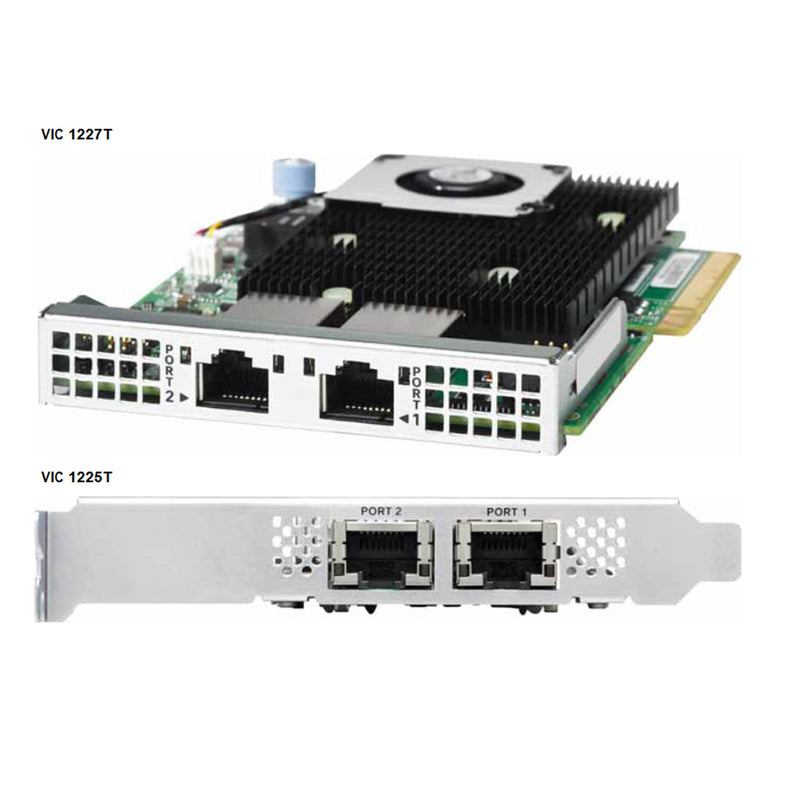
| UCSC-MLOM-C10T-02 | Cisco UCS VIC1227T VIC MLOM - Dual Port 10GBaseT | N/A | ||||||||
| UCSC-MLOM-CSC-02 | Cisco UCS VIC1227 VIC MLOM - Dual Port 10Gb SFP+ | N/A | ||||||||
| UCSC-MLOM-IRJ45 | Intel i350 quad-port MLOM NIC | N/A | ||||||||
| UCSC-MLOM-C40Q-03 | Cisco VIC 1387 Dual Port 40Gb QSFP CNA MLOM | N/A | ||||||||
| Virtual Interface Cards (VICs) | ||||||||||
| UCSC-PCIE-CSC-02 | Cisco VIC 1225 Dual Port 10Gb SFP+ CNA | Half | ||||||||
| UCSC-PCIE-C10T-02 | Cisco VIC 1225T Dual Port 10GBaseT CNA | Half | ||||||||
| UCSC-PCIE-C40Q-03 | Cisco VIC 1385 Dual Port 40Gb QSFP+ CNA w/RDMA | Half | ||||||||
| Network Interface Cards (NICs) | ||||||||||
| 1 Gb NICs | ||||||||||
| UCSC-PCIE-IRJ45 | Intel i350 Quad Port 1Gb Adapter | Half | ||||||||
| 10 Gb NICs | ||||||||||
| N2XX-AIPCI01 [3] | Intel X520 Dual Port 10Gb SFP+ Adapter | Half | ||||||||
| UCSC-PCIE-ITG | Intel X540 Dual Port 10GBase-T Adapter | Half | ||||||||
| UCSC-PCIE-QNICBT | QLogic QLE8442 dual-port 10Gbase-T NIC | Half | ||||||||
| UCSC-PCIE-QNICSFP | QLogic QLE8442 dual-port 10G SFP+ NIC | Half | ||||||||
| UCSC-PCIE-ID10GC | Intel X550-T2 dual-port 10GBase-T NIC | Half | ||||||||
| UCSC-PCIE-ID10GF | Intel X710-DA2 dual-port 10G SFP+ NIC | Half | ||||||||
| UCSC-PCIE-IQ10GF | Intel X710 quad-port 10G SFP+ NIC | Half | ||||||||
| 25 GB NICs | ||||||||||
| UCSC-PCIE-QD25GF | Qlogic QL41212H dual-port 25G NIC | Half | ||||||||
| 40 GB NICs | ||||||||||
| UCSC-PCIE-ID40GF | Intel XL710 dual-port 40G QSFP+ NIC | Half | ||||||||
| 10 Gb Converged Network Adapters (CNAs) | ||||||||||
| UCSC-PCIE-E14102B | Emulex OCe14102B-UX dual-port 10G SFP+ with iSCSI, FCoE CNA | Half | ||||||||
| UCSC-PCIE-E14102 | Emulex OCe14102-UX dual-port 10 GbE FCoE CNA | Half | ||||||||
| UCSC-PCIE-Q8362 | Qlogic QLE8362 dual-port 10 GbE FCoE CNA | Half | ||||||||
| Host Bus Adapters (HBAs) | ||||||||||
| UCSC-PCIE-BS32GF | Broadcom LPe32000 Single-Port 32G FC HBA | Half | ||||||||
| UCSC-PCIE-BD32GF | Broadcom LPe32002 Dual-Port 32G FC HBA | Half | ||||||||
| UCSC-PCIE-QD32GF | Qlogic QLE2742 dual-port 32G FC HBA N2XX-AQPCI05 Qlogic QLE2562 Dual Port 8Gb Fibre Channel HBA | Half | ||||||||
| N2XX-AQPCI05 | Qlogic QLE2562 Dual Port 8Gb Fibre Channel HBA | Half | ||||||||
| UCSC-PCIE-Q2672 | Qlogic QLE2672-CSC, 16Gb Fibre Channel HBA with SR Optics N2XX-AEPCI05 Emulex LPe 12002 Dual Port 8Gb Fibre Channel HBA | Half | ||||||||
| N2XX-AEPCI05 | Emulex LPe 12002 Dual Port 8Gb Fibre Channel HBA | Half | ||||||||
| UCSC-PCIE-E16002 | Emulex LPe16002-M6, 16Gb Fibre Channel HBA with SR Optics | Half | ||||||||
| UCS Storage Accelerators [4] | ||||||||||
| UCSC-F-S13002 | UCS Rack PCIe Storage 1300 GB SanDisk SX350 Medium Endurance | Half | ||||||||
| UCSC-F-S16002 | UCS Rack PCIe Storage 1600 GB SanDisk SX350 Medium Endurance | Half | ||||||||
| UCSC-F-S32002 | UCS Rack PCIe Storage 3200 GB SanDisk SX350 Medium Endurance | Half | ||||||||
| UCSC-F-S64002 | UCS Rack PCIe Storage 6400 GB SanDisk SX350 Medium Endurance | Full | ||||||||
| UCS NVMe/PCie Add in Cards | ||||||||||
| UCSC-F-H38001 | 3.8 TB NVMe/PCIe storage (HGST SN150) Read Intensive | Half | ||||||||
| UCSC-NVME-H64003 | Cisco HHHL AIC 6.4T HGST SN260 NVMe Extreme Perf High Endurance | HHHL* | ||||||||
| UCSC-NVME-H76801 | Cisco HHHL 7.7T HGST SN260 NVMe Extreme Perf Value Endurance | HHHL* | ||||||||
| UCSC-NVME-H32003 | Cisco HHHL AIC 3.2T HGST SN260 NVMe Extreme Perf High Endurance | HHHL* | ||||||||
| *HHHL= Half Height Half Length | ||||||||||
| Footnote: | ||||||||||
| [1] | The GPU cards must be inserted into a full length x16 (electrical) PCIe slot. The rest of the PCIe cards are x8 (electrical) and can be plugged into any PCIe slot of riser 1 or riser 2. | |||||||||
| [2] | The mLOM cards do not plug into any of the riser 1 or riser 2 card slots | |||||||||
| [3] | The Intel X520 supports the following Cisco PIDs: UCS-SFP-1WLR and UCS-SFP-1WSR SFPs. Refer to the Intel X520 product brief for a full list of supported optics and cables. | |||||||||
| [4] | A maximum of six storage accelerator cards are supported and some are riser dependent. 1.3 TB, 2.6 TB, or 3.2 TB cards should not be installed in slots 5 or 6 so the total number of those capacity points is four. | |||||||||
| [Caveats] | - | |||||||||
| [] | If you choose an external drives controller (Cisco 9300-8e 12G SAS HBA), it will consume one PCIe slot. | |||||||||
| [] | A maximum of six storage accelerator cards are supported and some are riser dependent. 1.3 TB, 2.6 TB, or 3.2 TB cards should not be installed in to slots 5 or 6 so the total number of those capacity points is four. | |||||||||
| [For 1-CPU systems:] | Only the PCIe slots on PCIe riser 1 are available for 1-CPU system. | |||||||||
| [-] | The PCIe slots on riser 2 are not supported on 1-CPU systems. The slots are full-height PCIe slots 4, 5, and 6 | |||||||||
| [-] | Only a single plug-in PCIe VIC card may be installed on a 1-CPU system, and it must be installed in slot 2 of riser 1. You can order an mLOM VIC card to be installed in the mLOM slot internal to the chassis and thus have two VIC cards in operation at the same time. | |||||||||
| [For 2-CPU systems:] | Depending on the riser 1 option chosen, up to six PCIe slots are available, three on PCIe riser 1 (PCIe slots 1, 2, and 3) and three on PCIe riser 2 (PCIe slots 4, 5, and 6). | |||||||||
| [-] | All of the slots are full-height. | |||||||||
| [-] | Two plug-in PCIe VIC cards can be installed in 2-CPU systems, using slots 2 and 5. In addition, you can order an mLOM VIC card, which is installed in the mLOM slot inside the chassis and thus have three VIC cards in operation at the same time. | |||||||||
| [-] | If GPUs are installed in slots 2 (Riser 1 option A) and 5 (Riser 2), the NCSI capability automatically switches over to slots 1 (Riser 1 option A) and 4 (Riser 2). Therefore, Cisco PCIe VICs can be installed in slots 1 and 4 if GPUs are installed in slots 2 and 5. | |||||||||
| [Notes] | UCSM managed servers are discoverable only if a VIC 1225 is installed in slot 2 or a VIC 1227/1227T is installed in the MLOM slot. If you install two GPUs, they must be located in slots 2 and 5. Therefore, if two GPUs are installed, UCSM managed servers are discoverable only if you install a VIC 1227/1227T in the MLOM slot. | |||||||||
| [-] | The quantity and type of PCIe cards that can be installed depends in the riser card options. | |||||||||
Available Fabric I/O Extenders
| Product ID(PID) | PID Description | |||||||||
|---|---|---|---|---|---|---|---|---|---|---|
| Available Twinax Cables | ||||||||||
| SFP-H10GB-CU1M | 10GBASE-CU SFP+ Cable (1 M) | |||||||||
| SFP-H10GB-CU3M | 10GBASE-CU SFP+ Cable (3 M) | |||||||||
| SFP-H10GB-CU5M | 10GBASE-CU SFP+ Cable (5 M) | |||||||||
| Available SFP Modules | ||||||||||
| SFP-10G-SR | 10GBASE-SR SFP+ Module 850 nm, multimode, SR, 3.3V, LC connector, with Digital Optical Monitoring | |||||||||
| SFP-10G-LR | 10GBASE-LR SFP+ Module 1310 nm, single mode, LR, 3.3 V, with Digital Optical Monitoring | |||||||||
| DS-SFP-FC8G-SW | 8 Gbit SFP+ Module 850 nm, multimode, SR, 3.3V, LC connector, with Digital Optical Monitoring | |||||||||
| Footnote: | ||||||||||
| [Approved Configurations] | - | |||||||||
| [1] | Choose Up to Two Twinax Cables for Each Network Card Ordered
You may choose one or two twinax cables for each compatible PCIe network card ordered. The cables can be different lengths | |||||||||
| [2] | Choose Up to Two SFP+ Modules for Each Network Card Ordered
You may choose one or two SFP+ optical modules cables for each compatible PCIe network card ordered. You would normally order two modules for connecting to the primary and redundant network switching equipment. With the SFP+ optical modules, you can use common fiber optic cables, widely available. | |||||||||
Available Power Supply
| Product ID (PID) | PID Description | |||||||||
|---|---|---|---|---|---|---|---|---|---|---|
| UCSC-PSU2V2-1400W | 1400W V2 AC Power Supply (200 - 240V) 2U & 4U C Series | |||||||||
| UCSC-PSU2V2-1200W [1] | 1200W / 800W V2 AC Power Supply for 2U C-Series Servers | |||||||||
| UCSC-PSU-930WDC | 930 W -48V DC Common Slot Power Supply for C-series servers | |||||||||
| UCSC-PSU2V2-930DC | 930 W - 48V V2 DC Power Supply for 2U C-Series Servers | |||||||||
| UCSC-PSU2V2-650W | 650W V2 AC Power Supply for C-Series Servers | |||||||||
| Footnote: | ||||||||||
| [1] | The C240 M4 server requires at least one power supply. A lightly loaded server may require one or two 650 W power supplies. A fully loaded server might need to be powered with two larger capacity power supplies. A server with one GPU requires at least two power supplies (1400 W power supplies are recommended). A server with two GPUs also requires at least two power supplies (1400 W power supplies are recommended | |||||||||
| [2] | In a two power supply server, both power supplies must be identical | |||||||||
Available Power Cords
| Product ID (PID) | PID Description | |||||||||
|---|---|---|---|---|---|---|---|---|---|---|
| R2XX-DMYMPWRCORD | No power cord (dummy PID to allow for a no power cord option) | |||||||||
| CAB-N5K6A-NA | Power Cord, 200/240V 6A, North America | |||||||||
| CAB-AC-L620-C13 | AC Power Cord, NEMA L6-20 - C13, 2M/6.5ft | |||||||||
| CAB-C13-CBN | CABASY,WIRE,JUMPER CORD, 27" L, C13/C14, 10A/250V | |||||||||
| CAB-C13-C14-2M | CABASY,WIRE,JUMPER CORD, PWR, 2 Meter, C13/C14,10A/250V | |||||||||
| CAB-C13-C14-AC | CORD,PWR,JMP,IEC60320/C14,IEC6 0320/C13, 3.0M | |||||||||
| CAB-250V-10A-AR | Power Cord, 250V, 10A, Argentina 186571 2500 mm Cordset rating: 10 A, 250/500 V MAX Length: 8.2 ft Plug: EL 219 (IRAM 2073) Connector: EL 701 (IEC60320/C13) | |||||||||
| CAB-9K10A-AU | Power Cord, 250VAC 10A 3112 Plug, Australia Plug: Cordset rating: 10 A, 250 V/500 V MAX Length: 2500mm 186580 Connector: EL 701C EL 210 (EN 60320/C15) (BS 1363A) 13 AMP fuse | |||||||||
| CAB-250V-10A-CN | AC Power Cord - 250V, 10A - PRC | |||||||||
| CAB-9K10A-EU | Power Cord, 250VAC 10A CEE 7/7 Plug, EU Connector: VSCC15 Cordset rating: 10A/16 A, 250 V Length: 8 ft 2 in. (2.5 m) Plug: M2511 186576 | |||||||||
| CAB-250V-10A-ID | Power Cord, SFS, 250V, 10A, India | |||||||||
| CAB-250V-10A-IS | Power Cord, SFS, 250V, 10A, Israel | |||||||||
| CAB-9K10A-IT | Power Cord, 250VAC 10A CEI 23-16/VII Plug, Italy Plug: I/3G (CEI 23-16) Connector C15M (EN60320/C15 ) Cordset rating: 10 A, 250 V Length: 8 ft 2 in. (2.5 m) 186575 | |||||||||
| CAB-9K10A-SW | Power Cord, 250VAC 10A MP232 Plug, Switzerland Plug: MP232-R Cordset rating: 10 A, 250 V Length: 8 ft. 2 in (2.5 m) 186578 Connector: IEC 60320 C15 | |||||||||
| CAB-9K10A-UK | Power Cord, 250VAC 10A BS1363 Plug (13 A fuse), UK | |||||||||
| CAB-9K12A-NA | Power Cord, 125VAC 13A NEMA 5-15 Plug, North America | |||||||||
| CAB-250V-10A-BR | Power Cord - 250V, 10A - Brazil | |||||||||
| CAB-JPN-3PIN | Power Cord 3PIN, Japan | |||||||||
| CAB-C19-C20-3M-JP | Power Cord C19-C20, 3M/10ft Japan PSE mark | |||||||||
Available Tool-less Rail Kit
| Product ID (PID) | PID Description | |||||||||
|---|---|---|---|---|---|---|---|---|---|---|
| UCSC-RAIL-NONE | No rail kit option | |||||||||
| UCSC-RAILB-M4 | Ball Bearing Rail Kit for C220 and C240 M4/M5 Rack Servers | |||||||||
Available NIC Mode (Optional)
| Product ID (PID) | PID Description | |||||||||
|---|---|---|---|---|---|---|---|---|---|---|
| UCSC-DLOM-01 | Dedicated Mode BIOS setting for C-Series Servers | |||||||||
| UCSC-CCARD-01 | Cisco Card Mode BIOS setting for C-Series Servers | |||||||||
| Footnote: | ||||||||||
| [1] | By default, the C220 M4 server NIC mode is configured to be Shared LOM Extended. This NIC mode allows any LOM port or adapter card port to be used to access the Cisco Integrated Management Controller (CIMC). The Cisco VIC card must be installed in a slot with NCSI support. | |||||||||
| [2] | To change the default NIC mode to Dedicated, select the UCSC-DLOM-01 PID shown in Table Above. In Dedicated NIC mode, the CIMC can be accessed only through the dedicated management port. | |||||||||
| [3] | To change the default NIC mode to Cisco Card Mode, select the UCSC-CCARD-01 PID shown in Table Above. In this mode, you can assign an IP address to the CIMC using DHCP and from there you can fully automate your deployment. | |||||||||
Available Security Devices (Optional)
| Product ID (PID) | PID Description | |||||||||
|---|---|---|---|---|---|---|---|---|---|---|
| UCSX-TPM2-001 | Trusted Platform Module 1.2 SPI-based for UCS Servers | |||||||||
| UCSX-TPM2-002 | Trusted Platform Module 2.0 for UCS servers | |||||||||
| Footnote: | ||||||||||
| [1] | A Trusted Platform Module (TPM) is a computer chip (microcontroller) that can securely store artifacts used to authenticate the platform (server). These artifacts can include passwords, certificates, or encryption keys. A TPM can also be used to store platform measurements that help ensure that the platform remains trustworthy. Authentication (ensuring that the platform can prove that it is what it claims to be) and attestation (a process helping to prove that a platform is trustworthy and has not been breached) are necessary steps to ensure safer computing in all environments. | |||||||||
| [2] | A chassis intrusion switch gives a notification of any unauthorized mechanical access into the server. | |||||||||
| [Notes] | The TPM module used in this system conforms to TPM v1.2 and 2.0, as defined by the Trusted Computing Group (TCG). It is also SPI-based. | |||||||||
| [1] | TPM installation is supported after-factory. However, a TPM installs with a one-way screw and cannot be replaced, upgraded, or moved to another server. If a server with a TPM is returned, the replacement server must be ordered with a new TPM. | |||||||||
Cisco SD Card Module (Optional)
| Product ID (PID) | PID Description | |||||||||
|---|---|---|---|---|---|---|---|---|---|---|
| UCS-SD-128G | 128 GB SD Card for UCS Servers | |||||||||
| UCS-SD-64G-S | 64 GB SD Card for UCS Servers | |||||||||
| UCS-SD-32G-S | 32 GB SD Card for UCS Servers | |||||||||
| Footnote: | ||||||||||
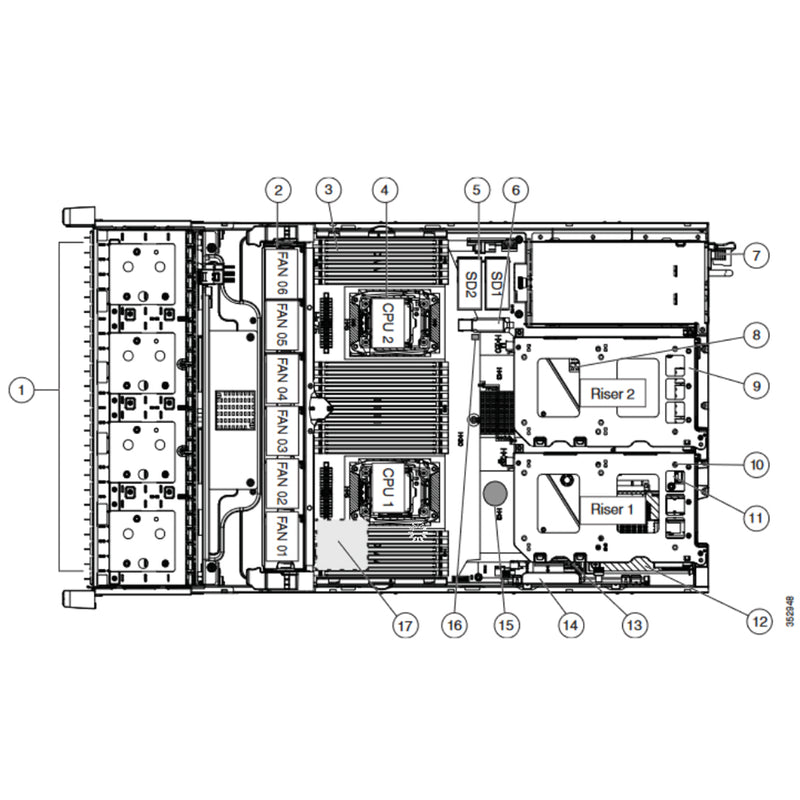
| [1] | Order one or two matching SD cards. See Figure 5 on page 73 for the location of the mini storage module connector, which accommodates an SD module. Each SD module accommodates two SD cards. | |||||||||
| [Caveats] | - | |||||||||
| [1] | Install either one or two SD cards | |||||||||
| [2] | Do not mix SD card sizes | |||||||||
| [3] | You cannot mix SD cards with an internal M.2 SATA SSD | |||||||||
USB 3.0 Drive (Optional)
| Product ID (PID) | PID Description | |||||||||
|---|---|---|---|---|---|---|---|---|---|---|
| UCS-USBFLSHB-16GB | UCS Servers 16 GB Flash USB Drive | |||||||||
| Footnote: | ||||||||||
| [1] | Please view the images above to find the location of the USB connector. | |||||||||
Spare Parts List
| Product ID (PID) | PID Description | |||||||||
|---|---|---|---|---|---|---|---|---|---|---|
| UCSC-PCIF-01F= | PCIe Full Height blanking panel for UCS C-Series Server1 | |||||||||
| UCSC-PCIF-C240M4= | C240 M4 PCIe Riser Blanking Panel1 | |||||||||
| UCSC-PCI-2-C240M4= | C240 M4 PCIe Riser 2 Assembly1 | |||||||||
| UCSC-PCI-1A-240M4= | C240 M4 PCIe Riser 1 Assembly (x8 slot + GPU)1 | |||||||||
| UCSC-PCI-1B-240M4= | C240 M4 PCIe Riser 1 Assembly (3 x8 slots)1 | |||||||||
| UCSC-PCI-1C-240M4= | C240 M4 PCIe Riser 1 Assembly (SATA Boot + 2 PCIe slots)1 | |||||||||
| UCSC-IP-SSD-240M4= | PCIe interposer board + cable for PCIe SSD (8 and 16 HDD backplane versions)1 | |||||||||
| UCSC-IPSSD-240M48= | PCIe interposer board + cable for PCIe SSD (24 HD backplane version)1 | |||||||||
| UCSC-IP-PCH-240M4= | Interposer board + cables for onboard PCH SATA 6G Embedded Software RAID1 | |||||||||
| UCSC-MLOM-BLK= | MLOM Blanking Panel | |||||||||
| UCS-240CBLMR8= | C240 M4 (2) RAID controller cables for 8 HD backplane2 | |||||||||
| UCS-240CBLMR16= | C240 M4 (2) RAID controller cables for 16 HD backplane2 | |||||||||
| UCS-240CBLMR24= | C240 M4 (2) RAID controller cables for 24 HD backplane2 | |||||||||
| UCSC-HS-C240M4= | Heat Sink for UCS C240 M4 Rack Server1 | |||||||||
| UCS-CPU-CVR-EP-M4= | CPU load plate dust cover (for unpopulated CPU sockets) | |||||||||
| UCSC-GPUCBL-240M4= | C240 M4 GPU Power Cable (1 cable per GPU card)1 | |||||||||
| N20-MBLIBATT= | Replacement Lithium Battery for Server Motherboard (CR2032)1 | |||||||||
| UCSC-FAN-C240M4= | C240 M4 Fan Module (one) | |||||||||
| UCSC-BAFF-C240M4= | C240 M4 Air Baffle Replacement Kit | |||||||||
| UCSC-PSU-BLKP240= | Power Supply Blanking Panel for C240 M4 Servers1 | |||||||||
| UCSC-RAILB-M4= | Tool-Less Ball Bearing Rail Kit for C220 M4 and C240 M4 rack servers | |||||||||
| UCSC-CMAB-M4= | Reversible CMA for C240 M4 ball bearing rail kit | |||||||||
| UCS-SD-32G-S= | 32 GB SD Card for UCS servers3 | |||||||||
| UCS-SD-64G-S= | 64 GB SD Card for UCS servers2 | |||||||||
| UCS-USBFLSHB-16GB= | UCS Servers 16 GB Flash USB Drive | |||||||||
| N20-BKVM= | KVM local IO cable for UCS servers console port | |||||||||
| UCS-CPU-GREASE3= | M4 Server CPU thermal grease syringe - needed for heatsink seal4 | |||||||||
| UCSX-HSCK= | UCS Processor Heat Sink Cleaning Kit (when replacing a CPU)3 | |||||||||
| UCSC-MRAID-SC= | SuperCap for Cisco 12G SAS Modular RAID, including all cables. | |||||||||
| UCSC-IP-SSD-240M4= | PCIe 8639 interposer board + cable for PCIe SSD (8&16 HD) | |||||||||
| UCSC-IPSSD-240M4B= | PCIe 8639 interposer board + cable for PCIe SSD (24 HD) | |||||||||
| UCS-300WKIT-240M4= | 300 Watt Cable, HS and Kit for UCS C240M4 Rack Server Includes two heat sinks and two power cables | |||||||||
| Footnote: | ||||||||||
| [1] | A drive blanking panel must be installed if you remove a disk drive from a UCS server. These panels are required to maintain system temperatures at safe operating levels, and to keep dust away from system components. | |||||||||
| [2] | Required if ordering the RAID controller as a spare or to replace damaged cables | |||||||||
Spec Sheet 4
| PCIe Cards | Twinax Cables | Cisco SFP Modules | ||
|---|---|---|---|---|
| SFP-10G-SR | SFP-10G-LR | DS-SFP-FC8G-SW | ||
| Converged Network Adapters (CNAs) | ||||
| UCSC-PCIE-BSFP (Broadcom 57712 Dual Port 10Gb SFP+ w/TOE iSCSI) | Yes | Yes | No | |
| UCSC-PCIE-CSC-02 (Cisco VIC 1225 Dual Port 10Gb SFP+ CNA) | Yes | Yes | Yes | No |
| UCSC-PCIE-C10T-02 (Cisco VIC 1225T Dual Port 10GBaseT CNA) | No | No | No | No |
| UCSC-MLOM-CSC-02 (Cisco UCS VIC1227 VIC MLOM - Dual Port 10Gb SFP+) | Yes | Yes | Yes | No |
| UCSC-MLOM-C10T-02 (Cisco UCS VIC1227T VIC MLOM - Dual Port 10GBaseT) | No | No | No | No |
| UCSC-PCIE-C40Q-02 (Cisco VIC 1285 Dual Port 40Gb QSFP CNA) | Yes | No [1] | No | |
| UCSC-PCIE-C40Q-03 (Cisco VIC 1385 Dual Port 40Gb QSFP+ CNA w/RDMA) | Yes | No [1] | No | |
| UCSC-PCIE-ESFP (Emulex OCe11102-FX dual-port 10 GbE FCoE CNA (Gen 3 CNA)) | Yes | Yes | No | |
| UCSC-PCIE-QSFP (QLogic QLE8242-CU dual-port 10 GbE FCoE CNA) | Yes | Use Qlogic SFP | ||
| UCSC-PCIE-B3SFP (Broadcom 57810 10Gb A-FEX SFP+ | Yes | Yes | No | |
| UCSC-PCIE-Q8362 (Qlogic QLE8362 dual-port 10 GbE FCoE CNA) | Yes | Use Qlogic SFP | ||
| UCSC-PCIE-E14102 (Emulex OCe14102-UX dual-port 10 GbE FCoE CNA) | Yes | Yes | No | |
| Converged Network Adapters (CNAs) | ||||
| N2XX-ABPCI01-M3 (Broadcom 5709 Dual-Port Ethernet PCIe Adapter for M3 Servers) | Use RJ45 Ethernet cable | |||
| N2XX-ABPCI03-M3 (Broadcom 5709 Quad Port 10/100/1Gb NIC w/TOE iSCSI for M3 Servers | Use RJ45 Ethernet cable | |||
| N2XX-AIPCI01 (Intel X520 Dual Port 10Gb SFP+ Adapter) | Yes | Use Intel SFP UCS-SFP-1WLR or UCS-SFP-1WSR | ||
| UCSC-PCIE-ITG (Intel X540 Dual Port 10GBase-T Adapter) | Use RJ45 Ethernet cable | |||
| UCSC-PCIE-IRJ45 (Intel i350 Quad Port 1Gb Adapter | Use RJ45 Ethernet cable | |||
| UCSC-PCIE-IRJ45 (Intel i350 Quad Port 1Gb Adapter | Yes | No | No | |
| Host Bus Adapters (HBAs) | ||||
| N2XX-AEPCI03 (Emulex LPe 11002 Dual Port 4Gb Fibre Channel HBA | No | Preinstalled - do not change SFP | ||
| N2XX-AEPCI05 (Emulex LPe 12002 Dual Port 8Gb Fibre Channel HBA) | No | Preinstalled - do not change SFP | ||
| N2XX-AQPCI03 (QLogic QLE2462 Dual Port 4Gb Fibre Channel HBA) | No | Preinstalled - do not change SFP | ||
| N2XX-AQPCI05 (QLogic QLE2562 Dual Port 8Gb Fibre Channel HBA) | No | Preinstalled - do not change SFP | ||
| UCSC-PCIE-Q2672 (Qlogic QLE2672-CSC, 16Gb Fibre Channel HBA with SR Optics) | No | Preinstalled - do not change SFP | ||
| UCSC-PCIE-E16002 (Emulex LPe16002-M6, 16Gb Fibre Channel HBA with SR Optics) | No | Preinstalled - do not change SFP | ||
| Footnotes: | ||||
| [1] | This card supports a 4x10 Gbps QSFP to SFP breakout fiber cable. | |||