



Current Configuration
(List below serves as quick links to each section)
Chassis Option
Processors
Memory
Devlopment Mode
Storage Controller/Boot Option
Drives Capacity
Drives Cache
mLOM Options
Riser Card Options
Virtual Interface Card (VIC)
GPU Options
Rail Kit
Security
ECS Warranty
Power Supply Units
The request has been sent.
Thank you.
Price as Configured:
$0
Price as Configured:
$0
- (2) 2nd Gen Intel Xeon Scalabel Processors
- (24) DDR4 2933 MT/s DIMMs
- (12 - 24) SAS/SATA/NVMe Drives
- (2) Rear Drive Bays
- (6) PCIe 3.0 slots
- (6) Fans
- (2) Power Supply Units
- (1) Dedicatred mLOM slot
- (1) Dedicated Internal SAS HBA Slot
- (1) M.2 Supported for Boot
- (1) Micro SD Slot on Riser 1
- Up to (6) GPUs Supported
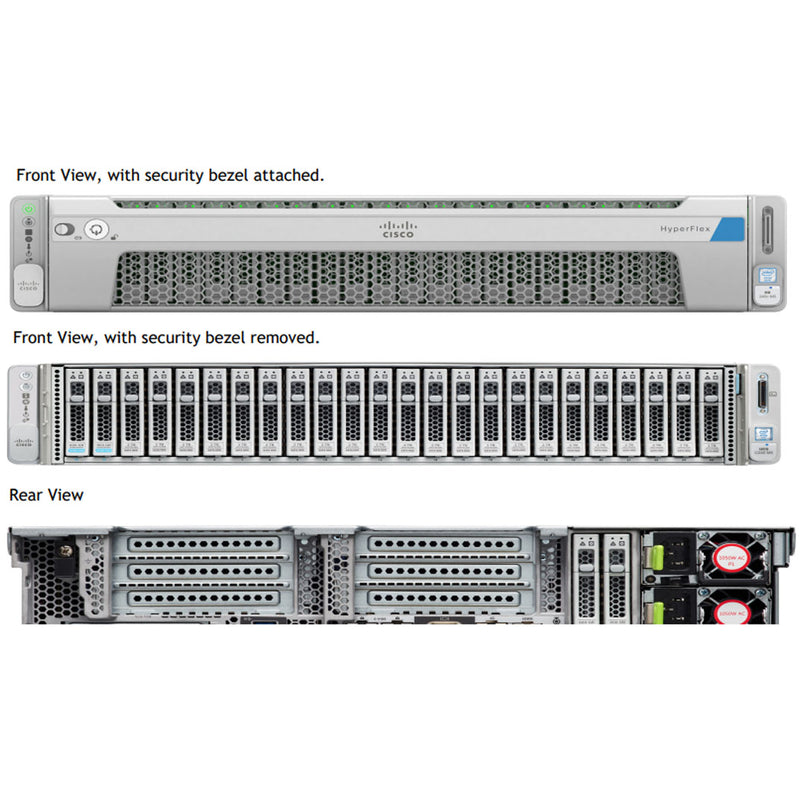
The Cisco HyperFlex HX240c M5 server, in its 12 LFF or 24-bay small form factor (SFF) configuration, is designed for high-performance, storage-intensive workloads. Powered by Intel® Xeon® Scalable processors, it supports up to two CPUs and 3 TB of DDR4 memory across 24 DIMM slots, delivering exceptional computational and memory performance.
This 2U chassis accommodates up to 24 hot-swappable SFF drives, offering flexible storage configurations, including all-NVMe, all-flash, or hybrid SSD/HDD setups. With six PCIe expansion slots, the server supports additional GPUs or network cards, enhancing its adaptability for virtualization, AI, and data-intensive applications.
(Click to View)
- Artificial Intelligence (AI)
- Big Data Analytics
- Cloud Servers
- Corporate IT
- Data Analytics
- Database
- Deep Learning (DL)
- Edge Servers
- High-Performance Computing (HPC)
- Hyper-Converged infrastructure (HCI)
- Language Model
- Machine Learning (ML)
- Network Function Virtualization (NFV)
- Virtualization
- Virtual Machines (VM)
 HX240c M5 LFF
HX240C-M5L
Front bay 1 - 12: Hybrid: (6 to 12) HDDs Drives
Rear bay 13: Caching NVMe SSD
Rear bay 14: Housekeeping SSD for SDS logs only
Cisco HyperFlex Software Minimum Level
3.0.1 or later
 HX240c M5 24x SAS/SATA
HX240C-M5SX
Front bay 1: Housekeeping SSD for SDS logs only
Front bays 2 - 24: Hybrid: (6 to 23) HDDs Drives
Rear bay 25: Caching NVMe SSD
Cisco HyperFlex Software Minimum Level
2.6.1a or later
 HX240c M5 All Flash 24x NVMe
HXAF240C-M5SX
Front bay 1: Housekeeping NVMe for SDS logs only
Front bays 2 - 24: Hybrid: (6 to 23) NVMe Drives
Rear bay 25: Caching NVMe only
Cisco HyperFlex Software Minimum Level
2.6.1a or later
Mixing HX240c Hybrid SED HyperFlex nodes with HX240c All-Flash SED HyperFlex nodes within the same HyperFlex cluster is not supported.
NVMe Drive RulesNVMe SSDs are supported only in the Caching SSD position, in drive bay 13 for LFF versions or bay 25 for SFF versions. NVMe SSDs are not supported for persistent storage or as the Housekeeping drive.
Housekeeping Drive Rules
- LFF versions: The Housekeeping SSD must be installed in rear bay 14.
- SFF versions: The Housekeeping SSD must be installed in front bay 1.
- LFF versions: The persistent data drives must be installed in front bays 1 - 12
- SFF versions: The persistent data drives must be installed in front bays 2 - 24
- LFF versions: The Caching SSD must be installed in rear bay 13.
- SFF versions: The Caching SSD must be installed in rear bay 25.
The deployment mode in the Cisco HyperFlex HX240c M5 SX Node is critical as it defines how the server integrates into the network and manages workloads. The deployment mode determines whether the server operates with or without Cisco Fabric Interconnect (FI), impacting scalability, compatibility, and feature availability.
This deployment option connects the server to Cisco Fabric Interconnect. The installation for this type of deployment can be done using the standalone installer or from the Intersight. This deployment mode has been supported since launch of HyperFlex.
- Enhanced Management: Servers are connected to Cisco Fabric Interconnects, enabling centralized management of compute, storage, and networking resources.
- High Availability: Ensures seamless integration with Cisco UCS Manager for automated discovery, configuration, and lifecycle management.
- Compatibility: Supports advanced features like stretch clusters, PMem (Persistent Memory), SED (Self-Encrypting Drives), and additional PCIe Cisco VIC adapters.
HX Data Center without Fabric Interconnect | HX-DC-NO-FI
This deployment option allows server nodes to be directly connected to existing switches. The installation for this type of deployment can be done from the Intersight only
- Standalone Mode: Servers connect directly to existing switches, relying on Cisco Intersight for management.
- Simplicity: Ideal for environments with fewer integration requirements or edge deployments.
- Limitations: Features like PMem, SED drives, and stretch clusters are not supported, reducing some advanced capabilities.
The mLOM on the HX240c 2U Node server from Cisco has its own dedicated slot. This is ideal way to connect to the Cisco FI on the network. If you selected the HX-DC-no-FI these options are not supported.
HX-PCIE-C40Q-03 (40G VICs), HX-PCIE-C25Q-04 and HX-PCIE-OFFLOAD-1The standard PCIe card offerings is:
- Modular LAN on Motherboard (mLOM)
- Virtual Interface Card (VIC)
- Network Interface Card (NIC)
The mLOM VIC 1387 has a 40Gb QSFP port but can be converted to a 10Gb SFP with the CVR-QSFP-SFP10G. This is a prefect solution when you need to provide a 10Gb connection to the Cisco FL 6200 series.
An internal slot is reserved for the Cisco 12G SAS HBA (HX-SAS-M5HD). This HBA is managed by the Cisco Integrated Management Controller (CIMC).
Supports JBOD mode only (no RAID functionality. Ideal for SDS (Software Defined Storage) applications. It is also ideal for environments demanding the highest IOPs (for external SSD attach), where a RAID controller can be an I/O bottleneck.
Supports up to 26 internal SAS HDDs and SAS/SATA SSDs
Must install 2 CPUs for GPU support and for Riser 2 to be supported.
 Riser 1A: HX-RIS-1-240M5
- 3 Full Half x8
- 2 Full Full x16 - GPU T4
- 1 Full Half x8
slot 2 requires CPU2.
 Riser 1B: HX-RIS-1B-240M5
- 3 Full Half x8
- 2 Full Full x8
- 1 Full Half x8
Only T4, RTX supported with 1 CPU, max 3 with HX-RIS-1B-240M5, Riser 1B 3PCIe slots (x8, x8, x8); all from CPU1.
 Riser 1C: HX-R1-A100-M5
- 3 Full Half x8
- 2 Full Full x16 - GPU
- 1 Full Half x8
slot 2 requires CPU2.
 Riser 2A: HX-R2A-A100-M5
- 6 Full Full x8
- 5 Full Full x16 - GPU
- 4 Full Half x16
 Riser 2B: HX-RIS-2B-240M5
- 6 Full Full x8
- 5 Full Full x16 - GPU T4, RTX
- 4 Full Half x8
PCIe cable connectors for rear NVMe SSDs
GPUs cannot be mixed.
Must install 2 CPUs for GPU support and for Riser 2 to be supported. All GPU cards require two CPUs and a minimum of two power supplies in the server. 1600 W power supplies are recommended.
Only T4 supported with 1 CPU, max 3 with HX-RIS-1B-240M5, Riser 1B 3PCIe slots (x8, x8, x8); all from CPU1, For T4
HX-GPU-T4-16 require special riser cards (HX-RIS-1-240M5 and HX-RIS-2B-240M5) for full configuration of 5 or 6 cards.
NVIDIA M10 GPUs can support only less than 1 TB of total memory in the server. Do not install more than fourteen 64-GB DIMMs when using an NVIDIA GPU card in this server
| Product ID (PID) | PID Description | Card Height | Maximum Cards Per Node |
|---|---|---|---|
| HX-GPU-M10 | NVIDIA M10 | Double wide (consumes 2 slots) | 2 |
| HX-GPU-T4-16 | NVIDIA T4 PCIE 75W 16GB | Low Profile Single-Width | 6 |
| HX-GPU-RTX6000 | NVIDIA QUADRO RTX 6000, PASSIVE, 250W TGP, 24GB | Double Wide (consumes 2 slots) | 2 |
| HX-GPU-RTX8000 | NVIDIA QUADRO RTX 8000, PASSIVE, 250W TGP, 48GB | Double Wide (consumes 2 slots) | 2 |
Each power supply is certified for high-efficiency operation and offer multiple power output options. This allows users to "right-size" based on server configuration, which improves power efficiency, lower overall energy costs and avoid stranded capacity in the data center.
All GPU cards require two CPUs and a minimum of two power supplies in the server. 1600 W power supplies are recommended.
| Product ID (PID) | PID Description |
|---|---|
| HX-PSU1-1050W | 1050W AC power supply for C-Series servers |
| HX-PSUV2-1050DC | 1050W DC Power Supply for C-Series servers |
| HX-PSU1-1600W | 1600W AC power supply for C-Series servers |
| HX-PSU1-1050EL | Cisco UCS 1050W AC Power Supply for Rack Server Low Line |
- Height: 3.43in (87.1mm)
- Width: 18.96in (481.5mm)
- Length: 30.44in (773.1mm
- Weight:
- Bare: 8 Bay (35.5lbs/16.1kg) | 24 Bay (40lbs/18.1kg)
- Min: 8 Bay (37lbs/16.8kg) | 24 Bay (41.5lbs/18.8kg)
- Max: 8 Bay (45.5lbs/20.6kg) | 24 Bay (59.5lbs/226.1kg)
Current Configuration
(List below serves as quick links to each section)
Chassis Option
Processors
Memory
Devlopment Mode
Storage Controller/Boot Option
Drives Capacity
Drives Cache
mLOM Options
Riser Card Options
Virtual Interface Card (VIC)
GPU Options
Rail Kit
Security
ECS Warranty
Power Supply Units
The request has been sent.
Thank you.
Price as Configured:
$0
Base Standard Capabilities
| Feature | Common Specifications across the HX240c M5 Node Family |
|---|---|
| Chassis | 2RU of rack space per node |
| Processors | One or two 2nd Generation Intel Xeon Scalable CPUs per node |
| Interconnect | 3 Intel UPI channels per processor, each capable of 10.4 gigatransfers per second (GTPS) |
| Chip set | Intel C621 series |
| Memory | Capability to use 16-, 32-, 64-, or 128-GB DIMMs; 24 slots for RDIMMs, LRDIMMs, or TSV DIMM modules per node; Advanced error-correcting code (ECC); Independent and Lockstep channel modes. |
| Storage | All-flash-memory, all-NVMe, or hybrid storage configurations (combination of HDDs and SSDs); Cisco 12-Gbps Modular SAS host bus adapter (HBA) with internal SAS connectivity; M.2 SATA SSD drive for boot. |
| PCIe | Up to 6 PCIe slots. |
| Expansion Slots | 4 full-height, full-length slots; 2 slots capable of GPU support for enhanced virtual desktop infrastructure (VDI); or 3 full-height, full-length slots 3 full-height, half-length slots |
| Modular LAN on Motherboard (mLOM) Slot | Up to 256 I/O devices programmable on demand for hypervisor and virtual machine support; 2 x 40-Gbps network connectivity to Cisco UCS 6300 Series Fabric Interconnects. |
| Network | Dual 10-Gbps Ethernet ports per node. |
| Cisco Integrated Management Controller (IMC) | Integrated baseboard management controller (BMC); IPMI 2.0 compliant; 1 x 10/100/1000 Ethernet out-of-band management interface; Command-line interface (CLI) and web GUI management tools. |
| Reliability, Availability, and Serviceability | Hot-swappable, front-accessible drives; Redundant fans and power supplies for enterprise-class reliability. |
| Front-Panel Connector | 1 KVM console connector per node (supplies 2 USB connectors, 1 VGA connector, and 1 serial connector). |
| Power Cooling | Up to two hot-pluggable power supplies; Second power supply provides 1+1 redundancy. 1050W or 1600W 6 hot-swappable fans |
| Rail-Kit Options | Cisco ball-bearing rail kit with optional reversible cable-management arm; Cisco friction rail kit with optional reversible cable-management arm. |
| Software | Cisco HyperFlex HX Data Platform Software (software subscription) |
Specs 1
| Feature | Benefit |
|---|---|
| Memory | High memory capacity, with 3 TB of memory supported |
| Intel Xeon Scalable CPUs | High performance: - 14-nanometer (nm) processor technology - Massive processing power - Top-of-the-line memory-channel performance - Improved scalability and intercore data flow - Intel Automated Vector Extensions 2 (AVX2) Agility: - Supports highly dense virtual machine deployments - Offers flexible virtualization technology that optimizes performance for virtualized environments Efficiency and Security: - Low-power, high-speed DDR4 memory technology - Automated energy efficiency reduces energy costs by optimizing power state - Hardware-assisted security advancements |
| Unified Network Fabric | - Low-latency, lossless, 2 x 40 Gigabit Ethernet connections - Wire-once deployment model eliminates the need for re-cabling when changing I/O configurations - Fewer interface cards, cables, and network ports to purchase, power, configure, and maintain |
| Expansion | - Support for up to 6 PCI Express (PCIe) 3.0 slots - Flexibility, increased performance, and compatibility with industry standards - High I/O bandwidth, increased flexibility, and backward compatibility with PCIe 2.0 |
| Virtualization Optimization | - I/O virtualization and Intel Xeon Scalable processor features extend the network to virtual machines - Consistent and scalable operational model - Increased security and efficiency with reduced complexity - Capability to move virtual machine security features and policies across racks or blades |
| Cloud-Based | Cisco Intersight™ simplifies operations across on-premises data centers, edge sites, and public clouds |
| Management | - Use a software-as-a-service platform that bridges applications with infrastructure. - Gain instant access to clusters regardless of deployment location. - Correlate visibility and management across bare-metal servers, hypervisors, Kubernetes, and serverless applications. - Transform operations with artificial intelligence to scale efficiently. - Collaborate and automate lifecycle workflows for faster operations. - Support compliance with open capabilities that integrate with third-party platforms. - Respond proactively to capacity needs using a recommendation engine. - Support for the VMware vSphere plug-in. - Cisco HyperFlex Connect interface accessible via HTML5 presentation layer. |
| Storage | - Support for all-flash, hybrid (HDD and SSD memory), or all-NVMe devices. - High-capacity configurations for the HX Data Platform capacity layer. |
| Enterprise Data Protection | - Pointer-based snapshot capabilities. - Native snapshots for iSCSI LUNs with consistency group, instantaneous creation, and RESTful APIs. - Integration with MEDITECH-BridgeHead for electronic health records. - Near-instant cloning. - Inline deduplication and compression. - Native replication for disaster recovery. - N:1 replication for clusters with fabric interconnects and more than 4 nodes. - Flexible retention policies for local and remote point-in-time copies. - Data-at-rest encryption using self-encrypting drives and enterprise key management. |
| Security | - Locking bezel option to prevent unauthorized disk access. - Trusted Platform Module (TPM) for secure storage of authentication artifacts. - Supports TPM 1.2 SPI. |
| Software | - Cisco HyperFlex HX Data Platform Software (software subscription). - VMware vSphere ESXi 6.0 preinstalled (supports ESXi 6.5 but not preinstalled). |
Spec Sheet 4
| Feature | HX240c M5 | HX240c M5 All Flash | HX240c M5 LFF |
|---|---|---|---|
| Storage |
3 to 23 SATA HDDs for the Data Platform capacity layer; 1 NVMe SSD log drive; 1 NVMe SSD caching drive; Optional self-encrypting drives. |
6 to 23 SSD drives for the Data Platform capacity layer; 1 NVMe SSD log drive; 1 NVMe SSD write-logging drive; Optional self-encrypting drives. |
Up to 12 LFF (3.5-inch) SAS or SATA HDDs and SSDs; Up to 2 SFF (2.5-inch) NVMe PCIe SSDs (with adapter); 1 NVMe SSD log drive; 1 NVMe SSD write-logging drive; One slot for a micro-SD card. |
| Network Interface Cards Supported |
Cisco UCS VIC 1387; Intel X550-T2 dual-port 10 Gigabit Ethernet network interface card; Intel XXV710-DA2 dual-port 25 Gigabit Ethernet network interface card; Intel i350 quad-port 1 Gigabit Ethernet network interface card; Intel X710-DA2 dual-port 10 Gigabit Ethernet network interface card. |
Cisco UCS VIC 1387; Intel X550-T2 dual-port 10 Gigabit Ethernet network interface card; Intel XXV710-DA2 dual-port 25 Gigabit Ethernet network interface card; Intel i350 quad-port 1 Gigabit Ethernet network interface card; Intel X710-DA2 dual-port 10 Gigabit Ethernet network interface card. |
Cisco Virtual Interface Cards; Intel i350 quad-port 1 Gigabit Ethernet network interface card. |