


Current Configuration
(List below serves as quick links to each section)
Select Chassis
Select Fabric Extender
Select Fabric Interconnect
Select Power Supply
Select Power Cable
ECS Warranty
The request has been sent.
Thank you.
Price as Configured:
$0
Price as Configured:
$0
 Tech
Tech
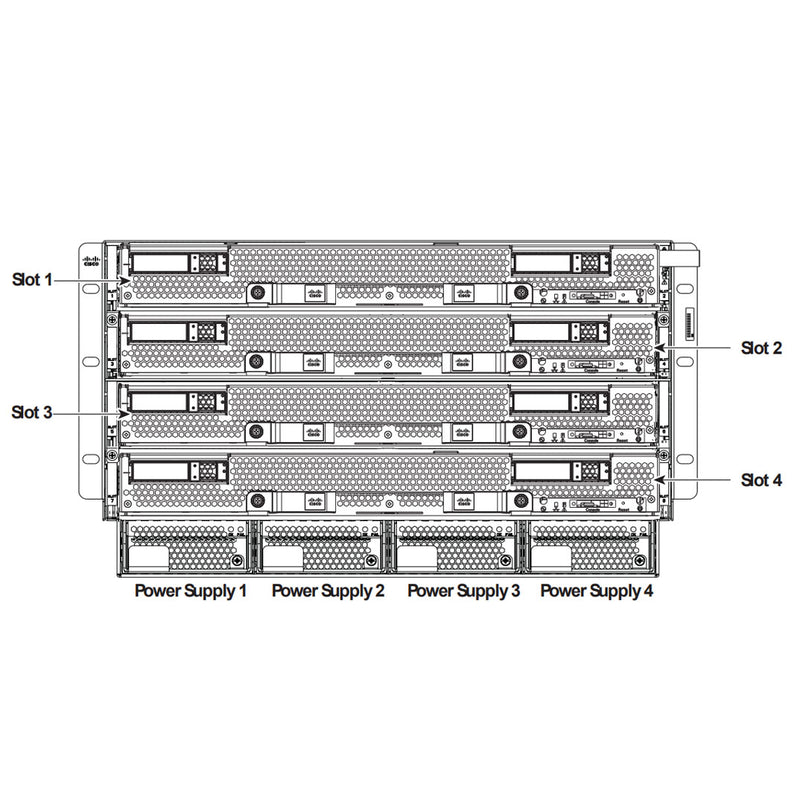
- Form Factory: 6U Enclosure
- Blade Support: 8x Half -Width, or 4x Full-Wdith
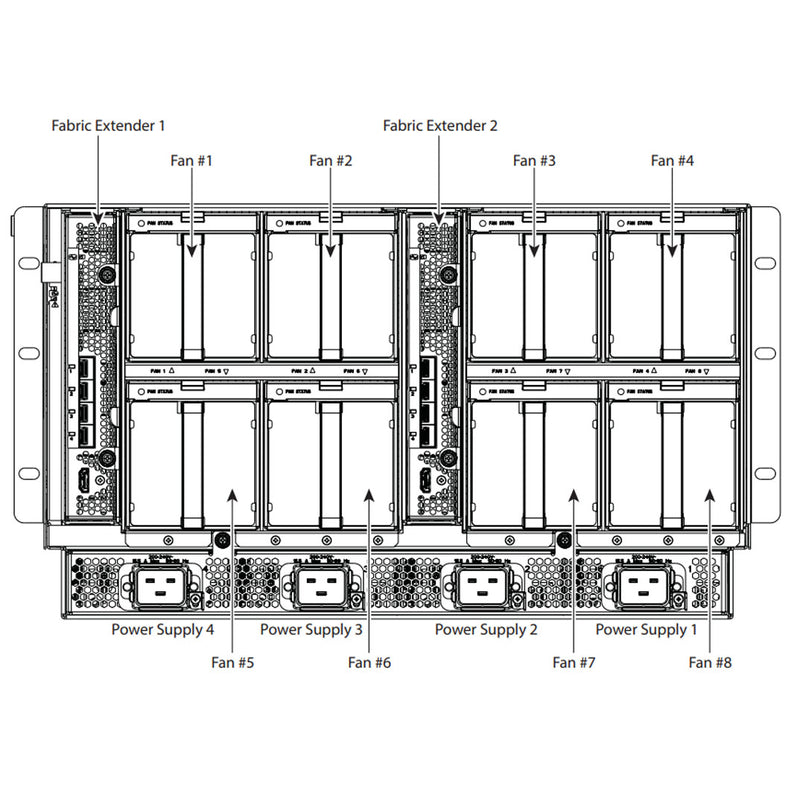
- Fabrics: 2x Extender or Interconnect
- Fans: 8
- Power Supply Unit: 4
-
Interconnect Speed:
2x 40GbE Per Half-Width
4x 40GbE Per Full-Width - Protocols: Ethernet, Fiber Over Ethernet (FCoE)
- UCS 5108
- UCS B200 M4
- UCS B200 M5
- UCS B200 M6
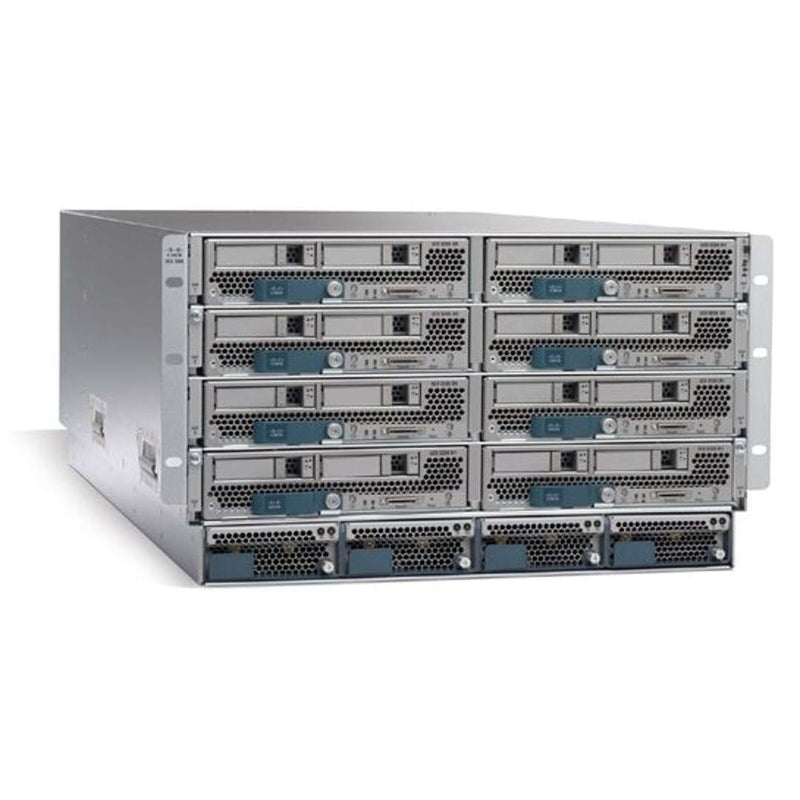
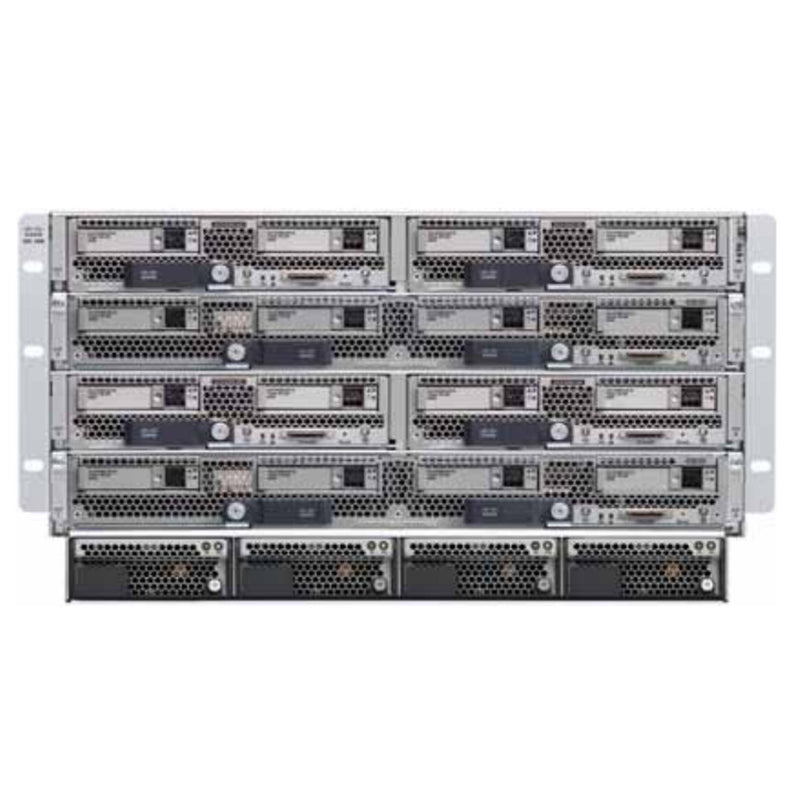
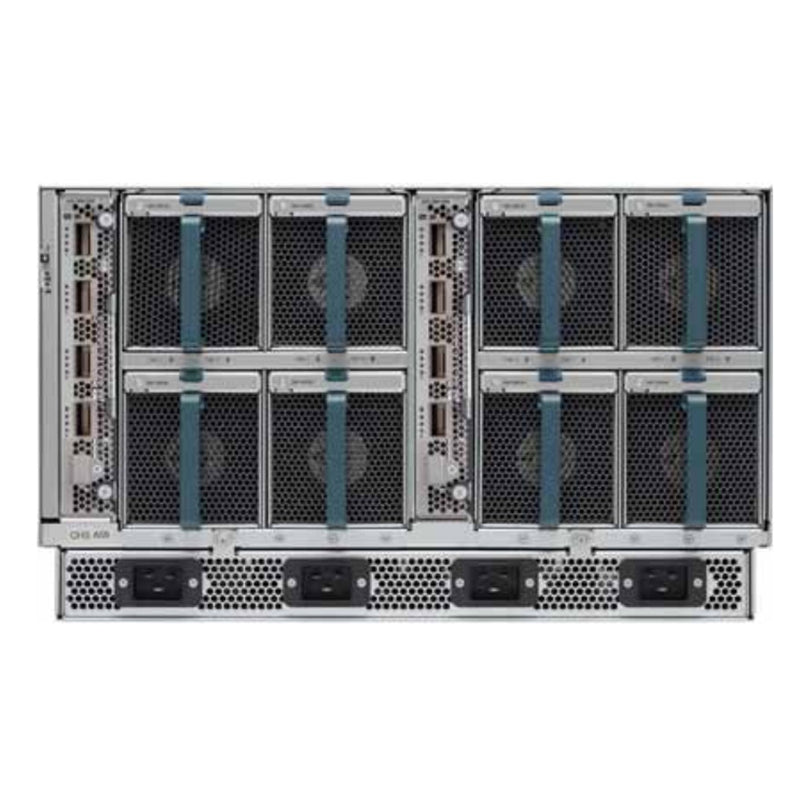
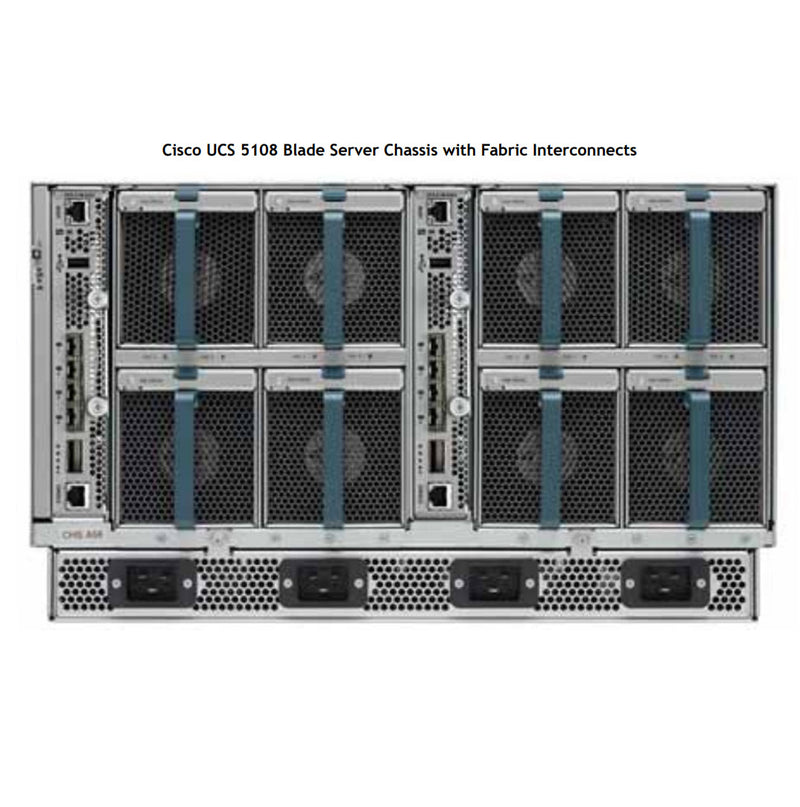
The Cisco UCS 5108 6U Enclosure houses the B-Series server blades, supporting up to 8 half-width or 4 full-width blades. Each blade is equipped with interconnect speeds of 2 x 40Gb for half-width nodes and 4 x 40Gb for full-width nodes. These blades connect directly to the two Fabric Extenders (FEX) or two Fabric Interconnects located at the rear of the Cisco 5108 Enclosure, ensuring high-performance network connectivity.
The Cisco UCS 5108 chassis offers various options and configurations for its Fabric Interconnects and Fabric Extenders, providing flexibility in how the system is set up. Each server node can be equipped with different types of adapters, which connect to the fabric for network communication. However, it's important to note that while you can mix different server nodes in the front of the 5108 chassis, you cannot mix different types of fabrics. This ensures consistency in connectivity and performance across all nodes. If you're unsure about the optimal node configurations or need assistance with understanding the setup options for this chassis, our team is ready to help. Contact us today!
 Half-Height
- Max Per 5108: 8
- CPU Count: 2
- Drive Count: 2
- Adapter Counts: 2
- Throughput I/O: Up to 80Gbps
- B200 M4
- B200 M5
- B200 M6
 Full-Height
- Max Per 5108: 4
- CPU Count: 4
- Drive Count: 4
- Adapter Counts: 3 - 6
- Throughput I/O: Up to 160Gbps
- B260 M4
- B420 M4
- B460 M4
- B480 M5
All Node Servers have their own CTO
You must configure each Server Nodes separately
Click here to configure the Nodes
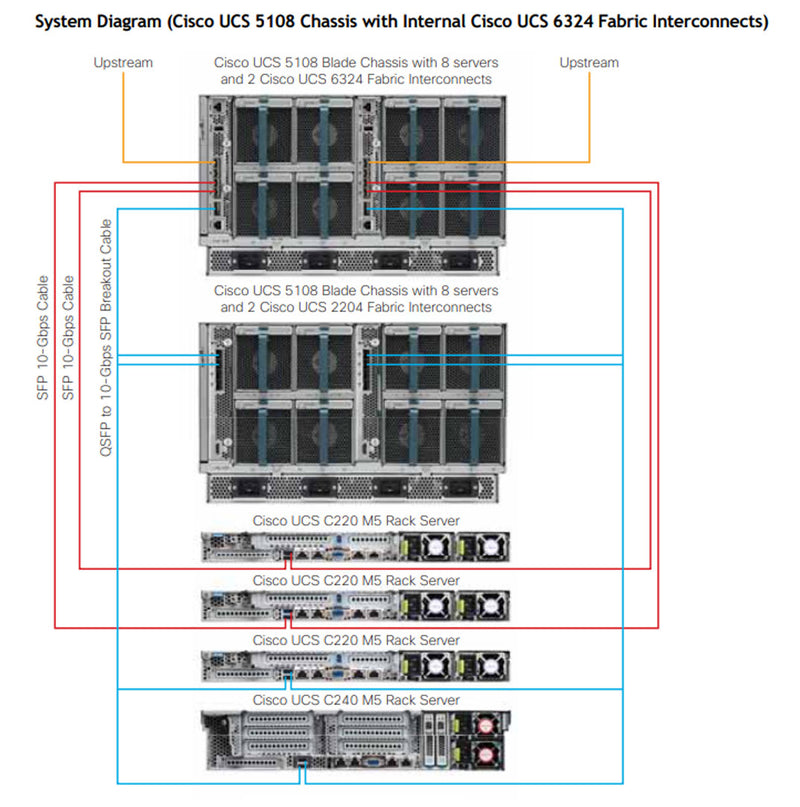
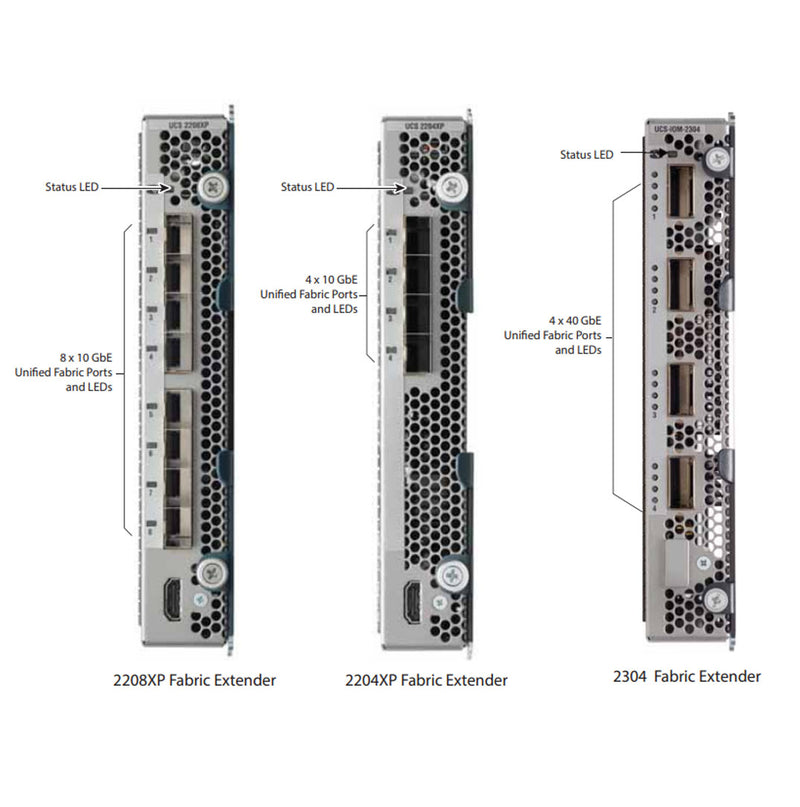
The Fabric Extender (FEX) is used in the Cisco UCS 5108 when the network already has Fabric Interconnects (FIs) deployed in the rack. In this scenario, the FEX serves as a bridge between the server blades in the chassis and the existing FIs. Instead of adding additional FIs inside the 5108, the FEX allows the chassis to connect to the pre-existing FIs, reducing the need for extra devices and simplifying the network design. This setup maintains network consistency and scalability while avoiding the complexity of additional cabling and hardware, ensuring the system remains efficient and easy to manage.
- Cisco UCS 2408 IOM (FEX)
- Cisco UCS 2304 IOM (FEX)
- Cisco UCS 2204XP (FEX)
- Cisco UCS 2208XP (FEX)
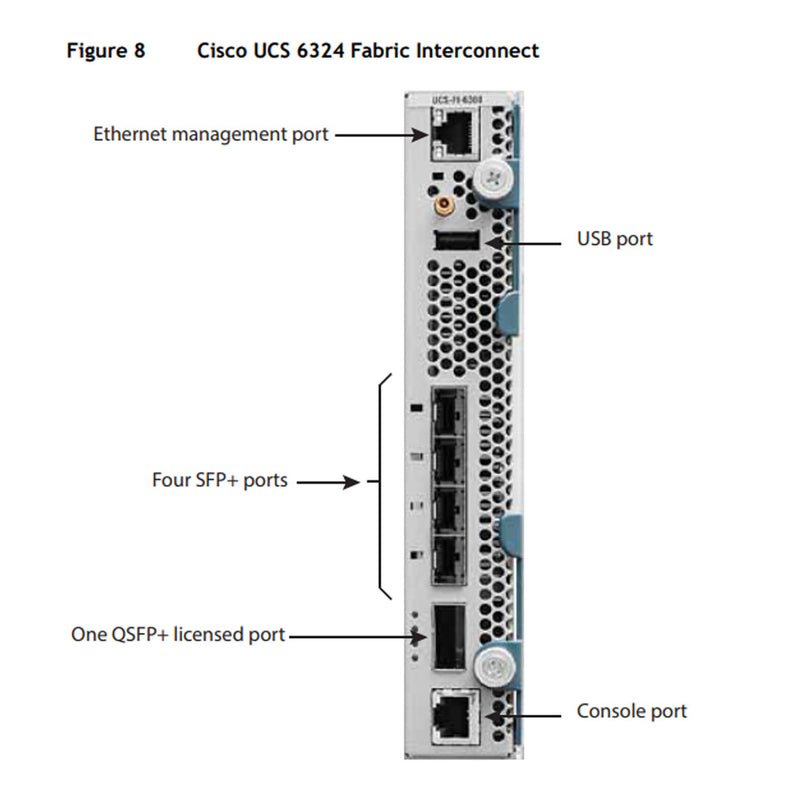
The Fabric Interconnect (FI) in the Cisco UCS 5108 provides a flexible and scalable solution by being integrated directly into the chassis, which eliminates the need for external FIs in the rack. This configuration simplifies the network architecture and reduces the overall footprint, as the interconnects are housed inside the 5108 chassis. This setup is ideal for environments where space is limited or where a more compact design is desired. By integrating the FIs inside the chassis, the system offers easier management, centralized control, and a more streamlined cabling design. This flexibility allows organizations to scale their infrastructure without the complexity of additional rack-mounted devices, making it a cost-effective and efficient solution.
- Cisco UCS 6324 Fabric Interconnect (FI)

- PN: UCS-IOM-2408
- External Ports: 8 x 25Gbps SFP28
- Internal Ports: 32 x 10Gbps
- Max I/O: 200Gbps
- Dimensions (HxWxD): 7.64 x 1.36 x 7.2in | (19.4 x 3.54 cm)
- Maximum Power consumption: 160 W
Supported (FI)
- Cisco UCS 6536 (FI)
- Cisco UCS 64108 (FI)
- Cisco UCS 6454 (FI)

Cisco UCS 2408 (FEX)
Data Sheet

- PN: UCS-IOM-2304
- External Ports: 4 x 40Gbps
- Internal Ports: 32 x 10Gbps or 8 x 40Gbps
- Max I/O: 160Gbps
- Dimensions (HxWxD): 7.64 x 1.36 x 7.2 in. (19.4 x 3.54 cm)
- Maximum Power consumption: 150 W
Supported (FI)
- Cisco UCS 6200 Series (FI)
- Cisco UCS 6300 Series (FI)
Cisco UCS 2304 (FEX)
Data Sheet

- PN: UCS-IOM-2204XP
- External Ports: 4 x 10Gbps
- Internal Ports: 16 x 10Gbps
- Max I/O: 40Gbps
- Dimensions (HxWxD): 7.64 x 1.36 x 7.2 in
- Maximum Power consumption: 80 W
Supported (FI)
- Cisco UCS 6100 Series (FI)
- Cisco UCS 6200 Series (FI)
Cisco UCS 2204XP (FEX)
Data Sheet

- PN: UCS-IOM-2204XP
- External Ports: 8 x 10Gbps
- Internal Ports: 32 x 10Gbps
- Max I/O: 80Gbps
- Dimensions (HxWxD): 7.64 x 1.36 x 7.2 in
- Maximum Power consumption: 80 W
Supported (FI)
- Cisco UCS 6100 Series (FI)
- Cisco UCS 6200 Series (FI)
Cisco UCS 2208XP (FEX)
Data Sheet

- PN: UCS-FI-M-6324
- External Ports: 1 x 40GbE/FCoE
- Uplink Ports: 4 x 1/10Gb FCoE
- Internal Ports: 16 x 10GbE/FCoE (10G-KR)
- Max I/O: 40Gbps
- Dimensions (HxWxD): 7.64 x 1.36 x 7.2 in
- Maximum Power consumption: 80 W
In order to use the QSFP+ port on 6324 FI, a license must be added. Mini FI License for 40G Scalability Port | UCS-6324-40G
Cisco UCS 6324 (FI)
Data Sheet
Current Configuration
(List below serves as quick links to each section)
Select Chassis
Select Fabric Extender
Select Fabric Interconnect
Select Power Supply
Select Power Cable
ECS Warranty
The request has been sent.
Thank you.
Price as Configured:
$0
Base Standard Capabilities
| Feature | Benefit |
|---|---|
| Management by Cisco UCS Manager |
|
| Unified fabric |
|
| Support for one or two Cisco UCS 2100, 2200, 2300 or 2400 Series Fabric Extenders |
|
| Support for Cisco UCS 6324 Fabric Interconnect |
|
| Autodiscovery |
|
| High-performance midplane |
|
| Redundant hot-swappable power supplies and fans |
|
| Hot-pluggable blade servers and fabric extenders |
|
| Comprehensive monitoring |
|
Items included with the chassis:
| Product ID (PID) | PID Description | |||||||||
|---|---|---|---|---|---|---|---|---|---|---|
| N01-UAC1 | AC power input module (AC blade chassis only) | |||||||||
| N20-CDIVH | Horizontal divider, where quantity is based on number and type of blade(s) selected. | |||||||||
| N20-CDIVV | Vertical divider, where quantity is based on number and type of blade(s) selected. | |||||||||
| N20-CBLKI | FEX blanking panel, where quantity is based on unpopulated slots. | |||||||||
| N20-CBLKB1 | Blade blanking panel, where quantity is based on unpopulated slots. | |||||||||
| N20-CBLKP | PSU blanking panel, where quantity is based on unpopulated slots. | |||||||||
| N20-FAN5 | Fan modules. | |||||||||
| N20-CAK | Chassis accessory kit, consisting of | |||||||||
| - | N20-CRMK2: Tool-less rail kit designed for racks with square mounting. | |||||||||
| - | N20-BKVM= : KVM local console connector cable that connects to the front of any UCS blade server, and documentation. | |||||||||
| Items not included with the chassis (but may be ordered separately): | ||||||||||
| N20-CRMK2-RHA= | Round hole adapter kit used to install tool-less rail kit in racks that have round mounting holes (supports threaded and non-threaded holes). | |||||||||
| Footnote: | ||||||||||
| [1] | The adapter kit only works with the N20-CRMK2 rail kit | |||||||||
| [] | The blade chassis input power module cannot be replaced in the field to convert the input power type, e.g. converting a DC input to an AC input blade chassis. | |||||||||
Available Fabric I/O Extenders
| Product ID(PID) | Fabric I/O Extender | Number of GbE/FCoE Ports to Fabric Interconnect | Number of Internal GbE/FCoE Ports | Total Chassis I/O per Fabric Extender | ||||||
|---|---|---|---|---|---|---|---|---|---|---|
| UCS-IOM-2408 | Cisco UCS 2408 I/O Module (8 external 25G ports, 32 internal 10G ports) | 8x25G | 32x10G | 200 Gbps | ||||||
| UCS-IOM-2408-8SFP | Cisco UCS 2408 I/O Module with 8xSFP-25G-SR-S | 8x25G | 32x10G | 200 Gbps | ||||||
| UCS-IOM2408-16SFP | Cisco UCS 2408 I/O Module with 16xSFP-25G-SR-S | 8x25G | 32x10G | 200 Gbps | ||||||
| UCS-IOM-2304 | Cisco UCS 2304 I/O Module | 4x40G | 32x10G or 8x40G | 160 Gbps | ||||||
| UCS-IOM-2304-8FET | Bundle that includes one 2304 plus 8 Fabric Extender Transceivers (FETs) [1] | 4x40G | 32x10G or 8x40G | 160 Gbps | ||||||
| UCS-IOM-2208XP | Cisco UCS 2208XP I/O Module | 8x10G | 32x10G | 80 Gbps | ||||||
| UCS-IOM2208-16FET | Bundle that includes one 2208XP plus 16 Fabric Extender Transceivers (FETs) [1] | 8x10G | 32x10G | 80 Gbps | ||||||
| UCS-IOM-2204XP | Cisco UCS 2204XP I/O Module | 4x10G | 16x10G | 40 Gbps | ||||||
| UCS-IOM2204-8FET | Bundle that includes one 2204XP plus 8 Fabric Extender Transceivers (FETs) [1] | 4x10G | 16x10G | 40 Gbps | ||||||
| Footnote: | ||||||||||
| [1] | Each Fabric I/O Extender connects to the Fabric Interconnect series 10GbE or 40GbE, Fibre Channel over Ethernet (FCoE) capable ports. | |||||||||
| [1] | Choose one or two identical Fabric I/O Extenders, or | |||||||||
| [2] | Choose one or two identical Fabric Extender bundles (includes one Fabric Extender plus transceivers) | |||||||||
| [1] | Do not use any Fabric Extender transceivers other than those that come in the bundles. | |||||||||
| [2] | You cannot combine a 6324 Fabric Interconnect and a Fabric Extender in the same chassis | |||||||||
| [Notes] | The Cisco UCS 2304 Fabric Extender is not compatible with the Cisco UCS 6200 Fabric Interconnect series | |||||||||
Available Fabric Interconnects
| Product ID (PID) | Fabric Interconnect | Number of Internal GbE/FCoE Ports | Number of FCoE Uplink Ports | Number of 40GbE/FCoE Scalability Ports [1] | Total Chassis I/O per Fabric Interconnect | |||||
|---|---|---|---|---|---|---|---|---|---|---|
| UCS-FI-M-6324 | UCS 6324 in-chassis FI with1 x 40G QSFP+ expansion port, and 16 10G-KR links to servers | 4x1G or 10G | 1 | 40 Gbs (one 40 GbE Port) | ||||||
| Footnote: | ||||||||||
| [1] | Each Fabric Interconnect integrates the functions of a Fabric I/O Extender and Fabric Interconnect and connects directly to external Nexus switches by means of several ports of 10GbE and Fibre Channel over Ethernet (FCoE). | |||||||||
| [2] | The scalability port supports a QSFP+ breakout cable. | |||||||||
| [] | You must select either one or two identical Fabric Interconnects. | |||||||||
| [] | You cannot combine a 6324 Fabric Interconnect and a Fabric Extender in the same chassis | |||||||||
Available Power Cords
| Product ID (PID) | PID Description | Comment |
|---|---|---|
| CAB-AC-16A-AUS | 16A, 250 VAC | 16A, 250 VAC |
| CAB-9K16A-BRZ | 16A, 250 VAC | 16A, 250 VAC |
| CAB-AC16A-CH | 16A, 250 VAC | 16A, 250 VAC |
| CAB-AC-2500W-EU | 16A, 250 VAC | 16A, 250 VAC |
| CAB-AC-2500W-INT | 16A, 250 VAC | 16A, 250 VAC |
| CAB-AC-2500W-ISRL | 16A, 250 VAC | 16A, 250 VAC |
| CAB-US620P-C19-US | 16A, 250 VAC NEMA L6-20P to IEC C19 | 16A, 250 VAC NEMA L6-20P to IEC C19 |
| CAB-AC-C6K-TWLK | 20A, 250 VAC NEMA L6-20 (Twist Lock) to IEC C19 | 20A, 250 VAC NEMA L6-20 (Twist Lock) to IEC C19 |
| CAB-ACS-16 | 16A, 250 VAC | 16A, 250 VAC |
| CAB-C19-CBN | 16A, 250 VAC | 16A, 250 VAC |
| CAB-US515P-C19-US | 15A, 125 VAC NEMA 44696 to IEC-C19 USA | 15A, 125 VAC NEMA 44696 to IEC-C19 USA |
| CAB-US520-C19-US | 20A, 125 VAC NEMA 44701 to IEC-C19 USA | 20A, 125 VAC NEMA 44701 to IEC-C19 USA |
| CAB-BS1363-C19-UK | 13A, 250 VAC BS1363 to IEC C19 | 13A, 250 VAC BS1363 to IEC C19 |
| CAB-9K16A-KOR | 16A, 250 VAC CEE 44749 to IEC C19 | 16A, 250 VAC CEE 44749 to IEC C19 |
| CAB-C19-C20-3M-JP | 16A, 250 VAC | 16A, 250 VAC |
| CAB-IR2073-C19-AR | 20A, 250 VAC IRSM 2073 to IEC C19 | 20A, 250 VAC IRSM 2073 to IEC C19 |
| CAB-SABS-C19-IND | 16A, 250 VAC SABS 164-1 to IEC C19 | 16A, 250 VAC SABS 164-1 to IEC C19 |
| CAB-S132-C19-ISRL | 16A, 250 VAC S132 to IEC C19 | 16A, 250 VAC S132 to IEC C19 |
| CAB-C2316-C19-IT | 16A, 250 VAC CEI 23-16 to IEC C19 | 16A, 250 VAC CEI 23-16 to IEC C19 |