




Current Configuration
(List below serves as quick links to each section)
Server Chassis
Select Processor
Memory
RAID Controllers
Boot Option | Boot Optimized Storage Subsystem (BOSS)
Boot Option | Internal Dual SD Module (IDSDM)
Mezzanine Card for Fabric A
Mezzanine Card for Fabric B
Mini-Mezzanine Card for Fabric C
Select Drive | SATA
Select Drive | SAS
Select Drive | NVMe SSD PCIe Gen 3
iDRAC Remote Options
Trusted Platform Module (TPM)
ECS Warranty
The request has been sent.
Thank you.
Price as Configured:
$0
Price as Configured:
$0
 Tech
Tech
Double Width Blade Server
Processor | Max: 28 Cores2 or 4 x 2nd Generation Intel Xeon Scalable
Memory | Max: 3TB (RDIMM)/6TB (LRDIMM)24 or 48 DDR4 RDIMM/LRDIMM 2933Mhz
24 Intel® OptaneTM DC persistent memory PMem Max: 15.36TB
12 NVDIMM-N 2933Mhz Max: 192GB
8 SFF SAS/SATA (HDD/SSD) NVMe SSD
Storage Controller:SW 140 (SW RAID)
PERC HBA330 MX, H730P MX, H745P MX, HBA330 MX Mini-Mezzanine
BOSS-S1
IDSDM
USB
4 PCIe 3.0 x 16 mezzanine slots (Fabric A and B)
2 PCIe 3.0 x 16 mini-mezzanine slots (Fabric C)
iDRAC9 with Lifecycle Controller
vFlash
- Boot options include BOSS-S1 or IDSDM
- Four PCIe mezzanine card slots for connecting to network Fabric A and B
- Two PCIe mini-mezzanine card slots for connecting to storage Fabric C
- iDRAC9 with Lifecycle Controller
- Dell PowerEdge MX7000 Modular CTO Enclosure Chassis
-
Dell PowerEdge MX740c CTO Compute Sled Up to 8
- Dell PowerEdge MX750c CTO Compute Sled Up to 8
- Dell PowerEdge MX760c CTO Compute Sled Up to 8
- Dell PowerEdge MX840c CTO Compute Sled Up to 4
- Dell PowerEdge MX5016s CTO Storage Sled Up to 7 Requires a minimum of 1 compute node in a chassis with storage sleds

Each Node is a separate CTO you must configure.
The PowerEdge MX840c is a powerful four-socket, full-height, double-width server that features dense compute, exceptionally large memory capacity, and a highly expandable storage subsystem. It is the ultimate scale-up server that excels at running a wide range of database applications, substantial virtualization, and software-defined storage environments. The MX7000 chassis supports up to four MX840c compute sleds.
Dell PowerEdge MX840c CTO Compute Sled
Powerful and flexible, four-socket double-width compute sled powered by up to four 28-core 2nd Generation Intel Xeon Scalable processors. PowerEdge MX840c features a large memory footprint with up to 48 DDR4 DIMMs slots. It supports up to eight 2.5-inch SAS/SATA (HDD/SDD) or Express Flash NVMe PCIe SSD drives. The PowerEdge MX7000 chassis supports up to four MX840c servers.
- Exceptionally broad memory configuration capacities of up to 3TB (RDIMM) or 6.1TB (LRDIMM); support up to 192GB NVDIMM for large in-memory applications
- Supports up to 24 slots for Intel OptaneTM DC persistent memory DCPMM (12.2TB) with a maximum total capacity of 15.36TB per server
- Choice of optional M.2 Boot Optimized Storage Solution (BOSS) or Internal Dual microSD Module (IDSDM), to streamline operating system and data storage
- Option of Express Flash NVMe PCIe SSD for high performing direct attached storage requirements
Simplify management and intelligently automate
All PowerEdge server feature the embedded, agent-free integrated Dell Remote Access Controller (iDRAC) 9 with Lifecycle Controller (LC) to simplify server systems management. Dell EMC OpenManage Enterprise – Modular Edition (OME-Modular) provides comprehensive in-system management within the PowerEdge MX7000 server chassis. Delivering key abilities of OpenManage Enterprise systems management, OME-Modular unified web/RESTful API interface manages the entire PowerEdge MX environment, including computer, storage and networking.
- Deploy, monitor, manage, configure, update, troubleshoot and remediate Dell EMC servers from any location, regardless of operating system or hypervisor presence or state.
- Speed systems management performance with enhanced iDRAC9 processor, up to four times better performance over the prior generation.
Set the foundation for the modern data center
Designed for Dell EMC’s PowerEdge MX kinetic infrastructure ecosystem, the PowerEdge MX840c server, with dense compute, exceptionally large memory capacity and highly expandable storage subsystem, delivers the flexibility and agility needed in today’s demanding, shared-resource environments.
- Double-width; up to four sleds per PowerEdge MX7000 chassis.
- Two or four, up to 28-core second-generation Intel Xeon Scalable processors per sled, up to 448 cores per chassis.
- Up to 48 DDR4 DIMMs slots, 6 TB max memory and speeds up to 2933MT/s; up to 192 DIMMS per chassis for up to 24.5TB max memory.
- Supports up to 24 DIMM slots for Intel Optane DC persistent memory DCPMM (12.2TB) with a maximum total capacity of 15.36TB per server.
- Up to 8x2.5" drive bays for SAS/SATA (HDD/SDD) and NVMe PCIe SSD support plus optional M.2 boot.
Dynamically configure for optimal workload performance and efficiency
PowerEdge MX architecture disaggregates and granularly reassigns resources, maximizing utilization, minimizing overprovisioning and stranded infrastructure. PowerEdge MX840c fully configurable, no compromise compute maximizes scalability to enhance workload performance and optimization.
- Scale compute resources with second-generation Intel Xeon Scalable processors and tailor performance based on your unique workload requirements.
- Flexible memory configurations from capacities of 8GB to 6TB; RDIMMs and LRDIMMs for reduced memory loading and greater density.
- Large, high-performance onboard storage footprint with double the HDD drives per compute sled.
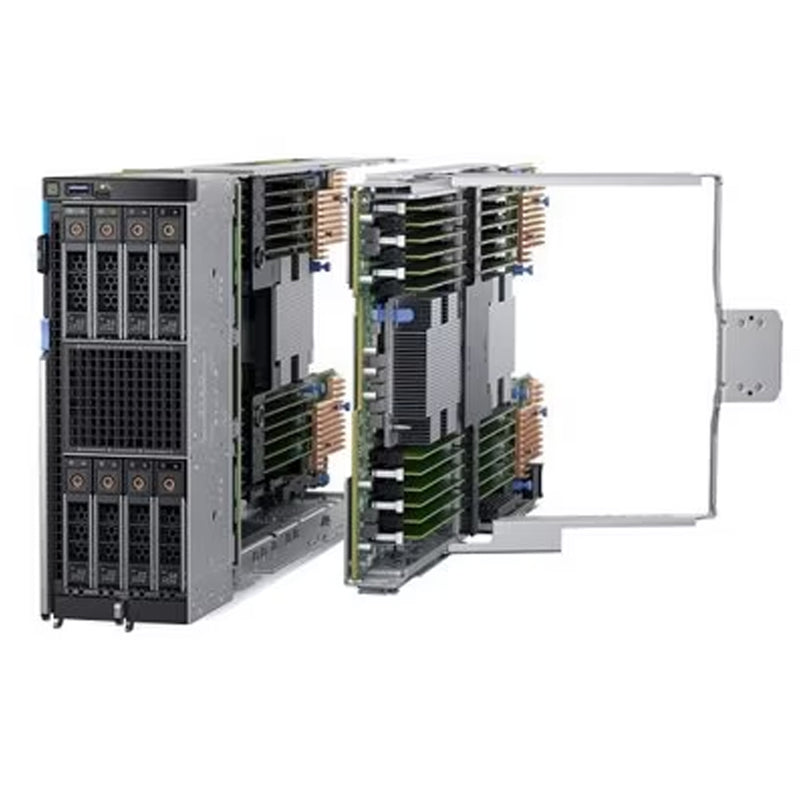
How do you get 4 Processors in a single blade? By making it a double-wide Blade with a Stacked System board. This is accomplished by installing the Processor Expansion Module (PEM).

The MX840c Dell Double Wide Blade has 4 Processors. This is accomplished with the use of the PEM board. This PEM Board holds not only the 3rd and 4th Processors, but the 24 extra DIMMs, 2 Mezzanine slots, and 1 extra Fab C Slots.

When the Processor Expansion Module (PEM) is installed, you will have full use of the system to accommodate any drive and DIMM configuration you desire.
The system can support 1 Mini-Mezz and 1 Internal PERC or is can handle 1 Jumbo PERC which will do the work of both the Mini-Mezz and the Internal PERC. This Fabric C slot is how you are able to connect the MX5016s Storage Array to this compute sled.

The Mini-Mezzanine is install in the rear of the system near the Fab A and B Mezzanine Cards. This Mini Mezzanine gets connect to the Fab C in the MX7000 Enclosure. Only certain cards are supported here.

This Internal PERC Module is considered the MX version of the PERC cards. This card controls the internal drives on this compute sled. There is a dedicated slot for this PERC near the front of the system. This is not supported if a JUMBO PERC is installed. They use the same SCREW to connect to the chassis.

The Jumbo PERC is very unique it does the action of both the Mini-Mezzanin card and the Internal PERC. Not only can this control the internal drives but with also controls the External Storage Arrays that are connected to the Fab C in the back of the MX7000 Enclosure. This is one way to connect to the MX5016s Storage Array. If this is installed, the system does not support the Mini-Mezzanine or the Internal PERC.
The MX740c has the option to install the OS with the BOSS Module. If you're trying to boot the Hypervisor you can install the IDSDM. These two cards can't be installed together. They take up the same slot. Likewise, you are able to manage the iDRAC Remote Management with the vFlash Module.

This iDRAC vFlash Module lets you install and manage the system remotely. You are also able to easily upgrade to the enterprise software with a Micro SD vFlash card that controls this all.

The Internal Dual SD Module supported up to 2 Micro SD cards for redundancy when loading the Hypervisor OS system. This is not suitable for loading a full OS. The Boss card will do that. The IDSDM and the BOSS card can not be installed together.

This Boot Optimized Sub System is ideal for loading the OS on to any server. It saves a drive from being allocated for this job and does not take up any PCIe slots. The BOSS and IDSDM can not be installed together.
Current Configuration
(List below serves as quick links to each section)
Server Chassis
Select Processor
Memory
RAID Controllers
Boot Option | Boot Optimized Storage Subsystem (BOSS)
Boot Option | Internal Dual SD Module (IDSDM)
Mezzanine Card for Fabric A
Mezzanine Card for Fabric B
Mini-Mezzanine Card for Fabric C
Select Drive | SATA
Select Drive | SAS
Select Drive | NVMe SSD PCIe Gen 3
iDRAC Remote Options
Trusted Platform Module (TPM)
ECS Warranty
The request has been sent.
Thank you.
Price as Configured:
$0
Base Standard Capabilities
| Feature | PowerEdge MX840c Technical Specifications | |
|---|---|---|
| Processor | Two or four 2nd Generation Intel™ Xeon™ Scalable Processors, up to 28 cores per processor Intel® C628 Chipset with optional Intel® QuickAssist Technology | |
| Memory | Front bays: 48 DIMM slots in total; supports DDR4 RDIMMs, LRDIMMs; up to 2933 MT/s speeds, 3TB maximum (RDIMM), 6TB maximum (LRDIMM) | |
| Persistent Memory | 12 DIMM slots support NVDIMM-N; up to 2933 MT/s, 192GB maximum Supports up to 24 slots for Intel® OptaneTM DC persistent memory PMem (12.2TB) with a maximum total capacity of 15.36TB per server | |
| Availability | ECC | |
| Controllers | Internal controllers: S140 Software RAID, HBA330 Internal SAS HBA, PERC H730P Adapter, PERC H745P Adapter, HBA330 mini-mezzanine SAS HBA Internal boot options: Choice of optional Boot Optimized Storage Solution (BOSS) (2 X M.2 SDDs) or Internal Dual SD Module (IDSDM) | |
| Drive Bays | Front: Up to 8 x 2.5” SAS/SATA (HDD/SDD) or NVMe PCIe SSD | |
| Power Supplies | MX7000 chassis: OpenManage Enterprise Modular Edition (OME-Modular); MX7000 chassis: up to 6 3000W; PSU and grid redundancy support | |
| Fans | MX7000 chassis: 5 rear and 4 front-accessible hot-swap fans | |
| Dimensions (LxWxD) | 610.39mm (24.03 inches) x 250.2mm (9.8 inches) x 85.5mm (3.37 inches) | |
| Embedded mgmt | MX7000 chassis: OpenManage Enterprise Modular Edition (OME-Modular); up to 2 redundant MX9002m management modules Unified control: single management point for server, storage and networking Intelligent automation: Operational template methodology and comprehensive RESTful API Quick Sync 2 Bluetooth Low Energy (BLE)/wireless module On compute sled: As with every other PowerEdge server, the integrated Dell Remote Access Controller (iDRAC) 9 iDRAC Direct iDRAC RESTful API with Redfish | |
| OpenManage™ SW | OpenManage Enterprise | OpenManage Mobile (OMM) OpenManage Power Center (OMPC) |
| Integrations & Connections | Integrations: Microsoft® System Center VMware® vCenter™ BMC Software (available from BMC) Ansible by Red Hat | Connections: Nagios Core and Nagios XI Oracle Enterprise Manager Microfocus Operations Manager (OM) and Operations Manager i (OMi) IBM Tivoli Netcool/OMNIbus |
| Security | TPM 1.2/2.0 (optional) Cryptographically signed firmware Silicon Root of Trust | Secure Boot System Lockdown (requires iDRAC Enterprise or Datacenter) System Erase |
| Embedded NIC | ||
| Networking Options (NDC) | MX7000 chassis Fabric options: up to 2 pair redundant general-purpose switch or pass-through modular bays (Fabrics A and B); redundant pair of storage-specific switch bays (Fabric C) Up to 25Gbe, 32Gbps Fibre Channel, 12Gbps SAS | |
| GPU Options | ||
| Front Ports | 1 USB 3.0 port external port | |
| Internal Ports | 1 x USB 3.0 internal port | |
| Video | Integrated VGA controller in iDRAC, VGA over LAN | |
| PCIe |
| |
| OS |
| |
Spec Sheet 4
| Feature | PowerEdge MX840c | PowerEdge M830/FC830 |
|---|---|---|
| The following table shows the comparison between the PowerEdge MX840c (designed for PowerEdge MX7000 chassis) and PowerEdge M830/FC830 (designed for PowerEdge M1000e/VRTX and FX2/FX2S chassis) modular server: | ||
| Processor | • Two or four Intel® Xeon Scalable Processors
• Up to 28 cores per socket • Max TDP: 205W |
• Two or four Intel® Xeon® E5-4600 v4
Processors
• Up to 22 cores per socket • Max TDP: 135 W |
| Chipset | • Intel® C628
• Optional Intel® QuickAssist Technology (QAT) |
Intel® C610 |
| Memory | • 48 DIMM slots
• 12 slots enabled for NVDIMM-N • Maximum capacity (RDIMM): 1.5TB • Maximum capacity (LRDIMM): 6TB • Maximum capacity (NVDIMM-N): 192GB |
• 48 DIMM sockets
• Maximum capacity: 3TB |
| Storage Controllers | • S140 Software RAID
• RAID HBA330 MX • H730P MX Performance RAID, 2GB NV cache • H745P MX Performance RAID, internal and external drive connect, 8GB NV cache • HBA330 MX mini-mezz, HBA, external drive connect, no cache |
• S130 Software RAID
• H330 Entry/Value RAID, no cache • H730 Value RAID, 1GB NV cache • H730P Performance RAID, 2GB NV cache |
| Drive Support | • 2.5-inch 12Gb SAS
• 2.5-inch 6Gb SATA • 2.5-inch NVMe |
• 2.5-inch 12Gb SAS
• 2.5-inch 6Gb SATA • 2.5-inch NVMe • 1.8-inch SAS |
| Drive Backplanes | • 8 x 2.5-inch SAS/SATA/NVMe
• 6 x 2.5-inch SAS/SATA/NVMe for NVDIMM implementations |
• 4 x 2.5-inch SAS
• 4 x 2.5-inch SATA • 2 x 2.5-inch SATA + 2 x 2.5-inch NVMe • 12 x 1.8-inch SAS |
| Internal Boot | Choice of BOSS (Boot Optimized Storage Subsystem) or IDSDM (Internal Dual SD Module) | IDSDM (Internal Dual SD Module) |
| I/O Slots | • Four PCIe 3.0 x16 Mezz slots (Fabric A and
B) • Two PCIe 3.0 x16 Mini-mezz slot (Fabric C) |
• Two bNDC (Ethernet)
• Four PCIe 3.0 x8 Mezz slots (M1000e) • Four PCIe 2.0 x8 switch mezz (VRTX) • PCIe adapter for FX2S enablement (FX2) |
| USB | • One internal USB 3.0 port
• One external USB 3.0 port • One USB 2.0 management port to iDRAC • One USB 3.0 + USB 2.0 port for IDSDM |
• One external USB 3.0 port
• One external USB 2.0 port • One internal USB port |
| Video | • Integrated VGA controller in iDRAC
• VGA over LAN • 4Gb DDR4 shared with iDRAC application memory |
• Integrated VGA controller in iDRAC
• VGA over LAN • 2Gb DDR3 shared with iDRAC application memory |
| Management | iDRAC9 | iDRAC8 |
| Security | • Optional TPM 1.2/2.0
• Cryptographically signed firmware • Silicon Root of Trust • Secure Boot • System Lockdown • System Erase |
• Optional TPM 1.2 |
| Fans | In chassis | In chassis |
| Power Supplies | Power provided by chassis | Power provided by chassis |
| Chassis | MX7000 | • M830: M1000e / VRTX
• FC830: FX2 / FX2S |