




Current Configuration
(List below serves as quick links to each section)
Storage Chassis
Select Drives | HDD SAS 2.5"
Select Drives | SSD SAS 2.5"
Trusted Platform Module (TPM)
ECS Warranty
The request has been sent.
Thank you.
Price as Configured:
$0
Price as Configured:
$0
 Tech
Tech
Full Height Single Width Blade Server
Processor:N/A
Memory:N/A
Storage | Max: 11216 SFF SAS (HDD/SSD) Per Sled
GPU:None
- Database
- Virtualization
SATA and NVMe drives are not supported but mixing of rotational and SSD SAS drives is supported.
Dell PowerEdge MX Series
- Dell PowerEdge MX7000 Modular CTO Enclosure Chassis
-
Dell PowerEdge MX740c CTO Compute Sled Up to 8
- Dell PowerEdge MX750c CTO Compute Sled Up to 8
- Dell PowerEdge MX760c CTO Compute Sled Up to 8
- Dell PowerEdge MX840c CTO Compute Sled Up to 4
- Dell PowerEdge MX5016s CTO Storage Sled Up to 7 Requires a minimum of 1 compute node in a chassis with storage sleds

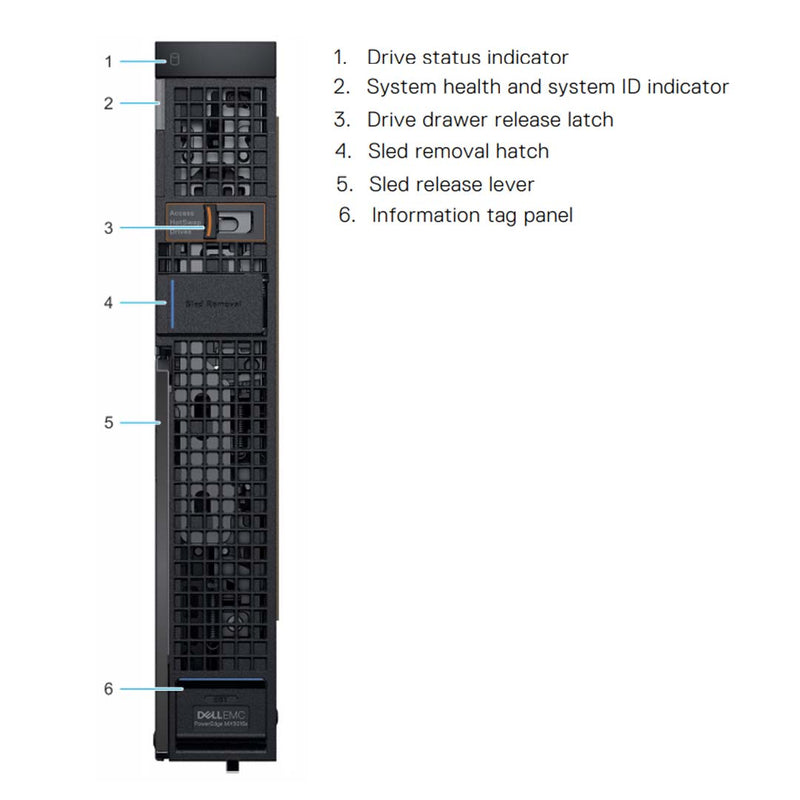
Dell PowerEdge MX5016s CTO Storage Sled
The Dell EMC PowerEdge MX5016s direct-attached storage sled delivers flexible performance and capacity options within the PowerEdge MX architecture to address data-intensive workloads. These MX5016s can only be accessed by a computer sled (MX740c, MX750c, MX840c). If these are installed into the MX7000 Modula Chassis. That chassis needs to install 2 MX5000s SAS switches. Please check with the compute sled if you plan to have access to these drives. If you want multiple sleds to access this data in the MX5016s. Both compute sleds will need the PERC HBA330 mini-mezzanine card installed.
Consolidate compute, storage and networking in one trusted platform
Dell EMC PowerEdge MX offers a scalable and flexible architecture so you can adapt to changing requirements. Tailor your ideal storage to compute configuration ratio within the MX7000 chassis with the Dell EMC PowerEdge MX5016s SAS storage sled.
The MX5016s supports up to 16 SSDs and HDDs that can be mapped across one or more PowerEdge MX compute sleds. This granular drive-level assignment lets you address diverse workloads without wasting any space.
The Dell EMC PowerEdge MX consolidates computing, storage, and networking in one trusted platform. The full-height, single-width MX5016s offer easy front access to quickly swap and add up to 16 2.5” HDDs or SSDs. Scale-out to 7 MX5016s sleds with up to 112 drives per chassis (plus up to an additional 6 internal server drives and two M.2 boot devices).
- Support diverse, data-heavy workloads such as SDS (vSAN), SQL, ERP and dense virtualization.
- Map individual drives to two-socket MX740c and four-socket MX840c servers.
- Configure your direct-attached SAS environment with PERC and HBA storage controller options.
- Help deliver high availability for your critical workloads with dual port 12Gb/s SAS, hot-pluggable drives and hot serviceable expanders.
- Assign the appropriate ratios of compute, storage and networking, then adapt as workloads change.
Avoid complex storage administration with OpenManage Enterprise intelligent automation across the MX compute, storage and networking modules. The PowerEdge MX offers end-to-end lifecycle management and a single point authentication for all devices to increase team effectiveness and accelerate operations.
- Manage your servers, storage and networking from one console or RESTful API interface with OpenManage Enterprise - Modular Edition.
- Streamline administration with simplified set-up/updates and multiple at-the-box management options.
Flexible storage that scales as you grow
The MX5016 full-height, single-width storage sled provides easy front access to swap and add drive capacity and performance options. Scale incrementally to keep your budget in check.
- Map individual drives to two-socket MX740c and four-socket MX840c servers
- Scale-out to 7 MX5016s sleds with up to 112 drives per MX7000 chassis (plus up to an additional 6 internal server drives and two M.2 boot devices)
- Configure your direct-attached SAS environment with PERC and HBA storage controller options
- Help ensure uptime with dual port 12Gb SAS, hot-pluggable drives and hot serviceable expanders
How does a compute Nodes use these drives?
When the MX5016s Blade is installed. The MX5000 SAS Switch must also be installed in the Rear of the MX7000 Enclosure in Fabric Slot C. This MX5000 SAS Switch connects to the SAS Expanders in the MX5016s Blade. This connection allows any compute node which connects to the MX5000 SAS Switch access to the drives.
The Way a compute sled connects to the MX5000 SAS Switch is with the Fab C slots. The Fab C Mezzanine Slot on the compute sled is wired to the Fabric C Slot on the back of the enclosure. The Mezzanine card on the compute sled must be a 12Gb HBA like the HBA330 Mezzanine Card.
The Image here will show you a layout as to how it all works. If you have any questions please contact us via chat or email.

Current Configuration
(List below serves as quick links to each section)
Storage Chassis
Select Drives | HDD SAS 2.5"
Select Drives | SSD SAS 2.5"
Trusted Platform Module (TPM)
ECS Warranty
The request has been sent.
Thank you.
Price as Configured:
$0
Base Standard Capabilities
| Feature | PowerEdge MX5016s Technical specification |
|---|---|
| Enclosure | PowerEdge MX Chassis |
| Form factor | Full height, single width, up to 7 MX5016s storage sleds per PowerEdge MX enclosure |
| Dimensions | Height: 250.2mm Width: 42.15mm Depth: 600mm Weight: 12kg maximum with all 16 HDDs installed. |
| Drive bays | Up to 16 x 2.5” SAS (HDDs/SSDs) in one storage sled. Up to 112 drives, 7 storage sleds within the PowerEdge MX chassis (plus 6 internal server storage drives). |
| Storage controllers | HBA330 mini-mezz (MMZ)- (on the connected server) PERC H745P MX- (on the connected server) |
| Power supplies | Power supplies and fans are provided by the PowerEdge MX chassis. |
| I/O & Ports | The MX5016s connects to the servers via the MX5000s SAS switch. |
| Systems management | • PowerEdge MX uses OpenManage Enterprise - Modular Edition to manage all servers, storage, and networking for multiple chassis in a single web console or RESTful API interface. • Manage multiple PowerEdge MX groups, rack servers, and legacy modular systems with OpenManage Enterprise. • Once mapped to servers, the drives are configured, monitored, and updated via the iDRAC with Lifecycle Controller. |
| OEM-ready version available | From bezel to BIOS to packaging, your servers can look and feel as if they were designed and built by you. For more information, visit Dell.com/OEM. |
| Recommended support | Dell ProSupport Plus for critical systems or Dell ProSupport for premium hardware and software support for your PowerEdge solution. Consulting and deployment offerings are also available. Contact your Dell representative today for more information. Availability and terms of Dell Services vary by region. For more information, visit Dell.com/ServiceDescriptions. |