




Current Configuration
(List below serves as quick links to each section)
Select Chassis
Select Processor
Direct Liquid Cooling (DLC)
Memory
SFF SAS Drives
SFF SATA Drives
NVMe Drives
EDSFF E3.S Drives
Storage Controllers.
Fabric A./B Mezzanine Cards
Mini MX Mezzanine PCIe 4 x16 slot connects to Fabric C
Internal Boot - BOSS-N1
Security
ECS Warranty
The request has been sent.
Thank you.
Price as Configured:
$0
Price as Configured:
$0
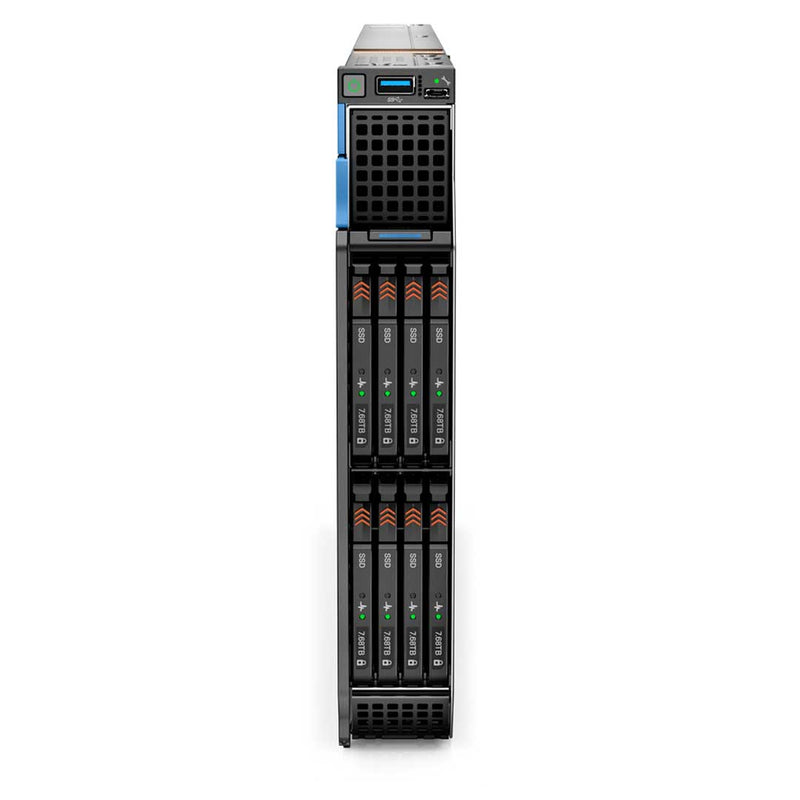
Single Width Compute Sled
Processor | Max: 56 Cores2 x 4th Generation Intel Xeon Scalable
Memory | Max: 8TB32 DDR5 RDIMM 4800Mhz
Storage | Max: 92TB8 E3.S EDSFF Gen 5 NVMe Max: 61TB
6 SFF SAS/SATA/NVMe Max: 92TB
6 SFF SAS/SATA Max: 46.08TB
4 SFF SAS/SATA Max: 61TB
S160 (SW RAID SATA/NVMe)
PERC H755 MX, H965i MX, HBA350i MX
Supports a 100 Gb NIC per port for Mezz A/B
Boot Options:BOSS-N1 (480GB or 960GB)
USB
iDRAC9 with Lifecycle Controller
- Artificial Intelligence (AI)
- Big Data Analytics
- Virtualization
- Dell PowerEdge MX7000 Modular CTO Enclosure Chassis
-
Dell PowerEdge MX740c CTO Compute Sled Up to 8
- Dell PowerEdge MX750c CTO Compute Sled Up to 8
- Dell PowerEdge MX760c CTO Compute Sled Up to 8
- Dell PowerEdge MX840c CTO Compute Sled Up to 4
- Dell PowerEdge MX5016s CTO Storage Sled Up to 7 Requires a minimum of 1 compute node in a chassis with storage sleds

Each Node is a separate CTO you must configure.
- Add up to two 4th generation Intel® Xeon® Scalable processors with up to 56 cores per socket for faster performance
- Support for higher-speed and dense memory capacity, optimized for 2 DIMMs/channel and up to 32 DDR5 DIMMs 4800 MT/s
- Storage options include increased storage density with E3.S EDSFF NVME devices/PCIe Gen5, and up to 64 E3.S devices per chassis
- Introduction of the 100G switch with simplified common management.
Thoughtfully designed to fit in your current air-cooled infrastructure
- Alleviate the worry about expensive liquid cooling retrofitting to your data center
- Synchronize your workload needs with a tailored performance configuration that is an air-cooled system
- Minimize the carbon footprint of your data center by better matching the system power consumption with anticipated workload requirements
The Dell OpenManage™ systems management portfolio delivers a secure, efficient, and comprehensive solution for PowerEdge servers. Simplify, automate and centralize one-to-many management with the OpenManage Enterprise console and iDRAC.
Security is integrated into every phase of the PowerEdge lifecycle, including protected supply chain and factory-to-site integrity assurance. Silicon-based root of trust anchors end-to-end boot resilience while Multi-Factor Authentication (MFA) and role-based access controls ensure trusted operations.
The MX760c is different from the MX740c and the MX750c. This server does not have a JUMBO PERC. Even though a few of the PERCs seem JUMBO. They do not support the Fab C slot as well as the PERC slot. You will need to install both cards if you want access to the Expansion Storage Array MX5016s.

The Mini-Mezzanine is installed in the rear of the system near the Fab A and B Mezzanine Cards. This Mini Mezzanine gets connected to the Fab C in the MX7000 Enclosure. Only certain cards are supported here.

These PERCs are only supporting the Storage in this blade server. The large MX PERC do not support the MX5016s like the HBA330 and HBA350i controllers do. You are also able to install any perc with the mezzanine card for fab c.
The MX760c has the option to install the OS with the BOSS Module or internal USB. If you're trying to boot the Hypervisor you can use the Internal USB.

The Internal USB is the only other way to handle Booting. This USB can handle both the main OS and the OS on the hypervisor. For iDRAC Support use one front USB 2.0 management port.

This Boot Optimized Sub System is ideal for loading the OS onto any server. It saves a drive from being allocated for this job and does not take up any PCIe slots. This system does not support any IDSDM.
Current Configuration
(List below serves as quick links to each section)
Select Chassis
Select Processor
Direct Liquid Cooling (DLC)
Memory
SFF SAS Drives
SFF SATA Drives
NVMe Drives
EDSFF E3.S Drives
Storage Controllers.
Fabric A./B Mezzanine Cards
Mini MX Mezzanine PCIe 4 x16 slot connects to Fabric C
Internal Boot - BOSS-N1
Security
ECS Warranty
The request has been sent.
Thank you.
Price as Configured:
$0
Base Standard Capabilities
| Feature | Techinal Specifications | |
|---|---|---|
| Processor | • Up to two 4th Generation Intel Xeon Scalable processors with up to 56 cores per processor • Intel® C741 chipset with optional Intel® QuickAssist Technology | |
| Memory | 32 DDR5 DIMM slot, supports RDIMM max 8 TB, speeds up to 4800 MT/s | |
| Availability | Supports registered ECC DDR5 DIMMs only | |
| Storage controllers | • Internal controllers: PERC H755 MX, PERC H965i MX, HBA350i MX • Internal boot: USB or Boot Optimized Storage Subsystem (BOSS-N1): HWRAID 1, 2 x M.2 SSDs 480 GB or 960 GB • Software RAID: S160 | |
| Drive Bays | Front bays: • Up to 4 x 2.5-inch SAS/SATA (HDD/SSD) max 61 TB • Up to 6 x 2.5-inch SAS /SATA (HDD/SSD) max 46.08 TB • Up to 6 x 2.5-inch NVMe/SAS/SATA (HDD/SSD) max 92 TB • Up to 8 x E3.s NVMe PCIe Gen 5 SSD max 61 TB | |
| Power Supplies | MX7000 chassis: Up to six 3000 W AC Platinum PSU and grid redundancy support | |
| Fans | MX7000 chassis: 5 rear and 4 front-accessible hot-swap fans with full redundancy (Gen 2 fan required) | |
| Dimensions | • Height — 51.0 mm (2 inches) • Width — 257.0 mm (10 inches) • Depth — 631.77 mm (24.8 inches) | |
| Weight | 8.59 kg (18.93 pound) | |
| Form Factor | Up to 8 independent hot-swappable, 1U single-width compute sled in a MX7000 chassis | |
| Embedded Management | MX7000 chassis: OpenManage Enterprise Modular Edition (OME-Modular); • Up to 2 redundant MX9002m management modules • Unified control: single management point for server, storage and networking • Intelligent automation: Operational template methodology and comprehensive RESTful API • Quick Sync 2 Bluetooth Low Energy (BLE) / wireless module option | On compute sled: • iDRAC9 • iDRAC Direct • iDRAC RESTful API with Redfish • iDRAC Service Module |
| OpenManage Software | • CloudIQ for PowerEdge plug in • OpenManage Enterprise • OpenManage Enterprise Integration for VMware vCenter • OpenManage Integration for Microsoft System Center • OpenManage Integration with Windows Admin Center • OpenManage Power Manager plugin • OpenManage Service plugin • OpenManage Update Manager plugin | |
| OpenManage Integrations | • BMC Truesight • Microsoft System Center • OpenManage Integration with ServiceNow • Red Hat Ansible Modules • Terraform Providers • VMware vCenter and vRealize Operations Manager | |
| Security | • Cryptographically signed firmware • Data at Rest Encryption (SEDs with local or external key mgmt) • Secure Boot • Secured Component Verification (Hardware integrity check) • Secure Erase • Silicon Root of Trust • System Lockdown (requires iDRAC9 Enterprise or Datacenter) • TPM 2.0 FIPS, CC-TCG certified, TPM 2.0 China NationZ | |
| Ports | Front ports • 1 x iDRAC Direct port (Micro-AB USB) • 1 x USB 3.0 | Internal port • 1 x USB 3.0 |
| Networking_Options (NDC) | • MX7000 chassis Fabric options: up to 2 pairs redundant general purpose switch or passthrough modular bays (Fabrics A and B); redundant pair of storage specific switch bays (Fabric C) • Up to 25 Gb CNA/NIC or 100 Gb NIC per port for Mezz A/B, 32 Gb Fibre Channel | |
| PCIe | • One x16 PCIe Gen4 slot for PERC - connected to processor 1 • One x16 PCIe Gen4 slot for Mezz A - connected to processor 1 • One x16 PCIe Gen5 slot for Mezz B - connected to processor 2 • One x16 PCIe Gen4 slot for Mini Mezz - connected to processor 1 • Two x8 PCIe Gen5 (SL1, SL2) connectors for NVMe drive – connected to processor 1 • Two x8 PCIe Gen5 (SL4, SL5) connectors for NVMe drive – connected to processor 2 • One x4 PCIe Gen4 for BOSS-N1 HWRAID card | |
| Operating System and Hypervisors | • Canonical Ubuntu Server LTS • Microsoft Windows Server with Hyper-V • Red Hat Enterprise Linux • SUSE Linux Enterprise Server • VMware vSAN/ESXi | |
Spec Sheet 4
| Feature | PowerEdge MX760c | PowerEdge MX750c |
|---|---|---|
| Processor | Up to two 4rd Generation Intel® Xeon® Scalable Processors
DIMM Speed: Up to 4800 MT/s Up to 56 cores per socket Max TDP: 350 W |
Up to two 3rd Generation Intel® Xeon® Scalable Processors
DIMM Speed: Up to 3200 MT/s Up to 40 cores per socket Max TDP: 270 W |
| Chipset | Intel® C741 | Intel® C627A |
| Memory | 32 DDR5 DIMM slots
32 slots for RDIMMs Maximum capacity (RDIMM): 16 TB |
32 DDR4 DIMM slots
32 slots for RDIMMs and LRDIMMs Maximum capacity (RDIMM): 2 TB Maximum capacity (LRDIMM): 8 TB Intel Optane PMem 200 Series |
| Storage Controllers | S160 Software RAID
H755 MX Performance RAID, NVMe RAID H965i MX Performance RAID, Performance RAID, SAS/SATA or NVMe RAID HBA350i MX |
S150 Software RAID
HBA350i MX H745P MX Performance RAID via PERC 10, internal and external drive connect, 8GB NV cache H755 Performance RAID, NVMe RAID HBA330 MX mini-mezz, HBA, external drive connect, no cache |
| Drive Support | 2.5-inch 12 Gb SAS
2.5-inch NVMe 6 Gb SATA 8 x E3.S EDSFF NVMe SSD |
2.5-inch 12 Gb SAS
2.5-inch 6 Gb SATA 2.5-inch NVMe |
| Drive Backplanes | 4 x 2.5-inch SAS/SATA/NVMe (universal BP)
6 x 2.5-inch SAS/SATA 6 x 2.5-inch SATA/NVMe (universal BP) 8 x E3.S BP |
6 x 2.5-inch SAS/SATA
6 x 2.5-inch SATA/NVMe (universal BP) 4 x 2.5-inch SAS/SATA/NVMe (universal BP) |
| Internal Boot | Choice of BOSS (Boot Optimized Storage Subsystem) | Choice of BOSS (Boot Optimized Storage Subsystem) or IDSDM (Internal Dual SD Module) |
| I/O Slots | One PCIe 4.0 x16 Mezz slots (Fabric A)
One PCIe 5.0 x16 Mezz slots (Fabric B) One PCIe 4.0 x16 Mini-mezz slot (Fabric C) One PCIe 4.0 x16 PERC slots One PCIe 4.0 x4 BOSS-N1 |
Two PCIe 4.0 x16 Mezz slots (Fabric A and B)
One PCIe 4.0 x16 Mini-mezz slot (Fabric C) |
| USB | One internal USB 3.0 port
One front external USB 3.0 port One front USB 2.0 management port to iDRAC |
One internal USB 3.0 port
One external USB 3.0 port One USB 2.0 management port to iDRAC One USB 3.0 + USB 2.0 port for IDSDM |
| Video | Integrated VGA controller in iDRAC, VGA over LAN | Integrated VGA controller in iDRAC, VGA over LAN
4 Gb DDR4 shared with iDRAC application memory |
| Management | iDRAC9 | iDRAC9 |
| Security | Optional TPM 2.0
Secure Boot Power-off security |
Optional TPM 1.2/2.0
Cryptographically signed firmware Silicon Root of Trust Secure Boot System Lockdown System Erase |
| Fans | In chassis Gen 2 fans | In chassis |
| Power Supplies | Power provided by chassis | Power provided by chassis |
| Chassis | MX7000 | MX7000 |