



Current Configuration
(List below serves as quick links to each section)
Node Option
Processors
x210c Memory
Drives SAS/SATA
Drives NVMe
Boot-Optimized RAID controller
mLOM / VIC Options
Intellegent Fabric Module / Fabric Module
X-Fabric - x440p
x440p Risers
x440p GPU
TPM
Power Supply Units
ECS Warranty
The request has been sent.
Thank you.
Price as Configured:
$0
Price as Configured:
$0
- Supports Up to (8) Nodes
- (4) Nodes Options | x210c, x210c Universal, x210c GPU or X440p GPU
- (2) Intelligent Fabric Modules (IFMs)
- (2) X-Fabric Modules (X-FMs)
- (6) Hot Swap Fans
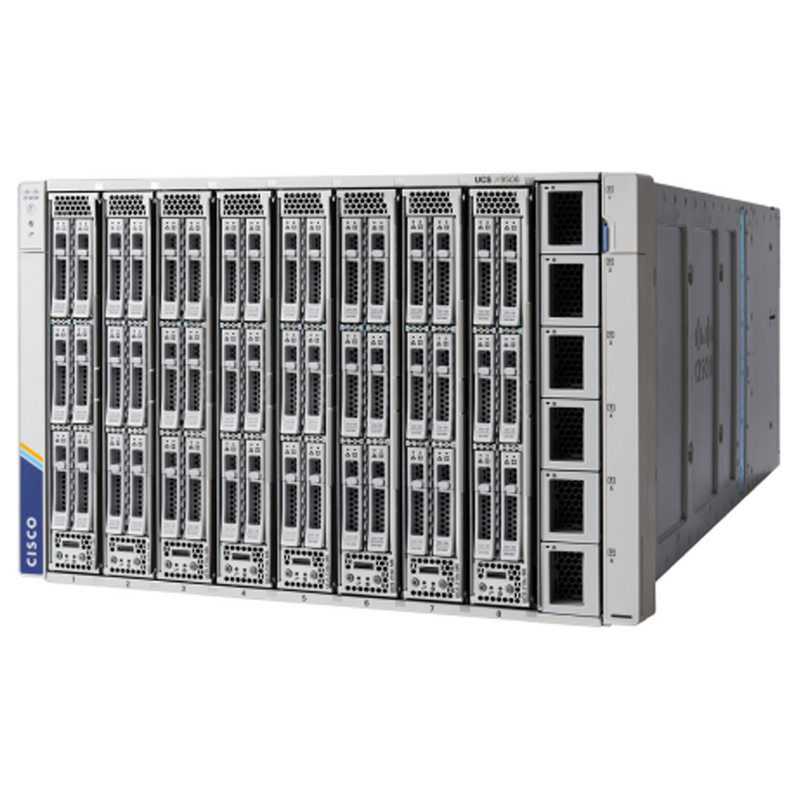
The Cisco UCS X-Series Modular System starts with the X9508 chassis, designed for adaptability and hybrid cloud integration. Its midplane-free architecture enables I/O connectivity via front-loading compute nodes intersecting with rear I/O modules, supported by PCIe Gen4 and future protocols.
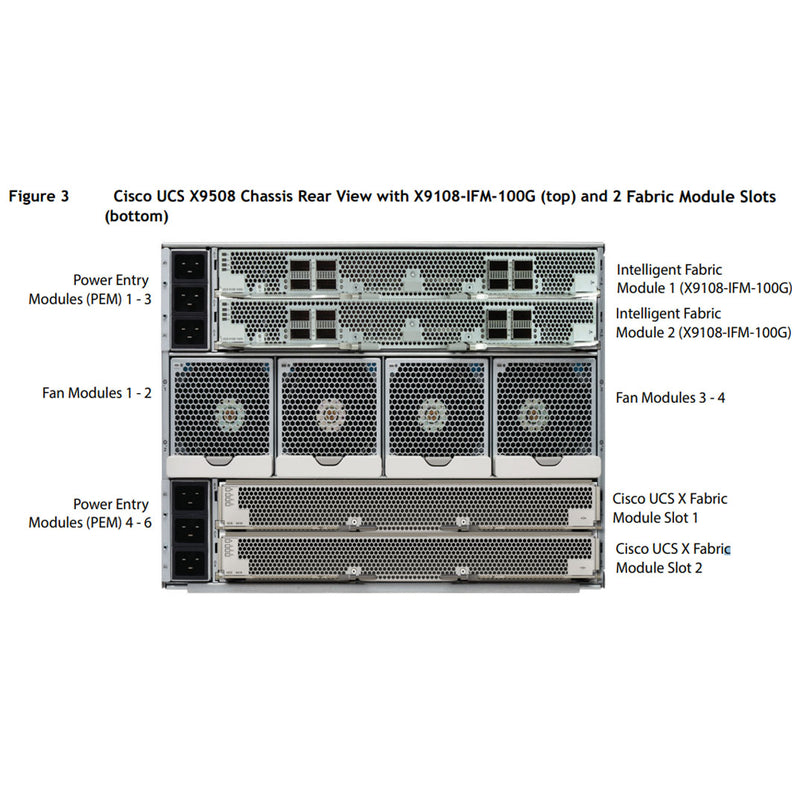
The 7RU chassis houses up to 8 flexible slots for compute nodes, GPUs, disk storage, and NVMe resources. Two intelligent fabric modules connect to Cisco UCS 6400/6536 Fabric Interconnects, while X-Fabric Technology facilitates modular updates for evolving technologies. Six 2800W PSUs provide efficient power delivery with multiple redundancy options. Advanced thermal management supports future liquid cooling for high-power processors.
The Cisco UCS X-Series Direct adds self-contained integration with internal Cisco UCS Fabric Interconnects 9108, enabling unified fabric connectivity and management through Cisco Intersight or UCS Manager.
(Click to View)
- Artificial Intelligence (AI)
- Big Data Analytics
- Cloud Servers
- Corporate IT
- Data Analytics
- Database
- Deep Learning (DL)
- High-Performance Computing (HPC)
- Hyper-Converged infrastructure (HCI)
- Language Model
- Machine Learning (ML)
- Network Function Virtualization (NFV)
- Retail Servers
- Telecom Networks
- Video Analytics
- Video Streaming
- Virtualization
- Virtual Machines (VM)
- Web Tech
- Anything as a service (Xaas)
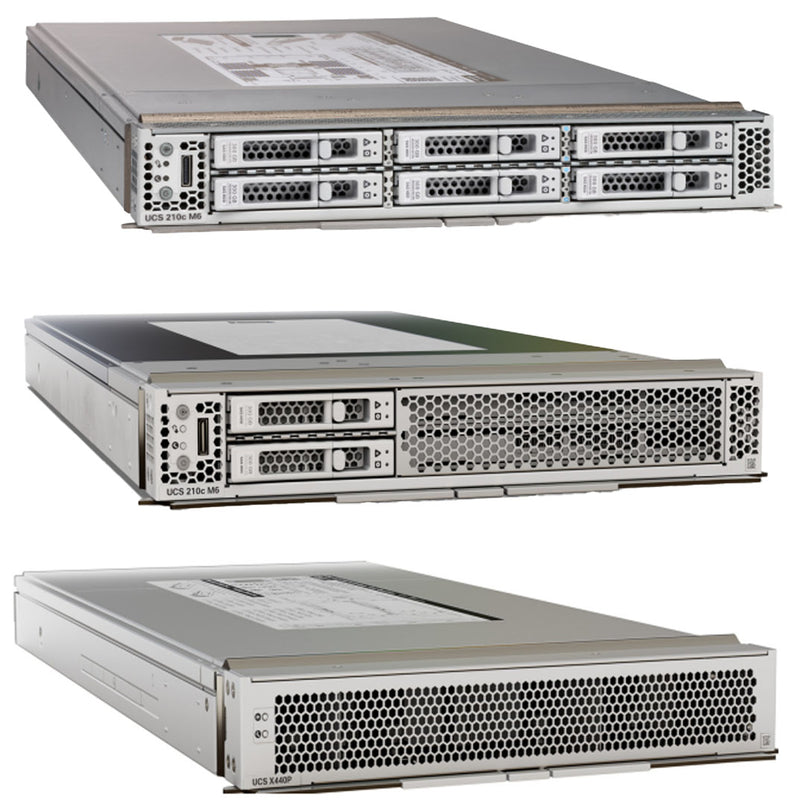
 UCS x210c Node M6
1U
(2) Intel 3rd Gen Processors
(32) DDR4 DIMMs
Up to (6) SAS/SATA/NVMe Drives
Up to (2) GPUs
Up to (8) Per x9508 Enclosure
Cisco x210c Node OptionsUCSX-X10C-PT4F - Up to 6 NVMe drives
UCSX-X10C-RAIDF - Up to 6 SAS/SATA or 4 NVMe drives
UCSX-X10C-GPUFM - Up to 2 NVIDIA T4 GPUs & 2 NVMe drives
-

Cisco UCS x210c Spec Sheet
-
Cisco UCS x210c Service Guide
 UCS x440p Node
1U
Up to (2) NVMe Drives
Up to (4) GPUs
Up to (4) Per x9508
RequiresPaired with (1) x210c Compute Node
(1) X-Fabric must be installed per x440p
Mezzanine Risers have to match in paried Nodes.
-
Cisco UCS x440p Spec Sheet
-
Cisco UCS x440p Data Sheet
-
Cisco UCS x440p Service Guide
The UCSX-V4-PCIME or UCSX-V4-Q25GME is required when a x210c compute node is paired with a x440p PCIe node.
Choose two Fabrics of same type
You can not mix IFM and integrated FI in the same chassis
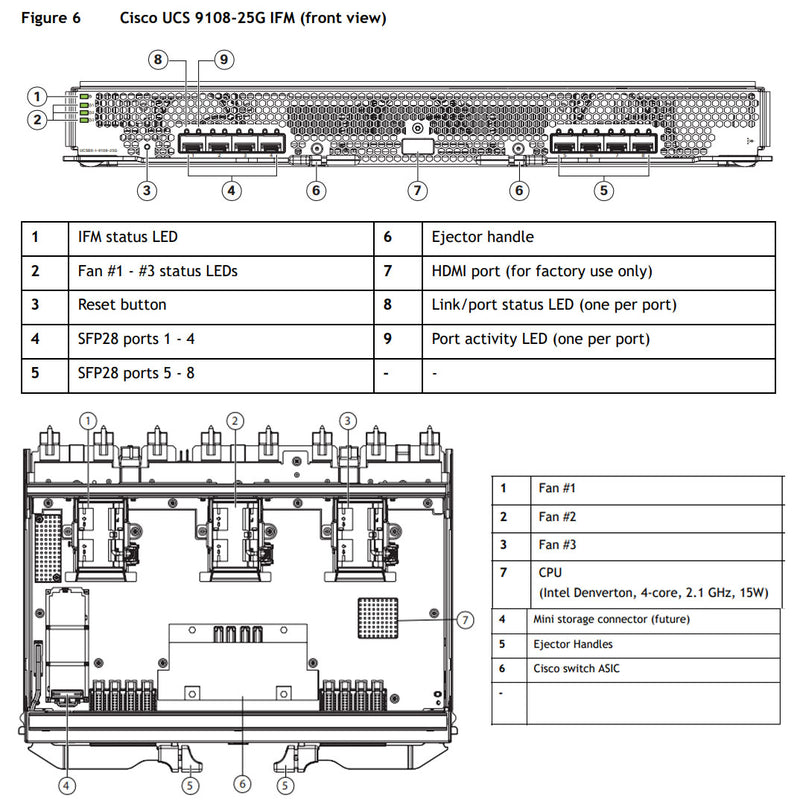
 UCSX-I-9108-25G
8x 25-Gbps SFP28 ports
Up to 50 Gbps of unified fabric connectivity per compute node with two IFMs.
 UCSX-I-9108-100G
8x 100-Gbps QSFP8 ports
Up to 200 Gbps of unified fabric connectivity per compute node with two IFMs.
 UCSX-S9108-100G
8 Ports 1/10/25/40/100 Gb
Ethernet, FCoE, and Fibre Channel
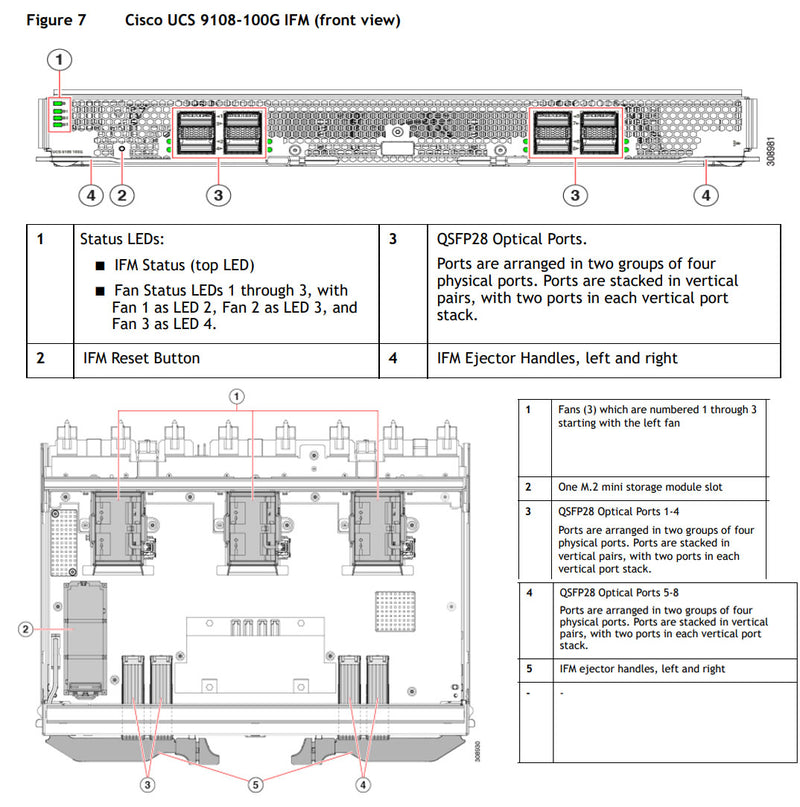
Up to two Intelligent Fabric Modules (IFMs) serve as line cards, managing data multiplexing, chassis resources, and compute node communication. They ensure redundancy and failover with paired configurations.
Each IFM features 8x SFP28 (25 Gbps) or 8x QSFP28 (100 Gbps) connectors, linking compute nodes to fabric interconnects. Compute nodes interface with IFMs via upper mezzanine cards (mLOMs) using orthogonal connectors. Supported configurations include UCS 9108-25G, 9108-100G IFMs, or Fabric Interconnect 9108 100G.
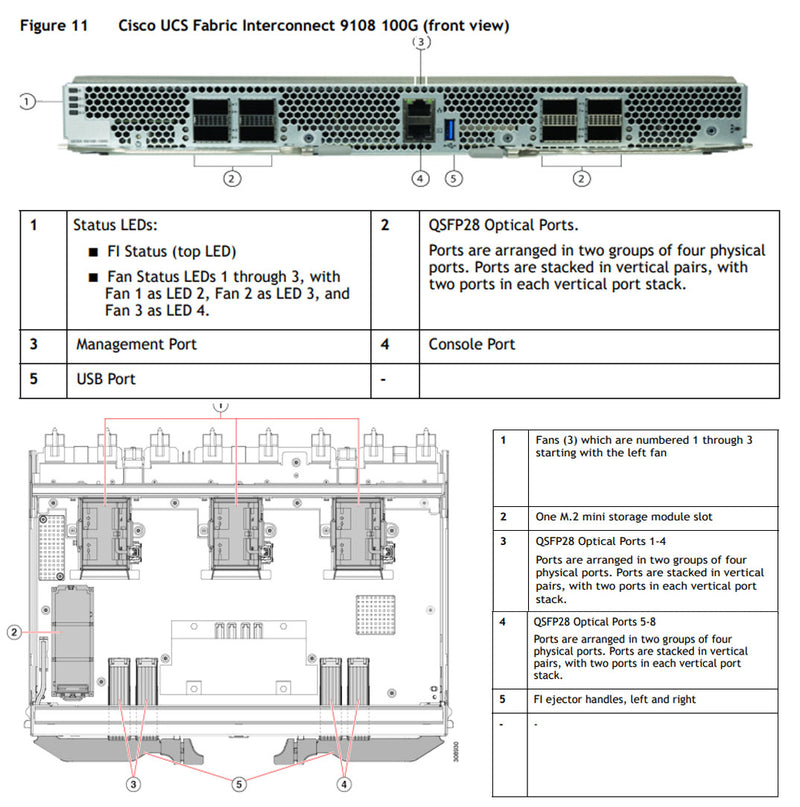
The Cisco UCS Fabric Interconnect 9108 100G is a high-performance switch offering up to 1.6 Tbps throughput with 6x 40/100-Gbps Ethernet ports and 2 unified ports supporting Ethernet or 8 Fibre Channel ports (8/16/32-Gbps). All ports support FCoE, and breakout options enable 10/25-Gbps Ethernet or 1-Gbps Ethernet.
It provides eight 100G or thirty-two 25G backplane connections to X-Series compute nodes, depending on the VIC used. Additional features include a network management port, console port, and USB port for configuration.
 >
>- Cisco UCS VIC 14425 4x25G mLOM | UCSX-V4-Q25GML
- Cisco UCS VIC 15230 2x100G mLOM | UCSX-ML-V5D200GV2
- Cisco UCS VIC 15231 2x100G mLOM | UCSX-ML-V5D200G
- Cisco UCS VIC 15420 4x25G mLOM | UCSX-ML-V5Q50G
- *15231 does not support bridging
- Cisco UCS VIC 14825 4x25G | UCSX-V4-Q25GME
- Cisco UCS VIC 15422 4x25G | UCSX-ME-V5Q50G
- *They both come with a Bridging Card
- Cisco UCSPCI Mezz card for X-Fabric | UCSX-V4-PCIME
- UCS VIC 14000 bridge connector (UCSX-V4-BRIDGE)
- UCS VIC 15000 bridge connector (UCSX-V5-BRIDGE)
The UCSX-V4-PCIME or UCSX-V4-Q25GME is required when a compute node is paired with a PCIe node
1. The VIC 14825 only works with mLOM 14425
2. The VIC 15422 only works with mLOM 15420

- Supports up to 2 per Enclosure
- Connects x210c Compute Node to x440p Node
- Required when x440p's are installed
- Required when GPUs or other PCIe resources need to be shared across multiple nodes in the chassis.
- UCS VIC 14425 mLOM + 14825 Mezz Card
- UCS VIC 14425 mLOM + PCIe Mezz Card
- UCS VIC 15230 mLOM + 14825 Mezz Card
- UCS VIC 15230 mLOM + PCIe Mezz Card
The X-Fabric modules are required when the server chassis contains the Cisco UCS X440p PCIe node
Each X-Fabric module provides native PCIe Gen4 x16 connectivity to the X210c or X410c Compute node and the Cisco UCS X440p PCIe Node.
The X-Fabric module is not required if your server chassis contains only Cisco UCS X-Series compute nodes, such as the Cisco UCS X210c.
X-Fabric Modules are always deployed in pairs to support GPU acceleration through the Cisco UCS X440p PCIe nodes. Therefore, two PCIe modules must be installed in a server chassis that contains any number of PCIe nodes
Configuring Cisco UCS X210c or X410c Compute Nodes in the X9508 chassis with mLOM and mezzanine VICs provides up to 200 Gbps network bandwidth and enables connectivity to PCIe I/O devices via X-Fabric modules. These modules allow direct PCIe Gen4 connections between compute nodes, storage, and communication devices, reducing cost, power, and latency.
The Cisco UCS X9416 X-Fabric supports x16 high-speed PCIe Gen4 links from each module to compute nodes, with slots located at the chassis rear. Compute nodes connect directly to the X-Fabric modules via mezzanine cards, eliminating the need for a midplane.
 x210c SW GPUs | UCSX-X10C-GPUFM
Supports (2) SW GPUs
Supports (2) U.2/U.3 NVMe Drives
Does not need the X-Fabric
 x440p Riser Type A | UCSX-RIS-A-440P
Supports (2) DW GPUs
Requires (1) x210c Compute Node
Node x210c requires (1) (UCSX-V4-PCIME or UCSX-V4-Q25GME)
Requires the X-Fabric Modules
 x440p Riser Type B | UCSX-RIS-B-440P
Supports (4) SW GPUs
Requires (1) x210c Compute Node
Node x210c requires (1) (UCSX-V4-PCIME or UCSX-V4-Q25GME) installed
Requires the X-Fabric Modules
For the server chassis to support any number of Cisco UCS X440p PCIe Nodes, both Cisco UCS X9416 X-Fabric Modules must be installed to provide proper PCIe signaling and connectivity to the node slots on the front of the server chassis.
The x210c and the x440p need to have the same Mezzanine cards installed so they can both talk to the X-Fabric. This X-Fabric is the pathway for the x210c to communicate to the x440p node server.
When the X210c Compute Node is installed, the mLOM card connects directly to the Fabric Module (IFM or FI) at the top rear of the chassis, enabling networking and management traffic. For the GPU version of the X210c, the PCIe Mezzanine card must also be installed to provide the additional PCIe lanes required to support the GPUs and NVMe drives. This configuration ensures sufficient PCIe bandwidth for the compute-intensive and storage needs of the GPU version while maintaining connectivity to the Fabric Module for external networking.
x440p Configuration Overview
If the X440p PCIe Node is installed, the X210c Compute Node requires a mezzanine card, which can be a PCI Mezzanine Card, VIC 14825, or VIC 15422. When using a VIC (14825 or 15422), a bridge card is required to connect the mLOM VIC to the Mezzanine VIC, enabling proper PCIe connectivity.
In this configuration, 2 PCIe lanes are allocated to the X-Fabric modules at the bottom of the chassis to connect to the X440p, while the remaining PCIe lanes are routed to the Fabric Module (IFM or FI) for external networking. Conversely, when the PCI Mezzanine Card is installed, no bridge card is needed, but the PCIe lane allocation remains the same: 2 lanes to the X-Fabric and the rest to the IFM or FI. This setup ensures efficient connectivity for both internal PCIe resources and external networking capabilities.
The X9508 chassis accommodates up to six power supplies. The six dual feed power supplies provide an overall chassis power capability of greater than 9000 W, and can be configured as N, N+1, N+2, or N+N redundant.
Choose from 2 to 6 power supplies- If node quantity 1 is selected, then minimum 2 quantity of PSU is required
- If node quantity 2 to 6 is selected, then minimum 4 quantity of PSU is required
- If node quantity 7 or 8 is selected, then minimum 6 quantity of PSU is required

Current Configuration
(List below serves as quick links to each section)
Node Option
Processors
x210c Memory
Drives SAS/SATA
Drives NVMe
Boot-Optimized RAID controller
mLOM / VIC Options
Intellegent Fabric Module / Fabric Module
X-Fabric - x440p
x440p Risers
x440p GPU
TPM
Power Supply Units
ECS Warranty
The request has been sent.
Thank you.
Price as Configured:
$0
Base Standard Capabilities
| Capability/Feature | Description |
|---|---|
| Chassis | The Cisco UCS X210c M6 Compute Node mounts in a Cisco UCS X9508 chassis. |
| CPU |
|
| Chipset | Intel® C621A series chipset. |
| Memory |
|
| Mezzanine Adapter (Rear) |
|
| mLOM |
|
| Mezzanine Adapters (Front) | One front mezzanine connector that supports:
|
| Additional Storage | Dual 80 mm SATA 3.0 M.2 cards (up to 960 GB per card) on a boot-optimized hardware RAID controller. |
| Video | Video uses a Matrox G200e video/graphics controller.
|
| Front Panel Interfaces | OCuLink console port. Note that an adapter cable is required to connect the OCuLink port to the transition serial USB and video (SUV) octopus cable. |
| Power Subsystem | Power is supplied from the Cisco UCS X9508 chassis power supplies. The Cisco UCS X210c M6 Compute Node consumes a maximum of 1300 W. |
| Fans | Integrated in the Cisco UCS X9508 chassis. |
| Integrated Management Processor | The built-in Cisco Integrated Management Controller enables monitoring of Cisco UCS X210c M6 Compute Node inventory, health, and system event logs. |
| Baseboard Management Controller (BMC) | ASPEED Pilot IV. |
| ACPI | Advanced Configuration and Power Interface (ACPI) 6.2 Standard Supported. ACPI states S0 and S5 are supported. There is no support for states S1 through S4. |
| Front Indicators |
|
| Management |
|
| Fabric Interconnect | Compatible with the Cisco UCS 6454, 64108 and 6536 fabric interconnects. |
| Chassis | Compatible with the Cisco UCS 9508 X-Series Server Chassis |
Spec Sheet 4
| Capability/Feature | Description |
|---|---|
| 7 RU Chassis | The X9508 chassis has 8x front-facing flexible slots. These can house a combination of compute nodes and a pool of future I/O resources that may include GPU accelerators, disk storage, and nonvolatile memory. |
| Compute Node Support |
General:
|
| Intelligent Fabric Module |
2x Cisco UCS 9108 Intelligent Fabric Modules (IFMs) at the top of the chassis that connect the chassis to upstream Cisco UCS 6400 series or 6536 Fabric Interconnects. Each IFM features the following:
|
| Fabric Interconnect Module |
2x Cisco UCS Fabric Interconnect 9108 100G Modules (FIs) at the top of the chassis that connect the chassis to upstream Top-of-Rack (ToR) switches. Each FI features the following:
|
| Cisco UCS X-Fabric Technology | At the bottom rear of the X9508 chassis are slots ready to house X-Fabric modules that can flexibly connect the compute modules with I/O devices. The "X" in Cisco UCS X-Fabric technology denotes a variable that can evolve with new technology developments. |
| Next Generation Power and Thermal Capability |
|
| Density and Form Factor |
|
| Fabric Bandwidth |
|
| Chassis Storage Support | Local storage |
| Virtual Card Interface (VIC) Support |
|